<?xml version="1.0" encoding="UTF-8"?>
<?xml-stylesheet type="text/xsl" media="screen" href="/~files/atom-premium.xsl"?>
                                                                                                                                                                                                                                                                                                                                                                                                                                                                                                                                             
<feed xmlns="http://www.w3.org/2005/Atom" xmlns:feedpress="https://feed.press/xmlns" xmlns:media="http://search.yahoo.com/mrss/" xmlns:podcast="https://podcastindex.org/namespace/1.0">
  <feedpress:locale>en</feedpress:locale>
  <link rel="hub" href="https://feedpress.superfeedr.com/"/>
  <title type="text">Blogs - Mobility</title>
  <subtitle type="text"/>
  <id>uuid:ea2ab5d5-43a9-452b-8993-e34537215fe5;id=906</id>
  <updated>2026-04-09T10:24:19Z</updated>
  <contributor>
    <name>Danny Shain</name>
  </contributor>
  <contributor>
    <name>Nick Gasse</name>
  </contributor>
  <link rel="alternate" href="https://www.progress.com/"/>
  <link rel="self" type="application/atom+xml" href="https://feeds.progress.com/blogs/mobility"/>
  <entry>
    <id>urn:uuid:7356f7af-e0a3-4b98-b347-4de6addbd9a6</id>
    <title type="text">How to Build Web, Mobile and Chat Apps That Connect to Oracle​</title>
    <summary type="text">Learn about how Kinvey's app platform works well with Oracle databases, improving your app's performance and making it easy to connect to chat applications.</summary>
    <published>2019-02-07T13:00:00Z</published>
    <updated>2026-04-09T10:24:19Z</updated>
    <author>
      <name>Danny Shain</name>
    </author>
    <link rel="alternate" href="https://feeds.progress.com/link/20159/11050281/how-to-build-web-mobile-and-chat-apps-that-connect-to-oracle"/>
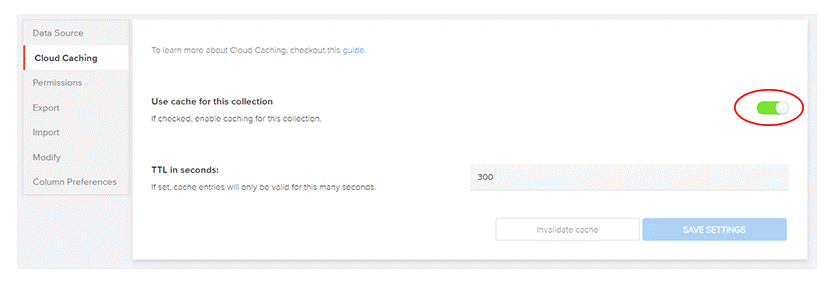
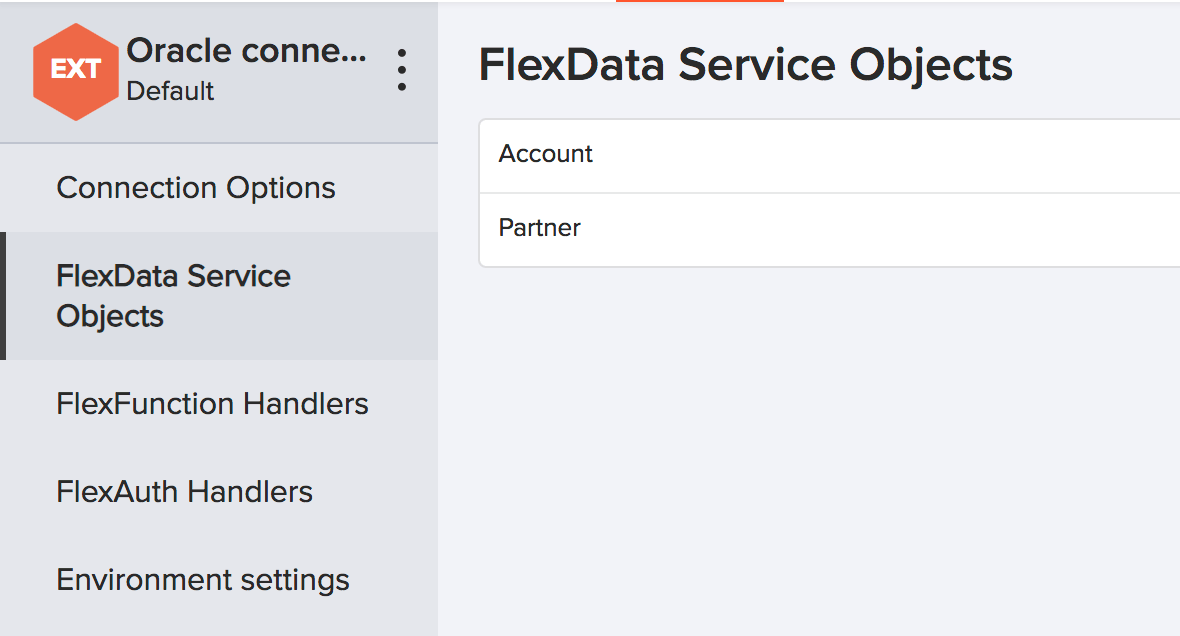
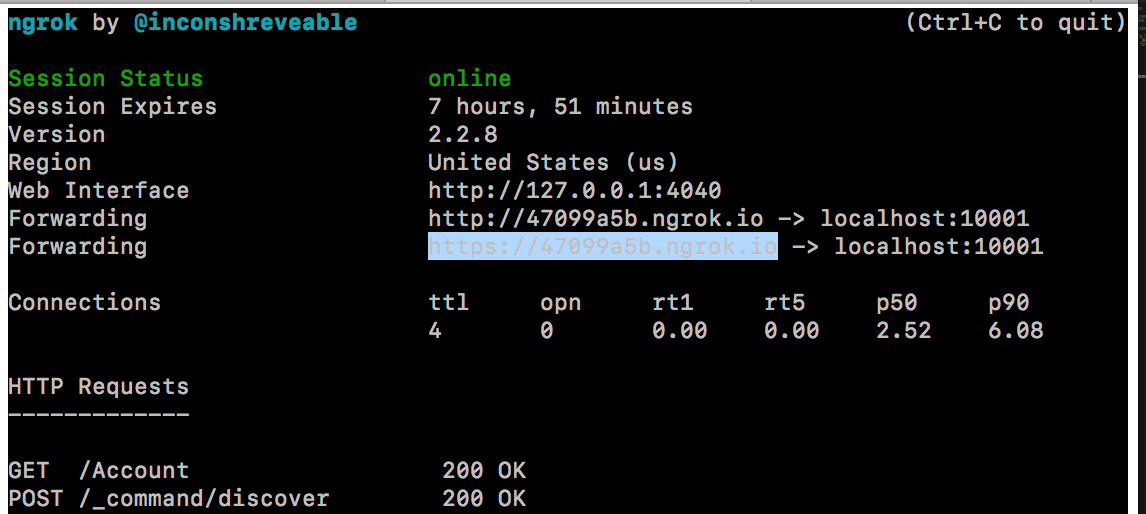
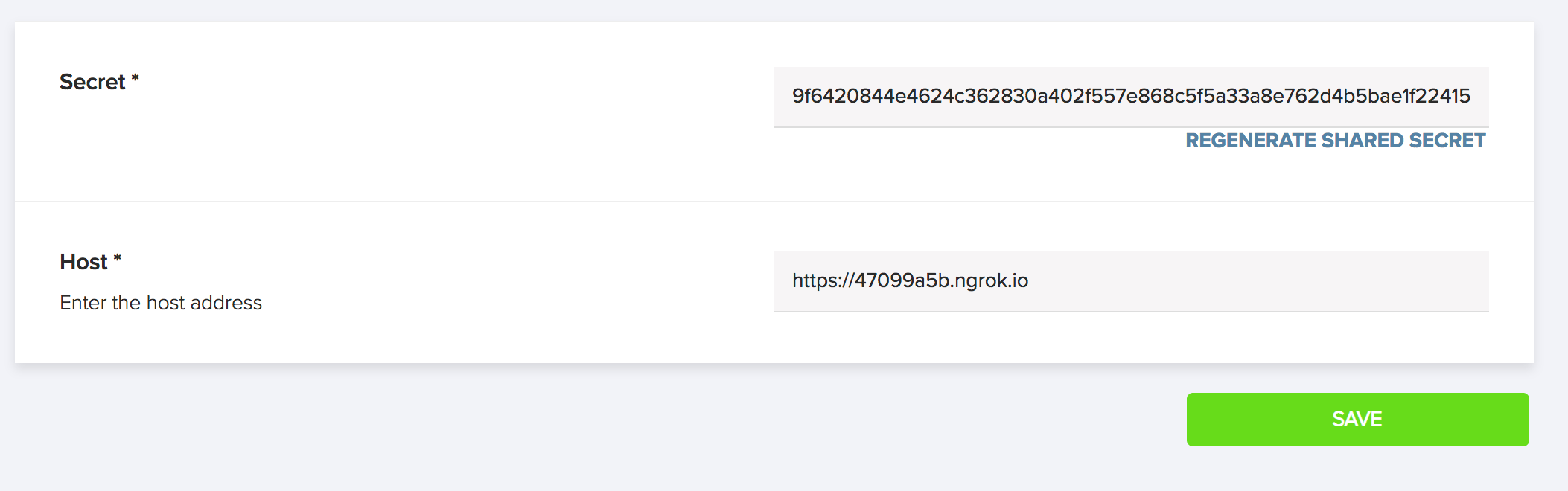
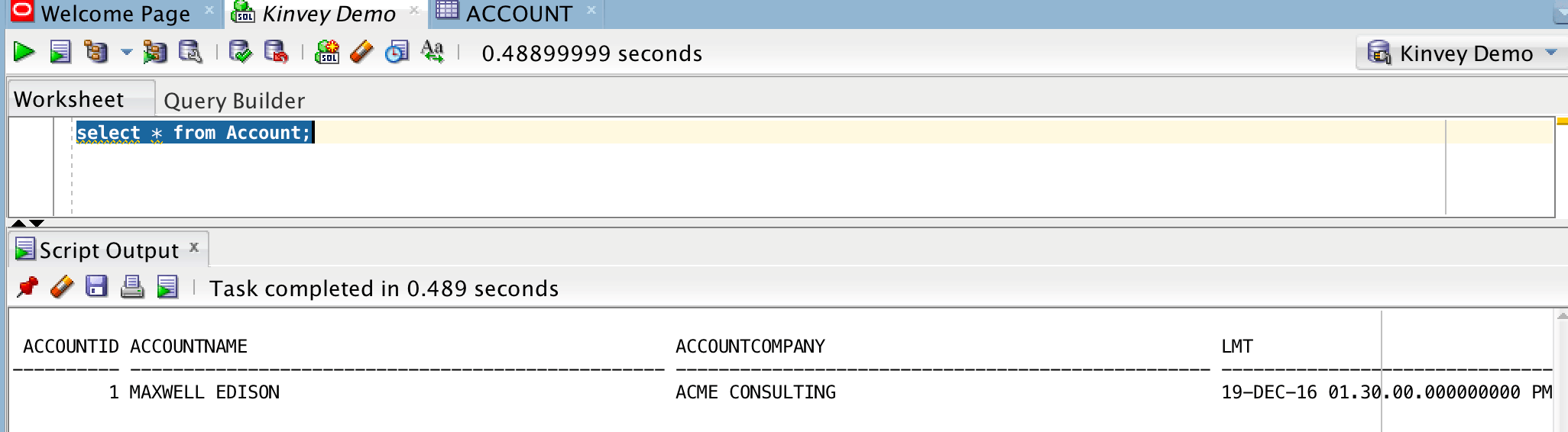
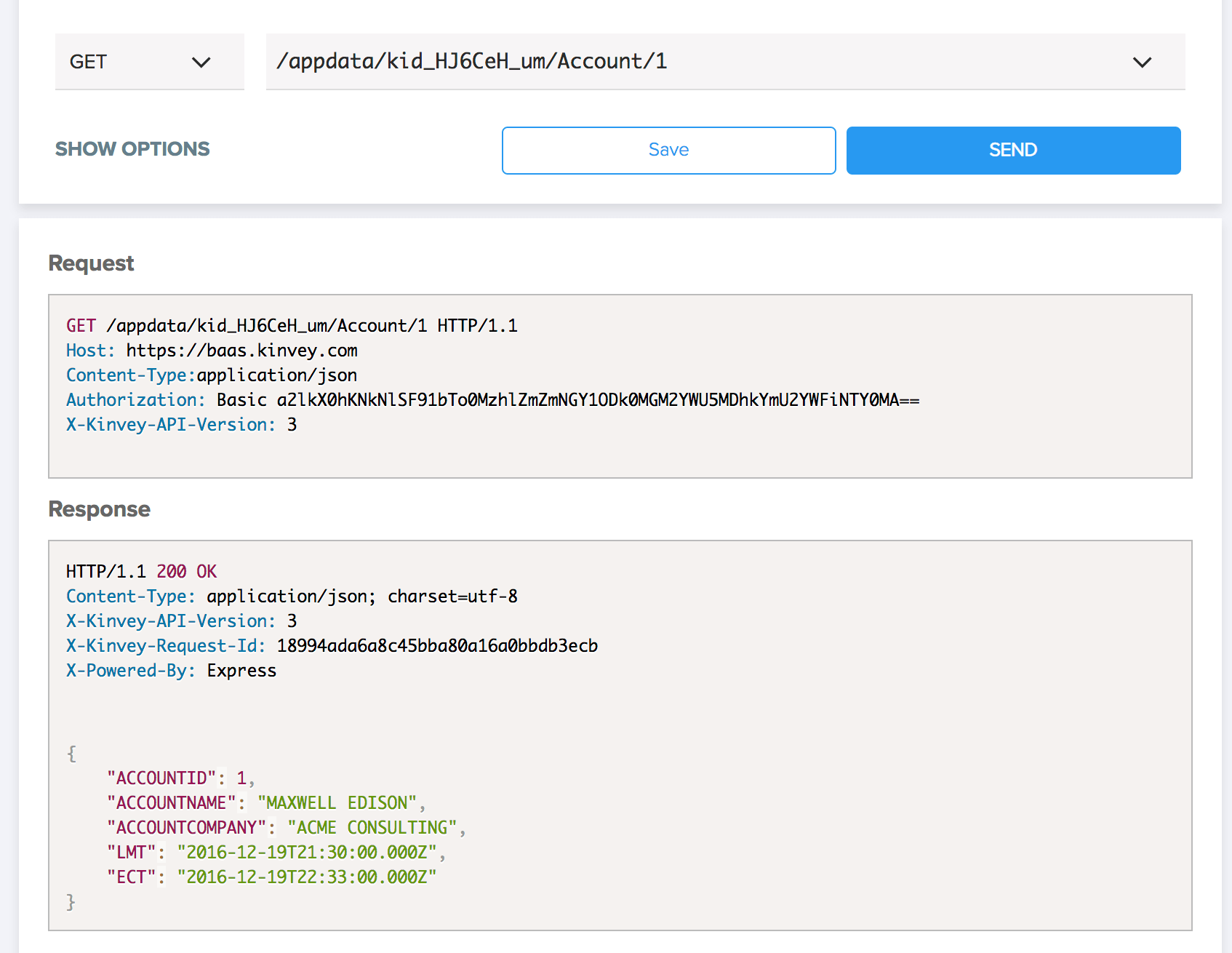
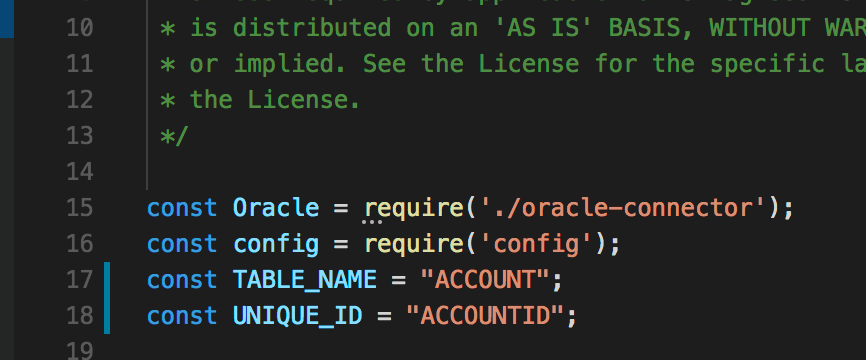
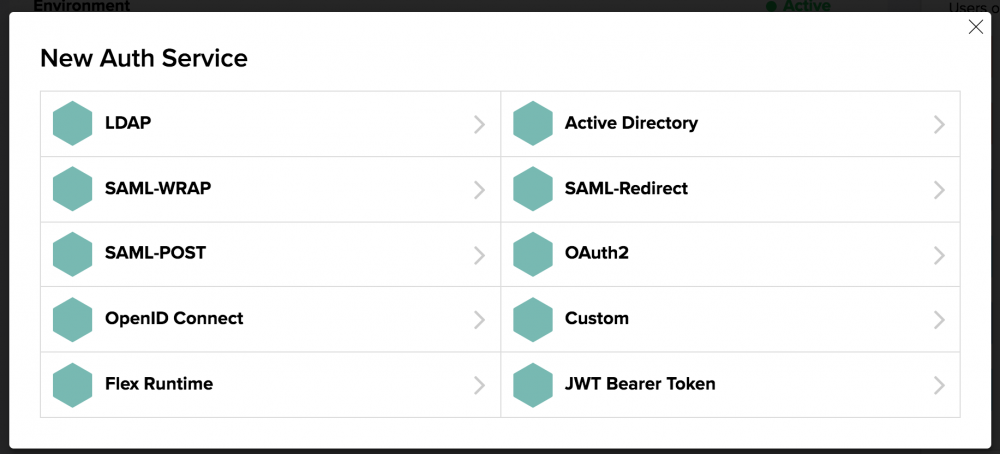
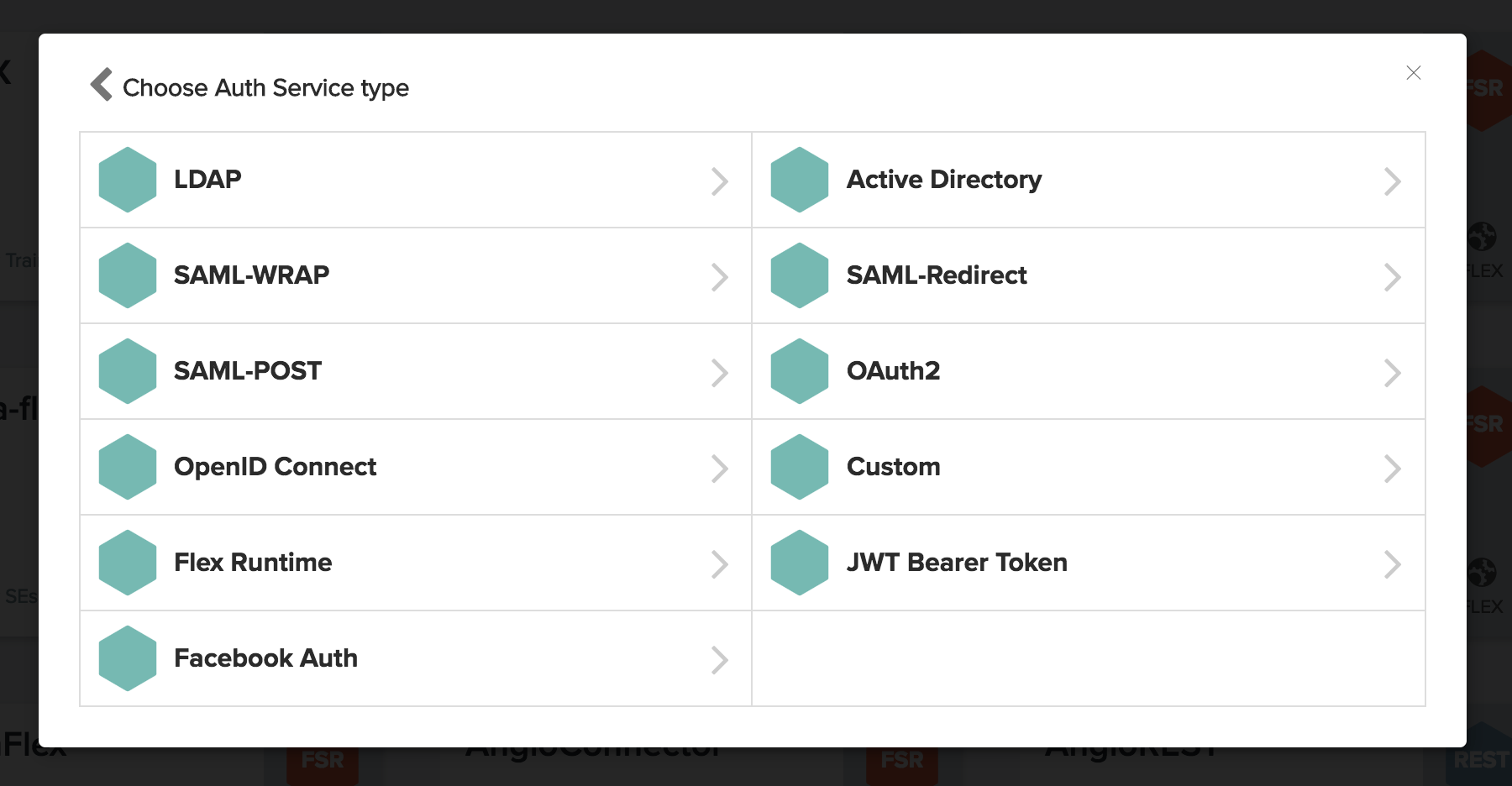
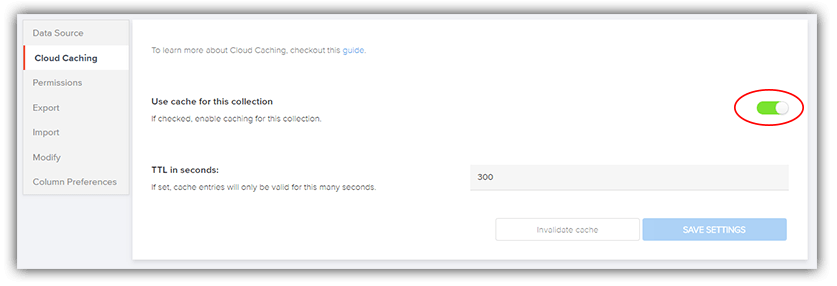
    <content type="text"><![CDATA[<p><span class="featured">Learn about how Kinvey's app platform works well with Oracle databases, improving your app's performance and making it easy to connect to chat applications.</span></p><h2>What is Oracle?</h2><p>Oracle database is a relational database management system built by the Oracle Corporation. First introduced in 1977 (so, a decade before Microsoft entered the field), Oracle is a well known and well-loved system within the enterprise database market, where it shares market share with Microsoft&rsquo;s SQL Server. Oracle runs on most of the major platforms: Windows, UNIX, Linux and on Mac OS. A robust ecosystem has grown up around it, including the well-loved <a href="https://www.quest.com/products/toad-for-oracle/" target="_blank">Toad</a> by Quest software, an excellent IDE that helps the database administrator manage processes, data, and stored procedures. Oracle&rsquo;s database is presented in four basic editions:</p><ul><li>Enterprise Edition - the full-featured enterprise-level database with robust performance and security included</li><li>Standard Edition - basic functionality for non-enterprise users</li><li>Express Edition - free, lightweight edition of the database</li><li>Oracle Lite - an edition for mobile devices</li></ul><p>Oracle differentiates itself from other enterprise offerings in that its architecture is &ldquo;split between the logical and the physical&rdquo; (<a href="https://www.techopedia.com/definition/8711/oracle-database" target="_blank">source</a>). In essence, the user is not concerned with the location of the data due to its distributed nature, and its modules can be altered independently so that the general activity of the database can be isolated. Oracle thus scales well to manage load and avoids having bottlenecks or single points of failure. Innovative offerings such as the &ldquo;<a href="https://investor.oracle.com/overview/highlights/default.aspx" target="_blank">Oracle</a><a href="https://investor.oracle.com/overview/highlights/default.aspx" target="_blank"> Autonomous Database</a>, the industry&rsquo;s only self-driving, self-securing, and self-repairing database&rdquo; ensure that the brand remains robust.</p><h2>Why Choose Oracle?</h2><p>Database solutions abound, even in the enterprise. For the smaller shop or individual app developer, the consideration of a database is often only between free or very low cost options, so if a relational database is desired, mySQL often seems like a good solution. For non-relational or document-type databases, a Mongo-type solution often works well; <a href="https://www.progress.com/kinvey">Progress Kinvey</a>, in fact, includes a non-relational database with collections that can be easily managed in the Kinvey console. But for the enterprise customer with a robust budget, the choice often boils down to MSSQL or Oracle. While you might not need such a robust database for a small app, a business plan that involves leveraging business intelligence and good security needs something heftier.&nbsp;</p><h2>Who Uses Oracle for Database Management?</h2><p>According to Oracle&rsquo;s 2018 <a href="https://investor.oracle.com/overview/highlights/default.aspx" target="_blank">annual report</a>, over 430,000 customers in 175 countries use Oracle, which terms itself the #1 provider of business software. According to <a href="https://csimarket.com/stocks/ORCL-Business-Description.html" target="_blank">CSI Market</a>, Oracle&rsquo;s primary customer base includes &ldquo;a significant number of businesses of many sizes, government agencies, educational institutions and resellers. [Their] primary industry markets include defense and government, education, financial services, technology, transportation, life sciences, telecommunications, manufacturing and healthcare.&rdquo;</p><h2>Why Kinvey's App Platform Works Well With Oracle</h2><p>One of the benefits of using Kinvey to connect to your Oracle database is that Kinvey incorporates a simple way of securely accessing data your database. You can also <em><a href="https://www.progress.com/blogs/how-to-use-continuous-integration-to-automate-kinvey-flex-services" target="_blank">combine data</a></em> from various sources such as different types of databases. Most importantly, you can use Kinvey&rsquo;s <a href="https://devcenter.kinvey.com/rest/guides/cloud-caching" target="_blank">Cloud Caching</a> feature to speed up your app&rsquo;s access to and consumption of data, a big bonus for a mobile app, for example. Simply toggle &lsquo;cloud caching&rsquo; in your Kinvey console to enable this feature.</p><p><a href="https://www.progress.com/images/default-source/blogs/2019/2019-2/kinvey-cloud-caching-console.png?sfvrsn=c2d07f54_1"><img src="https://www.progress.com/images/default-source/blogs/2019/2019-2/kinvey-cloud-caching-console.png?sfvrsn=c2d07f54_1" style="border-width:0px;border-style:solid;" alt="Kinvey Cloud Caching Console" title="Kinvey Cloud Caching Console" data-displaymode="Original" data-openoriginalimageonclick="true" /></a>
 <em>Kinvey Cloud Caching Console</em>
</p><h2>How You Can Use Kinvey to Connect Oracle Databases to Chat Applications</h2><p>If you already have an Oracle database and would like to connect it to Kinvey in order to marry Oracle&rsquo;s data storage and warehousing capabilities with Kinvey&rsquo;s app management expertise, there are a few steps to follow. First, in your Kinvey console, create a project and click the green &lsquo;Add A Service&rsquo; button to set up an External Flex Data Service Object.&nbsp;</p><p><a href="https://www.progress.com/images/default-source/blogs/2019/2019-2/connecting-kinvey-to-oracle-as-external-flex-data-service-object.png?sfvrsn=5c871705_1"><img src="https://www.progress.com/images/default-source/blogs/2019/2019-2/connecting-kinvey-to-oracle-as-external-flex-data-service-object.png?sfvrsn=5c871705_1" style="border-width:0px;border-style:solid;" title="Connecting Kinvey to Oracle as External Flex Data Service Object" data-displaymode="Original" alt="Connecting Kinvey to Oracle as External Flex Data Service Object" data-openoriginalimageonclick="true" /></a></p><p>Then, you will need to run a data connector locally (contact us for a copy of the library). Use a tool such as <a href="https://ngrok.com/" target="_blank">ngrok</a> for <a href="https://www.progress.com/blogs/developing-and-testing-of-kinvey-flex-services-the-easier-way" target="_blank">testing</a> the creation of a public URL locally. Your Oracle connector needs eventually to be deployed on an external Flex Service Runtime (the AWS Lambda instance used by Kinvey) to use your database.</p><p><a href="https://www.progress.com/images/default-source/blogs/2019/2019-2/run-oracle-data-connector-locally.png?sfvrsn=2b2bc1bc_1"><img src="https://www.progress.com/images/default-source/blogs/2019/2019-2/run-oracle-data-connector-locally.png?sfvrsn=2b2bc1bc_1" style="border-width:0px;border-style:solid;" title="Run Oracle Data Connector Locally" data-displaymode="Original" alt="Run Oracle Data Connector Locally" data-openoriginalimageonclick="true" /></a></p><p>Once you have created a public URL, you can connect to your external Flex Service that you set up earlier:</p><p><a href="https://www.progress.com/images/default-source/blogs/2019/2019-2/connect-external-flex-service-in-kinvey.png?sfvrsn=962ab89e_1"><img src="https://www.progress.com/images/default-source/blogs/2019/2019-2/connect-external-flex-service-in-kinvey.png?sfvrsn=962ab89e_1" style="border-width:0px;border-style:solid;" title="Connect External Flex Service in Kinvey" data-displaymode="Original" alt="Connect External Flex Service in Kinvey" data-openoriginalimageonclick="true" /></a></p><p>At this point, you should be able to query your database from Oracle directly:</p><p><a href="https://www.progress.com/images/default-source/blogs/2019/2019-2/query-database-from-oracle-directly.png?sfvrsn=5dd9bf54_1"><img src="https://www.progress.com/images/default-source/blogs/2019/2019-2/query-database-from-oracle-directly.png?sfvrsn=5dd9bf54_1" style="border-width:0px;border-style:solid;" title="Query Database from Oracle Directly" data-displaymode="Original" alt="Query Database from Oracle Directly" data-openoriginalimageonclick="true" /></a></p><p>...as well as from your Kinvey console:</p><p><a href="https://www.progress.com/images/default-source/blogs/2019/2019-2/query-oracle-database-from-kinvey-console.png?sfvrsn=2bcec4c4_1"><img src="https://www.progress.com/images/default-source/blogs/2019/2019-2/query-oracle-database-from-kinvey-console.png?sfvrsn=2bcec4c4_1" style="border-width:0px;border-style:solid;" title="Query Oracle Database from Kinvey Console" data-displaymode="Original" alt="Query Oracle Database from Kinvey Console" data-openoriginalimageonclick="true" /></a></p><p>...and from your chat application:</p><p><a href="https://www.progress.com/images/default-source/blogs/2019/2019-2/query-oracle-database-from-chat-app.png?sfvrsn=a64043dd_1"><img src="https://www.progress.com/images/default-source/blogs/2019/2019-2/query-oracle-database-from-chat-app.png?sfvrsn=a64043dd_1" style="border-width:0px;border-style:solid;" title="Query Oracle Database from Chat App" data-displaymode="Original" alt="Query Oracle Database from Chat App" data-openoriginalimageonclick="true" /></a></p><p>Kinvey is a high productivity platform that does a lot more to speed development too. Sign up for a free evaluation account today.&nbsp;</p><p><a href="https://www.progress.com/campaigns/kinvey/console-sign-up" class="Btn Btn--prim">Try Now for Free</a></p><img src="https://feeds.progress.com/link/20159/11050281.gif" height="1" width="1"/>]]></content>
  </entry>
  <entry>
    <id>urn:uuid:18b140a0-d859-4189-8578-32a09e9d4767</id>
    <title type="text">Highlighted Sessions from jsMobileConf</title>
    <summary type="text">Catch up on what you missed with a selection of top talks from jsMobileConf, or watch the whole playlist.</summary>
    <published>2019-02-01T19:20:50Z</published>
    <updated>2026-04-09T10:24:19Z</updated>
    <author>
      <name>Danny Shain</name>
    </author>
    <link rel="alternate" href="https://feeds.progress.com/link/20159/11035661/highlighted-sessions-from-jsmobileconf"/>
    <content type="text"><![CDATA[<p><span class="featured">Catch up on what you missed with a selection of top talks from jsMobileConf, or watch the whole playlist.</span></p>
<p>Back in October, <a href="https://www.progress.com/">Progress</a> put on a brand new event in Boston focused on mobile JavaScript and the broader JavaScript ecosystem. Called <a href="https://jsmobileconf.com/">jsMobileConf</a>, this conference brought in speakers from Microsoft, Adobe, Google, and Progress to talk about topics such as serverless, IoT, native apps, AR/VR, mobile web, AI, and more.</p>
<p>Admittedly we've been a bit tardy in getting videos of the conference ready for you all, but here is a selection of some of the most highly-rated talks from jsMobileConf 2018 (and the full playlist is <a href="https://www.youtube.com/playlist?list=PLC679RvCan2BecETAjIhyIk2tRN6AYKM6">available on YouTube</a>)!</p>
<blockquote>
<p><strong>NOTE:</strong> jsMobileConf is coming back to Boston later this year! Stay tuned to (soon-to-be-updated) <a href="https://jsmobileconf.com/">jsMobileConf.com</a> for more details.</p>
</blockquote>
<h3 id="tejasranadehttpstwittercomtejasrndbuildingrichofflineapplicationsslideshttpsgithubcomrdlauerjsmobileconf2018speakersblobmasterranade2020building20offline20appskeyrawtrue"><a href="https://twitter.com/tejasrnd">Tejas Ranade</a>: Building Rich Offline Applications [<a href="https://github.com/rdlauer/jsmobileconf-2018-speakers/blob/master/Ranade%20-%20Building%20Offline%20Apps.key?raw=true">slides</a>]</h3>
<p><img src="https://raw.githubusercontent.com/rdlauer/articles/master/misc/jsmobileconf2018-videos/tejasranade.jpg" alt="tejas ranade" title="tejas ranade"></p>
<p><em>IndexedDb, WebSQL, local storage, SQLite, Service Workers&hellip; what to choose and when. In this talk, we&rsquo;ll discuss the options available to the JS developer for designing rich, seamless offline experiences.</em></p>
<iframe width="560" height="315" src="https://www.youtube.com/embed/4PsI9Dal9no" frameborder="0" allow="accelerometer; autoplay; encrypted-media; gyroscope; picture-in-picture"></iframe>
<p>&nbsp;</p>
<h3 id="taramanicsichttpstwittercomtzmanicseverythingyouneedtonode"><a href="https://twitter.com/Tzmanics">Tara Manicsic</a>: Everything You Need To Node</h3>
<p><img src="https://raw.githubusercontent.com/rdlauer/articles/master/misc/jsmobileconf2018-videos/taramanicsic.jpg" alt="tara manicsic" title="tara manicsic"></p>
<p><em>Do you know Node? You&rsquo;ve probably heard of or even used Node but do you know all the things you can do with Node? You may have heard Node described as JavaScript for the back-end. Although you can create back-end applications it&rsquo;s not exclusively used to develop back-end apps. Since Node is a JavaScript runtime it allows you to execute JavaScript in a computing environment rather than a browser environment. Oh the possibilities! In this session we&rsquo;ll walk through a number of different types of projects you can build using Node. Hopefully unveiling some things you didn&rsquo;t even know you could Node. Finally, we&rsquo;ll code a Node application of our own, step-by-step. Looking forward to coding with you!</em></p>
<iframe width="560" height="315" src="https://www.youtube.com/embed/8Pwq-_jpsTc" frameborder="0" allow="accelerometer; autoplay; encrypted-media; gyroscope; picture-in-picture"></iframe>
<p>&nbsp;</p>
<h3 id="simonmacdonaldhttpstwittercommacdonstthefaasandtheserverlessslideshttpsslidescomsimonmacdonaldthefaasandtheserverless39"><a href="https://twitter.com/macdonst">Simon MacDonald</a>: The FaaS and the Serverless [<a href="https://slides.com/simonmacdonald/the-faas-and-the-serverless-39">slides</a>]</h3>
<p><img src="https://raw.githubusercontent.com/rdlauer/articles/master/misc/jsmobileconf2018-videos/simonmacdonald.jpg" alt="simon macdonald" title="simon macdonald"></p>
<p><em>Did you ever notice that FasS &amp; Serverless is a lot like the Fast &amp; the Furious series of movies? Each of the different characters is like a function specializing in doing one thing really well. Then when when you combine their abilities as a team they can accomplish anything like a great app.</em></p>
<iframe width="560" height="315" src="https://www.youtube.com/embed/_owPLNvymjo" frameborder="0" allow="accelerometer; autoplay; encrypted-media; gyroscope; picture-in-picture"></iframe>
<p>&nbsp;</p>
<h3 id="nischalreddyhttpstwittercomnischalsrinivasmicroappsbreakingthemobileappmonolithanddeliveringomnichannelexperiencesslideshttpsgithubcomrdlauerjsmobileconf2018speakersblobmasterreddy2020microappspptxrawtrue"><a href="https://twitter.com/nischalsrinivas">Nischal Reddy</a>: Micro Apps - Breaking the Mobile App Monolith and Delivering Omnichannel Experiences [<a href="https://github.com/rdlauer/jsmobileconf-2018-speakers/blob/master/Reddy%20-%20Microapps.pptx?raw=true">slides</a>]</h3>
<p><img src="https://raw.githubusercontent.com/rdlauer/articles/master/misc/jsmobileconf2018-videos/nischalreddy.jpg" alt="nischal reddy" title="nischal reddy"></p>
<p><em>We have long been breaking monoliths to create microservices that are atomic, independent and decoupled. But for the most part the mobile app UI is still a huge monolith that consumes all the microservices, which makes it hard to maintain, comes with high cost of change that causes development costs to soar. These problems are leading to long release cycles and eventually abandoning apps in production. The solution is to decompose a mobile monolith to an ecosystem of Microapps!. Microapps are single purpose, cross platform apps that are designed to support a single step in a users workflow. Microapps helps in delivering a constant stream of incremental updates without long app release cycle, they help deliver a consistent user experience across different user touchpoints (be it mobile, web or wearables). Come attend this session to find out how Microapps architecture can help your development team accelerate pace of change while enabling them to deliver value in parallel.</em></p>
<iframe width="560" height="315" src="https://www.youtube.com/embed/kFNNi1AQgmA" frameborder="0" allow="accelerometer; autoplay; encrypted-media; gyroscope; picture-in-picture"></iframe>
<p>&nbsp;</p>
<h3 id="sagefranchhttpstwittercomthetrendytechieblockchaincrashcourseslideshttpsgithubcomrdlauerjsmobileconf2018speakersblobmasterfranch2020blockchainpptxrawtrue"><a href="https://twitter.com/theTrendyTechie">Sage Franch</a>: Blockchain Crash Course [<a href="https://github.com/rdlauer/jsmobileconf-2018-speakers/blob/master/Franch%20-%20Blockchain.pptx?raw=true">slides</a>]</h3>
<p><img src="https://raw.githubusercontent.com/rdlauer/articles/master/misc/jsmobileconf2018-videos/sagefranch.jpg" alt="sage franch" title="sage franch"></p>
<p><em>Decentralization, blockchain, ICO - let&rsquo;s go beyond the buzzwords and understand the meaning of the movement. We&rsquo;ll explore blockchain in simple terms, look at the current ecosystem of decentralization tools, and walk through a simple blockchain application built with JS and Solidity.</em></p>
<iframe width="560" height="315" src="https://www.youtube.com/embed/L5w7UDD02LM" frameborder="0" allow="accelerometer; autoplay; encrypted-media; gyroscope; picture-in-picture"></iframe>
<p>&nbsp;</p>
<h3 id="brandonsatromhttpstwittercombrandonsatrombendingtheiottoyourwillwithjavascriptslideshttpsgithubcomrdlauerjsmobileconf2018speakersrawmastersatrom2020iotpdf"><a href="https://twitter.com/BrandonSatrom">Brandon Satrom</a>: Bending the IoT to Your Will with JavaScript [<a href="https://github.com/rdlauer/jsmobileconf-2018-speakers/raw/master/Satrom%20-%20IoT.pdf">slides</a>]</h3>
<p><img src="https://raw.githubusercontent.com/rdlauer/articles/master/misc/jsmobileconf2018-videos/brandonsatrom.jpg" alt="brandon satrom" title="brandon satrom"></p>
<p><em>In 2018, connected, embedded systems are everywhere, and &ldquo;the IoT&rdquo; is quickly moving beyond the connected-toaster memes of recent years and into the realm of reality. And as more and more developers are solving real problems with IoT devices, they are discovering that building an IoT solution is about more than a microcontroller, sensors, actuators and a Wi-Fi or cellular radio. It&rsquo;s also about how that device interfaces with the world around it, makes its data available, and allows itself to be controlled from the cloud. Ultimately, building IoT solutions is about building applications that leverage hardware, firmware, and software, and savvy developers are discovering that, in the software realm, JavaScript plays a heavy role in enabling connected applications. In this session, we&rsquo;ll explore some of the ways that the modern developer can take control of the IoT with JavaScript.</em></p>
<iframe width="560" height="315" src="https://www.youtube.com/embed/aeLsgyWbjTc" frameborder="0" allow="accelerometer; autoplay; encrypted-media; gyroscope; picture-in-picture"></iframe>
<p>&nbsp;</p>
<h3 id="sebastianwitalechttpstwittercomsebawitaadoptanaidrivenchatbottodayslideshttpsgithubcomrdlauerjsmobileconf2018speakersblobmasterwitalec2020chat20botskeyrawtrue"><a href="https://twitter.com/sebawita">Sebastian Witalec</a>: Adopt an AI-driven Chatbot Today [<a href="https://github.com/rdlauer/jsmobileconf-2018-speakers/blob/master/Witalec%20-%20Chat%20Bots.key?raw=true">slides</a>]</h3>
<p><img src="https://raw.githubusercontent.com/rdlauer/articles/master/misc/jsmobileconf2018-videos/sebastianwitalec.jpg" alt="sebastian witalec" title="sebastian witalec"></p>
<p><em>If you ever asked yourself any of these questions: What do chatbots eat? Do chatbots have dreams? What are the usual chatbot challenges? Then this talk is for you. We will answer all of the above questions and many more. You will learn how to build a fully functioning chatbot in less than 10 minutes &ndash; without a single IF statement &ndash; and train it to understand human language. Then we will top it up with a quick AI training to make it understand the language normal people speak.</em></p>
<iframe width="560" height="315" src="https://www.youtube.com/embed/ekBsnEQjreg" frameborder="0" allow="accelerometer; autoplay; encrypted-media; gyroscope; picture-in-picture"></iframe>
<p>&nbsp;</p>
<h3 id="amalhusseinhttpstwittercomnomadtechiemachinepoweredrefactoring"><a href="https://twitter.com/nomadtechie">Amal Hussein</a>: Machine Powered Refactoring</h3>
<p><img src="https://raw.githubusercontent.com/rdlauer/articles/master/misc/jsmobileconf2018-videos/amalhussein.jpg" alt="amal hussein" title="amal hussein"></p>
<p><em>Web apps are evolving targets which show their age via varying degrees of code cruft. And that&rsquo;s ok. Tech debt is an expected side-effect of living production web apps, and the challenge lies in paying down the debt while still pushing forward. Enter Abstract Syntax Trees&hellip; ASTs enable developers to parse input code into a predictable tree data structure that can be easily traversed, manipulated and then regenerated in place. Transpilers such as BabelJS use this powerful pattern to transpile ES2015+ down to a baseline of ES5. While this 1:1 transpiling is the most common usage of ASTs, they can also be leveraged to supercharge the transformation of your legacy code to meet the conventions, libraries, and/or design patterns your team is using today. Amal aims to demystify this process by breaking down the steps of how to build your own custom AST based transforms. Happy Traversing!</em></p>
<iframe width="560" height="315" src="https://www.youtube.com/embed/FR-4kVpizSY" frameborder="0" allow="accelerometer; autoplay; encrypted-media; gyroscope; picture-in-picture"></iframe>
<p>&nbsp;</p>
<h3 id="antonhristovhttpstwittercomantonhristovbuildinganinnovationengineinsideyourorganizationslideshttpsgithubcomrdlauerjsmobileconf2018speakersrawmasterhristov2020building20innovation20enginepdf"><a href="https://twitter.com/AntonHristov">Anton Hristov</a>: Building an Innovation Engine Inside Your Organization [<a href="https://github.com/rdlauer/jsmobileconf-2018-speakers/raw/master/Hristov%20-%20Building%20Innovation%20Engine.pdf">slides</a>]</h3>
<p><img src="https://raw.githubusercontent.com/rdlauer/articles/master/misc/jsmobileconf2018-videos/antonhristov.jpg" alt="anton hristov" title="anton hristov"></p>
<p><em>The pace of technological advancement is accelerating and so is the rate of user adoption which creates an amazing market opportunity and a daunting challenge for existing businesses that want to remain at the cutting edge of technology and grow. Let&rsquo;s explore how organizations can take advantage of this opportunity by creating a culture of learning, applying the scientific method to idea validation and helping entrepreneurial employees bring ideas to life &ndash; from launching a MVP (minimum valuable product) to achieving product-market fit and measuring success along the way. We will look at Progress Labs as a case in point.</em></p>
<iframe width="560" height="315" src="https://www.youtube.com/embed/qWp31VPpilU" frameborder="0" allow="accelerometer; autoplay; encrypted-media; gyroscope; picture-in-picture"></iframe>
<p>&nbsp;</p>
<h3 id="paneldiscussionthefutureofmobile">Panel Discussion: The Future of Mobile</h3>
<p><em>A panel discussion of where mobile is headed, including conversations on virtual/augmented reality, AI, machine learning, IoT, and more.</em></p>
<iframe width="560" height="315" src="https://www.youtube.com/embed/s5ip_oiBWMA" frameborder="0" allow="accelerometer; autoplay; encrypted-media; gyroscope; picture-in-picture"></iframe>
<p>&nbsp;</p>
<p>We hope you enjoy these videos, and be sure to check back with us at&nbsp;<a href="https://jsmobileconf.com/">jsMobileConf.com</a>, which will soon be updated with new details on the next jsMobileConf. Hope to see you there!</p><img src="https://feeds.progress.com/link/20159/11035661.gif" height="1" width="1"/>]]></content>
  </entry>
  <entry>
    <id>urn:uuid:615da0a9-aafc-4ead-aa83-fb83365e04b3</id>
    <title type="text">Kinvey for Node Developers</title>
    <summary type="text">The Kinvey high productivity platform makes it easy for Node developers to create native apps across multiple platforms while staying in control.</summary>
    <published>2019-01-31T19:56:22Z</published>
    <updated>2026-04-09T10:24:19Z</updated>
    <author>
      <name>Danny Shain</name>
    </author>
    <link rel="alternate" href="https://feeds.progress.com/link/20159/11031949/kinvey-for-node-developers"/>
    <content type="text"><![CDATA[<p><span class="featured">The Kinvey high productivity platform makes it easy for Node developers to create native apps across multiple platforms while staying in control.</span></p><p>Being a Node developer can span across many different types of programming these days because Node can be used for so much, from frontend to backend, machine learning to IoT. I started my career as a Node engineer mostly working on the backend and have watched Node grow to surpass many programming languages in usage and popularity. The Node ecosystem and community have also thrived and evolved each year. When I joined the <a href="https://www.progress.com/kinvey">Kinvey</a> team, I was excited by all the ways the platform aligned itself with Node and lent itself to the ways I was already programming with Node. I wanted to point a few out to you today, so you could be excited too .</p><h2 id="microservicearchitecture">Microservice Architecture</h2><p>One of the benefits of Node is the ability to keep your code scalable and modularized. This lends itself to building out microservices that allow you to have a "single responsibility" type building model for your application. That is to say, one app that does one job. This makes scalability and organization of your overall application much more manageable. Instead of worrying about breaking your billing logic because you wanted to change part of your inventory process, you separate them into individual services and leave that stress for another day.</p><p><img title="kinvey microservices" src="https://www.progress.com/images/default-source/products/kinvey/__sa_microservices-min.png?sfvrsn=5eaed8fb_2" alt="kinvey microservices"></p><p>The Kinvey team realized the benefits of this as well and developed the <a href="https://devcenter.kinvey.com/rest/guides/mobile-microservices-framework">Kinvey Microservice Framework</a> for building, deploying and maintaining scalable microservices. We also take some of the infrastructure work off your hands by autoscaling to the highest degree on our serverless cloud platform. That way you don't have to spend time configuring or developing low-level code with infrastructure providers. You have the option of creating low- to no-code microservices using our RapidServices like RapidAuth and RapidData, and FlexServices like FlexData, FlexAuth, and FlexFunctions.</p><h3 id="rapidauthandrapiddata">RapidAuth and RapidData</h3><p>The <a href="https://devcenter.kinvey.com/rest/guides/mobile-microservices-framework">RapidAuth and RapidData</a> services Kinvey provides allow you to easily hook up authorization and data integrations with no code. An old manager of mine used to joke that we all had a finite amount of keystrokes in our lifetime (<a href="https://keysleft.com/">in case you wonder what yours is</a>), so we wanted to help you out by giving you less code to write . Sure, I kid, but I have never found coding up these integrations to be quick or painless job. RapidAuth is pretty much what it sounds like: getting users authenticated rapidly. We do this with our <a href="https://devcenter.kinvey.com/rest/guides/mobile-identity-connect">Mobile Identity Connect</a> service which connects your app to enterprise identity and single sign-on solutions. We use OAuth2 as an underlying identity protocol for authentication and redirect users as necessary. There are many options to work with MIC including: SAML, OAuth2, OpenID Connect, Active Directory, LDAP, SAML-WRAP, Facebook Auth and Custom Authlink.</p><p><img title="kinvey MIC configuration" src="https://www.progress.com/images/default-source/blogs/2018/kinvey-migration/new-auth-service-1000x454.png?sfvrsn=d0cb8839_1" alt="kinvey MIC configuration"></p><p>A <a href="https://devcenter.kinvey.com/rest/guides/rapid-data">RapidData</a> service lets you use integrations like SAP, Salesforce, Sharepoint, NoSQL and Rest APIs to feed data into your applications instead of having to develop or deploy complex APIs. Having access to data and APIs already helps us build robust applications and now Kinvey can help you make that process easier and faster. This can help you cut down your coding time on integrations or use it to add even MORE integrations!</p><p><img src="https://devcenter.kinvey.com/rest/guides/rapid-data/sqlso.png" alt="sql service image" title="sql service image"></p><h2 id="built_by_nodedevelopers">Built <em>by</em> Node Developers</h2><p>Kinvey is actually built using Node so we've got a lot of Node devs creating what you're using. Being Node developers helps us realize what is important for fellow Node developers. For instance, we recently made it so that you can use any LTS version of Node. You just choose the version you like and we install the latest patch of that major version. From here on out we will be aligned with Node's release schedule to stay up-to-date and also avoid any complications with versions of Node that are no longer under maintenance.</p><p>We also know the value of the Node ecosystem. We have members of our team who have contributed to Node core and are active in the Node community. We also utilize the NPM ecosystem with our Flex Services to make it easy for you to incorporate them into your projects. <a href="https://devcenter.kinvey.com/nodejs/guides/flex-services">Kinvey FlexServices</a> are lightweight Node microservices used to integrate data and functional business logic into your application. You just need to install and require the modules like you would in any of your Node apps. We like to keep you in your comfort zone aka productive. You can check out this article on <a href="https://www.progress.com/blogs/getting-started-with-kinvey-flexservices">Getting Started with Kinvey FlexServices</a> to learn more.</p><h2 id="cli">CLI</h2><p>Practically every framework out there today has a Command Line Interface tool, because they're awesome, duh. Of course, it is also handy that most of our code editors have bash integration so that we don't have to switch from screen to screen, or from coding to GUI, in order to run commands for our application. Kinvey is right there with you. Our <a href="https://github.com/Kinvey/kinvey-cli">CLI</a> tool lets you work with your FlexServices, business logic, applications, app environments, and collections all through CLI commands. Our team is constantly updating the CLI to help it help you . Check out the <a href="https://github.com/kinvey/kinvey-cli/blob/HEAD/CHANGELOG.md">changelog</a> to keep up-to-date with all the newness.</p><p>The CLI also can be utilized in your CI pipeline to enable full continuous integration/continuous deployment of your apps through Kinvey. By using the CLI within any common CI tool such as Jenkins, Travis, etc., you can store your Kinvey Flex Services and application metadata in your version control system of choice (e.g. GitHub), and integrate and deploy your Kinvey apps automatically.</p><h2 id="someextragoodies">Some Extra Goodies</h2><p>I wanted to make a shout-out to a few other features Kinvey offers that aren't <em>specifically</em> Node-centric but are great, especially for creating multi-channel applications. In particular, I wanted to touch on a few things that I always found a bit cumbersome while doing Node development: security and offline support.</p><h3 id="builtinsecurity">Built-in Security</h3><p>Security and privacy are tricky, especially when it comes to mobile devices. Kinvey utilizes secure, enterprise-grade serverless cloud platform solutions, isolating and protecting data sources and networks from client applications running on untrusted devices and their networks. You can never be too safe. All of the Kinvey client libraries encrypt data on the client device using AES-256 and data is encrypted in transport using TLS 1.2. There are also more options that the Kinvey platform supports for secure connections to your systems including IPSEC VPN, SSL/TLS VPN and our own Secure Gateway solution. Work with sensitive medical information? Kinvey provides built-in HIPAA compliance. There's much more to the security we provide, if you want to learn more check out our <a href="https://www.progress.com/">whitepaper on Kinvey Cloud Services Security</a>.</p><h3 id="dataaccelerationwithoffline">Data Acceleration with Offline</h3><p>Although we as users are more connected than ever these days, our <em>network</em> connections aren't always the most reliable. Thankfully, the internet is advancing, giving us different methods to deliver data to users fast, even if they have a slow connection. I've written enough service workers to know just how complicated building out offline functionality can be. Service workers are really powerful and can do so much for controlling how and when to deliver data, but... not easy. This is where Kinvey can help you advance your application without slowing production down.</p><p>Knowing how important it is to get data to your users fast, the team created Kinvey Accelerate. Basically, it provides secure cloud storage for your datastore to cache data from your backend systems and services. When your data needs to be accessed it delivers it directly from the cloud in synchronized batches to limit the impact to the infrastructure and deliver data in sub-second responses. The kicker is that the Kinvey client SDKs provide several tools for working with offline data, letting you cache and sync when your users go offline. This means you have two-way syncing between the device and backend datastore, so when a connection is restored only changed data gets synced. This saves bandwidth and gives users the super quick response time they expect even on slower connections. On top of that you can set this up with no code, just check the 'Use offline storage' box ✨.</p><p><img title="offline storage" src="https://www.progress.com/images/default-source/products/kinvey/kinveyacceleratepage_protectenterprisesystemsfromload-min.png?sfvrsn=252755e1_4&amp;rev=1" alt="offline storage"></p><h2 id="yourturn">Your Turn &zwj;</h2><p>I hope I gave you a nice peek into some of the benefits that Kinvey brings to Node developers. The goal is to help you create native apps across multiple platforms quickly and easily while still being in control. As Node developer ourselves, our team knows where nuisances lay in the coding processes. We try to take care of those nuisances for you so you can work on your actual product and release features your users are asking for. Check out more information on the Kinvey high productivity platform <a href="https://www.progress.com/kinvey">here</a>, or jump right in to some docs and tutorials at our <a href="https://devcenter.kinvey.com/nodejs/tutorials">devcenter</a>. Feel free to <a href="https://www.progress.com/kinvey/contact">reach out to us</a> if you have any questions or want more info. Happy coding!</p><p>Looking to get started right away? Check out my next post, where we'll&nbsp;<a href="https://www.progress.com/blogs/getting-started-with-node-kinvey">get started creating a Node project with Kinvey</a>.</p><img src="https://feeds.progress.com/link/20159/11031949.gif" height="1" width="1"/>]]></content>
  </entry>
  <entry>
    <id>urn:uuid:fbe6e540-521f-416b-b183-46946af19693</id>
    <title type="text">Best Practices: Secure Frontend Code by Moving to Serverless Cloud</title>
    <summary type="text">We look at a modern approach to securely moving frontend code to the cloud using a serverless approach, walking step-by-step through two examples.</summary>
    <published>2019-01-29T20:06:45Z</published>
    <updated>2026-04-09T10:24:19Z</updated>
    <author>
      <name>Danny Shain</name>
    </author>
    <link rel="alternate" href="https://feeds.progress.com/link/20159/11025922/how-to-secure-your-frontend-code-by-moving-it-to-the-cloud"/>
    <content type="text"><![CDATA[<p><span class="featured">We look at a modern approach to securely moving frontend code to the cloud using a serverless approach, walking step-by-step through two examples.</span></p>
<p>Frontend code is inherently insecure. Yes, you can mangle your code with something like <a href="https://github.com/mishoo/UglifyJS">UglifyJS</a>, or use more a more advanced obfuscation tool like <a href="https://jscrambler.com/">Jscrambler</a>, but at the end of the day, the public nature of frontend code means it&rsquo;s accessible to nefarious users.</p>
<p>The tried-and-true solution to this problem has been moving sensitive code to the server, which works, but can be time consuming&mdash;especially in organizations where the server-side infrastructure is a hot mess of Java, .NET, and SAP code that has evolved over many decades.</p>
<p>In this article we&rsquo;ll look at a modern approach to moving frontend code to the cloud using a <a href="https://www.progress.com/blogs/what-is-a-serverless-backend">serverless approach</a>. We&rsquo;ll look at two examples: one where you&rsquo;ll hide a third-party API key in a serverless function, and another where you&rsquo;ll move a JavaScript algorithm to the cloud.</p>
<p>Let&rsquo;s get started.</p>
<h2 id="scenario1hidingathirdpartyapikey">Scenario 1: Hiding a Third-Party API Key Using Serverless Cloud</h2>
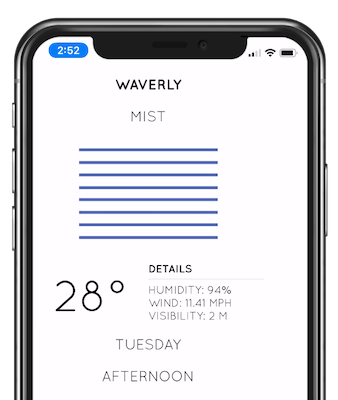
<p>For our first scenario, suppose you&rsquo;re working on an app that has a screen that shows the current weather in the user&rsquo;s location.</p>
<p><a href="https://www.progress.com/images/default-source/blogs/2019/2019-01/weather-app.png?sfvrsn=c90d0d1d_3"><img src="https://www.progress.com/images/default-source/blogs/2019/2019-01/weather-app.png?sfvrsn=c90d0d1d_3" data-displaymode="Original" alt="Weather App" title="Weather App" data-openoriginalimageonclick="true"></a></p>
<p>To get this data you use an API provided by <a href="https://openweathermap.org/">OpenWeatherMap</a>, a service which allows you to get weather data after signing up for an API key. Because OpenWeatherMap charges based off the number of calls you make to their backend, you don&rsquo;t want your API key to fall into the wrong hands&mdash;and you therefore don&rsquo;t want to ship that key in your client-side code.</p>
<p>This is a scenario where a serverless approach works really well. By leveraging the cloud, you can quickly and easily move this functionality out of your client-side code. Not only do you get to move your key to a safe location, you also get a cloud function on a server you don&rsquo;t have to maintain, and you get a function you can use across multiple applications.</p>
<p>There are a number of different serverless cloud providers, but for this article's examples we&rsquo;ll use <a href="https://www.progress.com/kinvey">Progress Kinvey</a>. Kinvey is a high productivity serverless platform that makes it easy to build everything from quick serverless functions for hiding API keys, to more advanced serverless scenarios we&rsquo;ll look at later in this article.</p>
<blockquote>
<p><strong>NOTE</strong>: New to Kinvey? <a href="https://www.progress.com/campaigns/kinvey/console-sign-up">Sign up for a free account</a>&nbsp;to follow along with the steps in this article.</p>
</blockquote>
<h3 id="creatingyourfirstserverlessfunction">Creating Your First Serverless Function</h3>
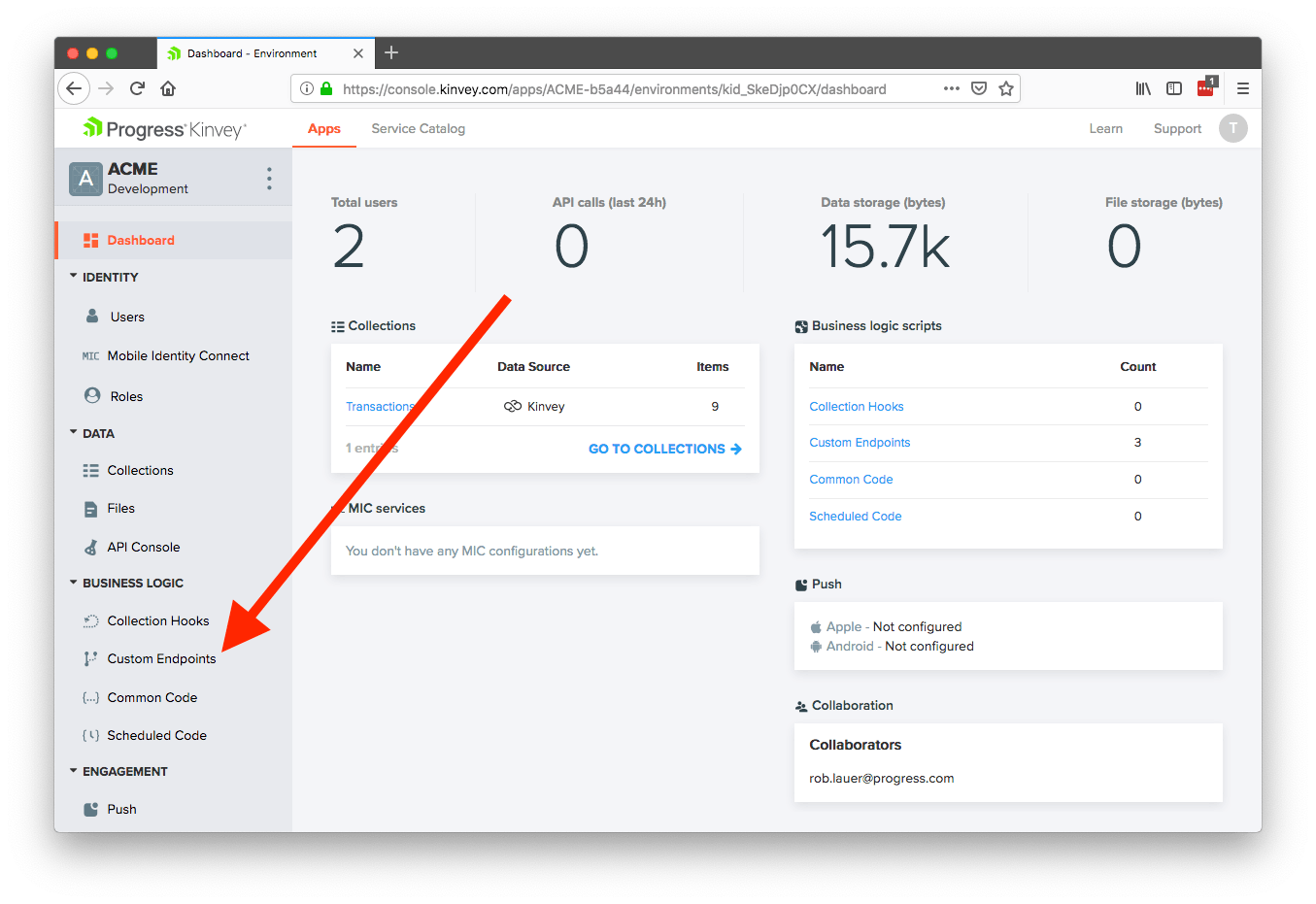
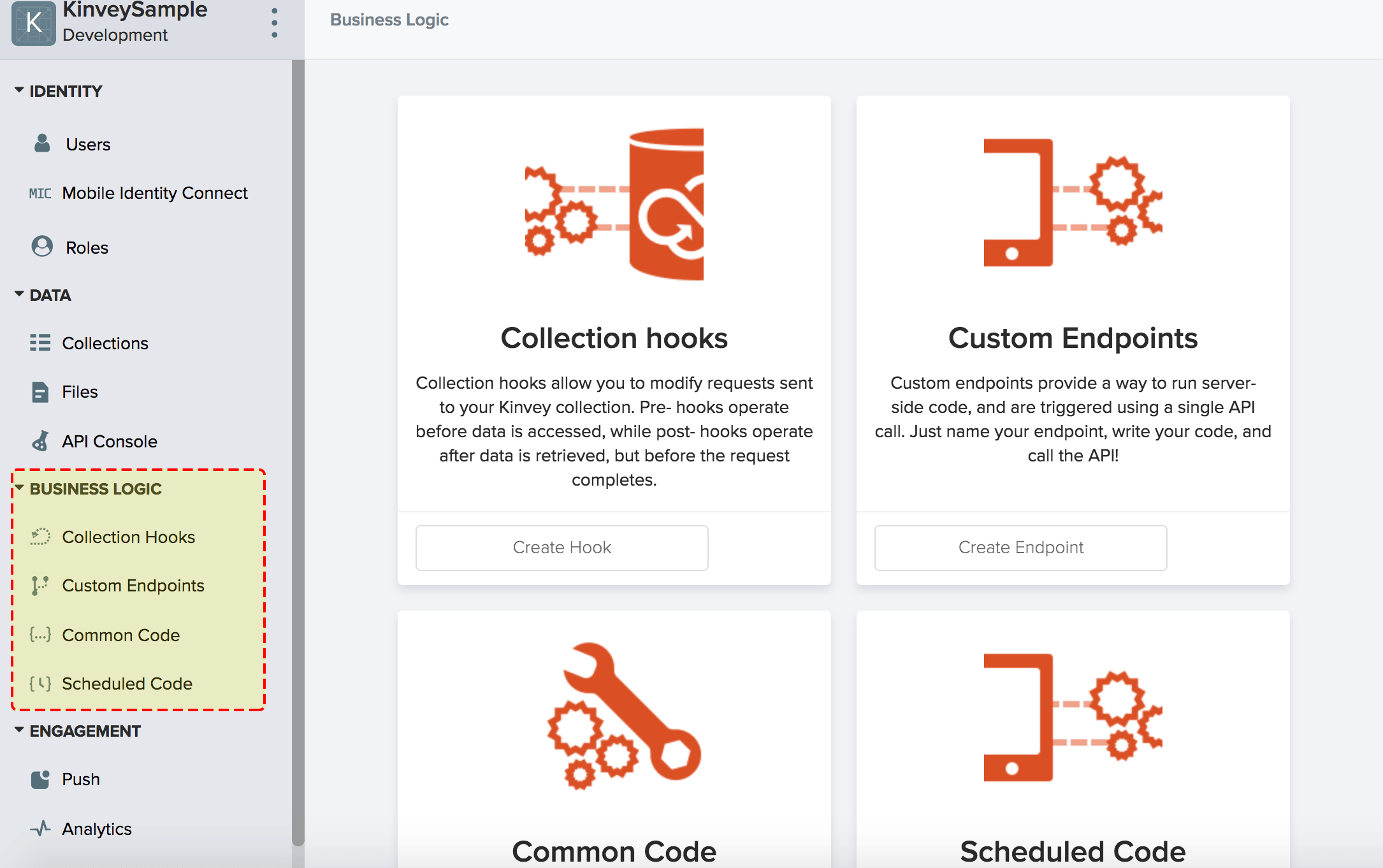
<p>After you <a href="https://www.progress.com/blogs/how-to-get-started-with-kinvey-and-nativescript-fast">set up a Kinvey account and create an app</a>, you&rsquo;ll see a dashboard that looks like the image below. Start by clicking &ldquo;Custom Endpoints,&rdquo; which is the easiest place to get started with serverless in Kinvey.</p>
<p><a href="https://www.progress.com/images/default-source/blogs/2019/2019-01/kinvey-dashboard.png?sfvrsn=16a21a5d_3"><img src="https://www.progress.com/images/default-source/blogs/2019/2019-01/kinvey-dashboard.png?sfvrsn=16a21a5d_3" data-displaymode="Original" alt="Kinvey Dashboard" title="Kinvey Dashboard" data-openoriginalimageonclick="true"></a></p>
<blockquote>
<p><strong>TIP</strong>: Kinvey does a lot more than just serverless. You can store files and data, connect to existing data and authentication providers, and even send push notifications. Learn more on the <a href="https://devcenter.kinvey.com">Kinvey Dev Center</a>.</p>
</blockquote>
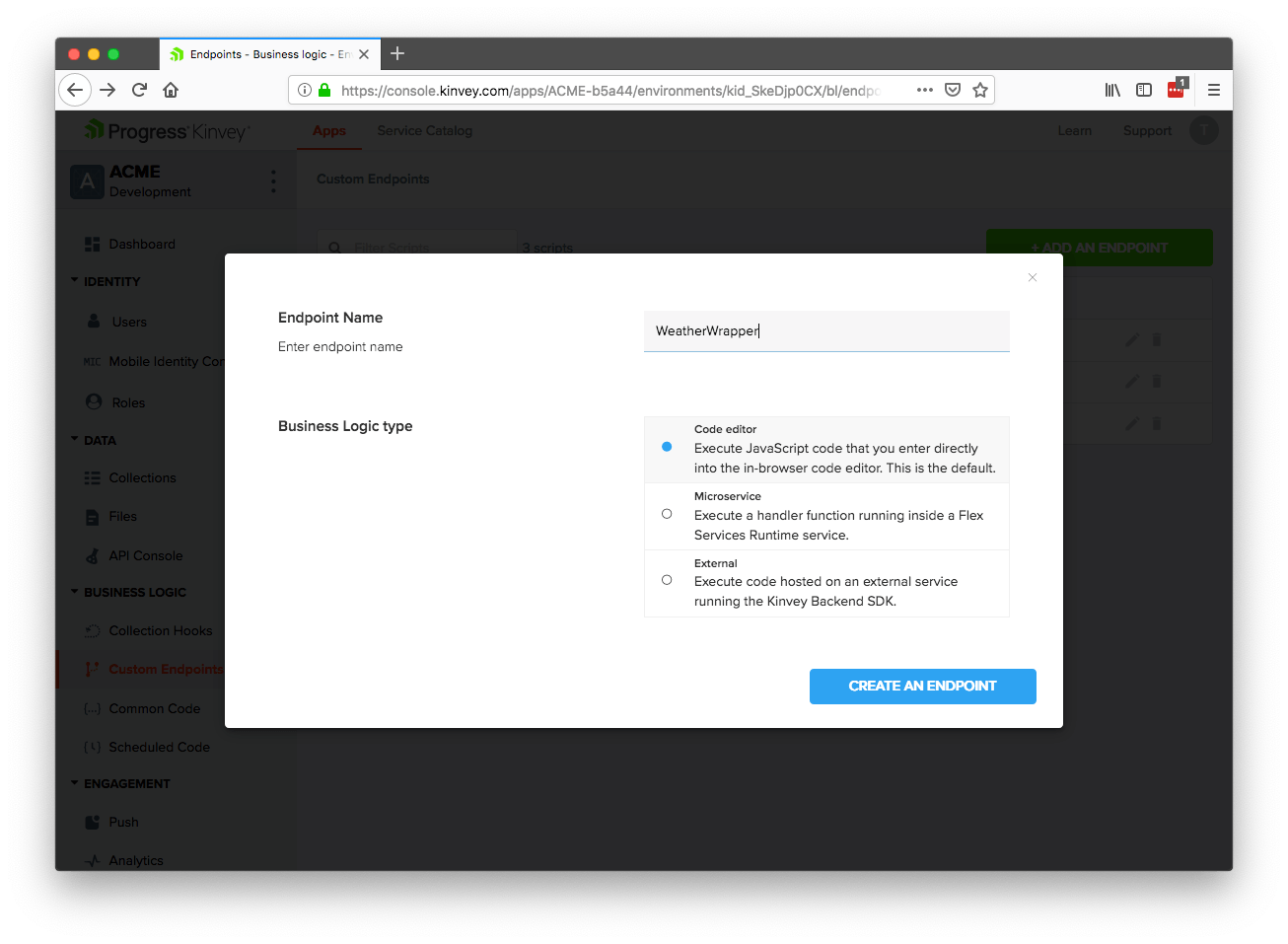
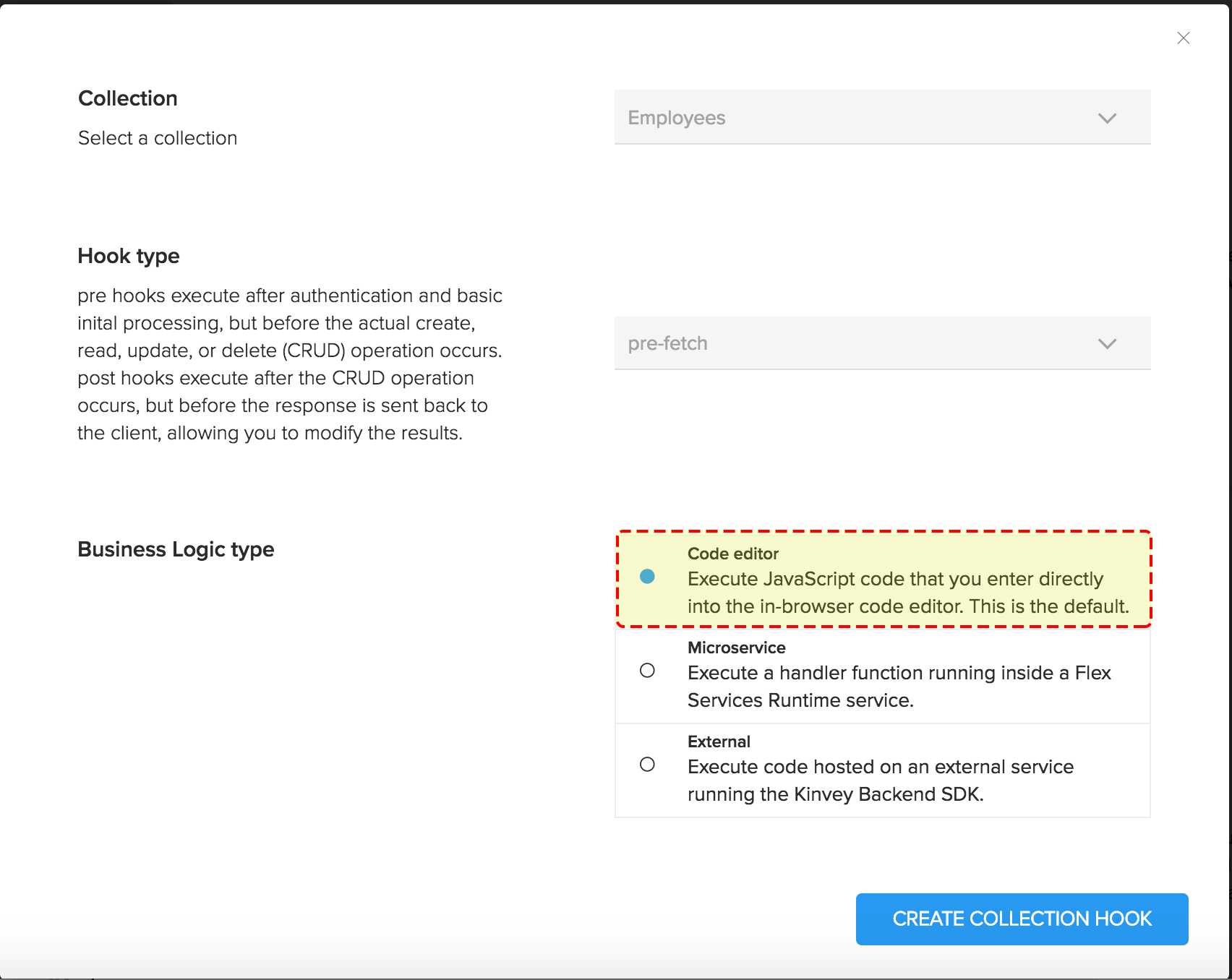
<p>At the next screen, click the <strong>ADD AN ENDPOINT</strong> button, give the endpoint a name of &ldquo;WeatherWrapper,&rdquo; select <strong>Code editor</strong>, and finally click the <strong>CREATE AN ENDPOINT</strong> button.</p>
<p><a href="https://www.progress.com/images/default-source/blogs/2019/2019-01/kinvey-dashboard-2.png?sfvrsn=4e3c4969_3"><img src="https://www.progress.com/images/default-source/blogs/2019/2019-01/kinvey-dashboard-2.png?sfvrsn=4e3c4969_3" data-displaymode="Original" alt="Kinvey Dashboard 2" title="Kinvey Dashboard 2" data-openoriginalimageonclick="true"></a></p>
<blockquote>
<p><strong>NOTE</strong>: A Kinvey custom endpoint is a HTTP POST endpoint. You&rsquo;ll try this out momentarily.</p>
</blockquote>
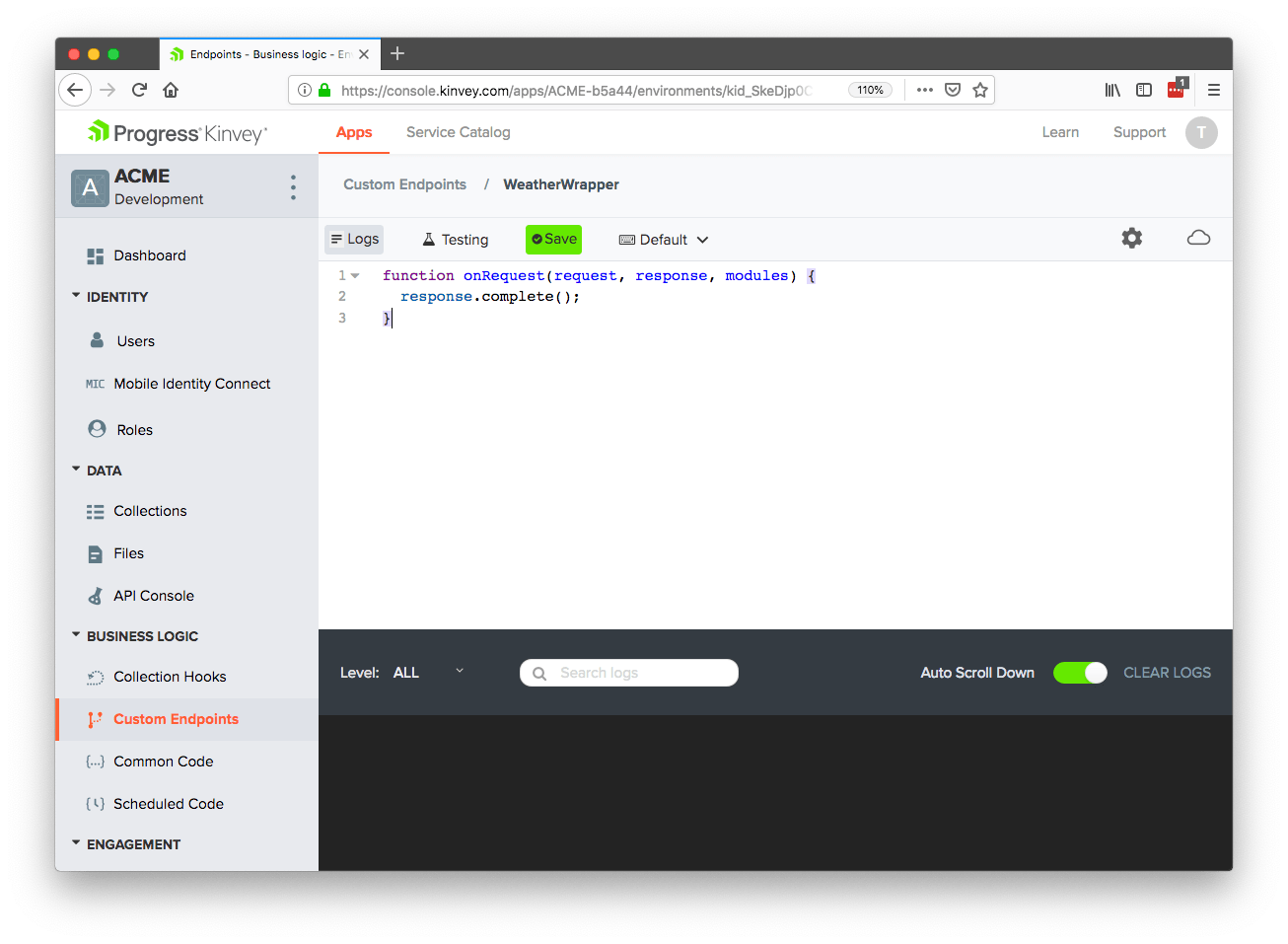
<p>After you finish those steps you&rsquo;ll see the Kinvey business logic editor, which is where you&rsquo;ll write the serverless function that you&rsquo;ll consume in your apps.</p>
<p><a href="https://www.progress.com/images/default-source/blogs/2019/2019-01/business-logic-editor.png?sfvrsn=49b7fe9_3"><img src="https://www.progress.com/images/default-source/blogs/2019/2019-01/business-logic-editor.png?sfvrsn=49b7fe9_3" data-displaymode="Original" alt="Business Logic Editor" title="Business Logic Editor" data-openoriginalimageonclick="true"></a></p>
<p>The default serverless function is a bit of boilerplate code that returns an empty response. For our example scenario you want to include an OpenWeatherMap API key in your response, so to do that, copy the code below, paste it in the Kinvey business logic editor, and then hit the <strong>Save</strong> button. (Feel free to use a placeholder for the API key for now.)</p>
<pre><code class="lang-javascript">function onRequest(request, response, modules) {
  response.body = "YOUR_API_KEY_HERE";
  response.complete();
}
</code></pre>
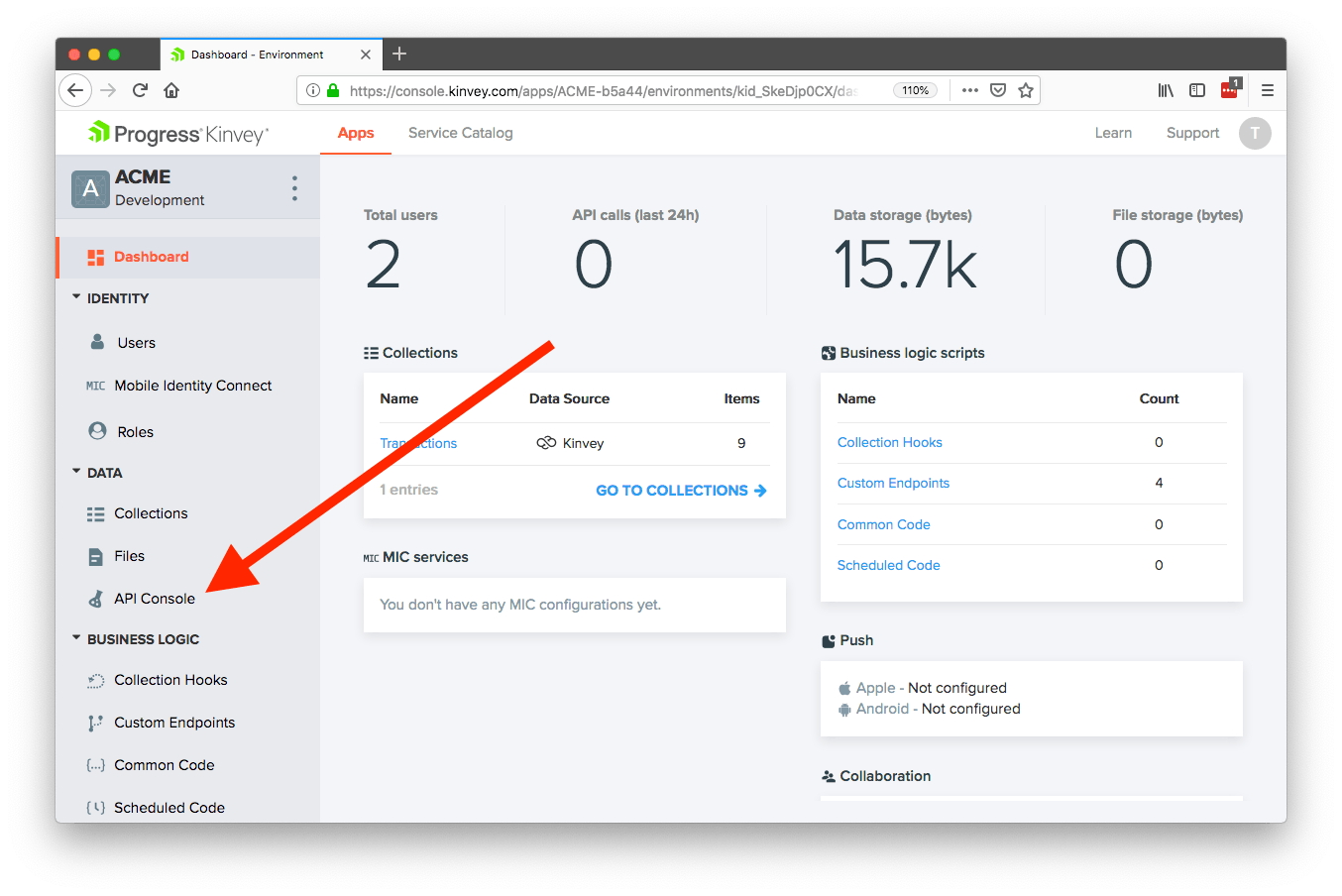
<p>With this code in place all you need to do is send an HTTP POST request to your new endpoint with the correct headers. The easiest place to do that is in the Kinvey API Console, which you can access using the link shown below.</p>
<p><a href="https://www.progress.com/images/default-source/blogs/2019/2019-01/kinvey-api-console55d1a6a24fc84489aeca3b9dff0d3407.png?sfvrsn=5106f0b6_3"><img src="https://www.progress.com/images/default-source/blogs/2019/2019-01/kinvey-api-console55d1a6a24fc84489aeca3b9dff0d3407.png?sfvrsn=5106f0b6_3" data-displaymode="Original" alt="Kinvey API Console" title="Kinvey API Console" data-openoriginalimageonclick="true"></a></p>
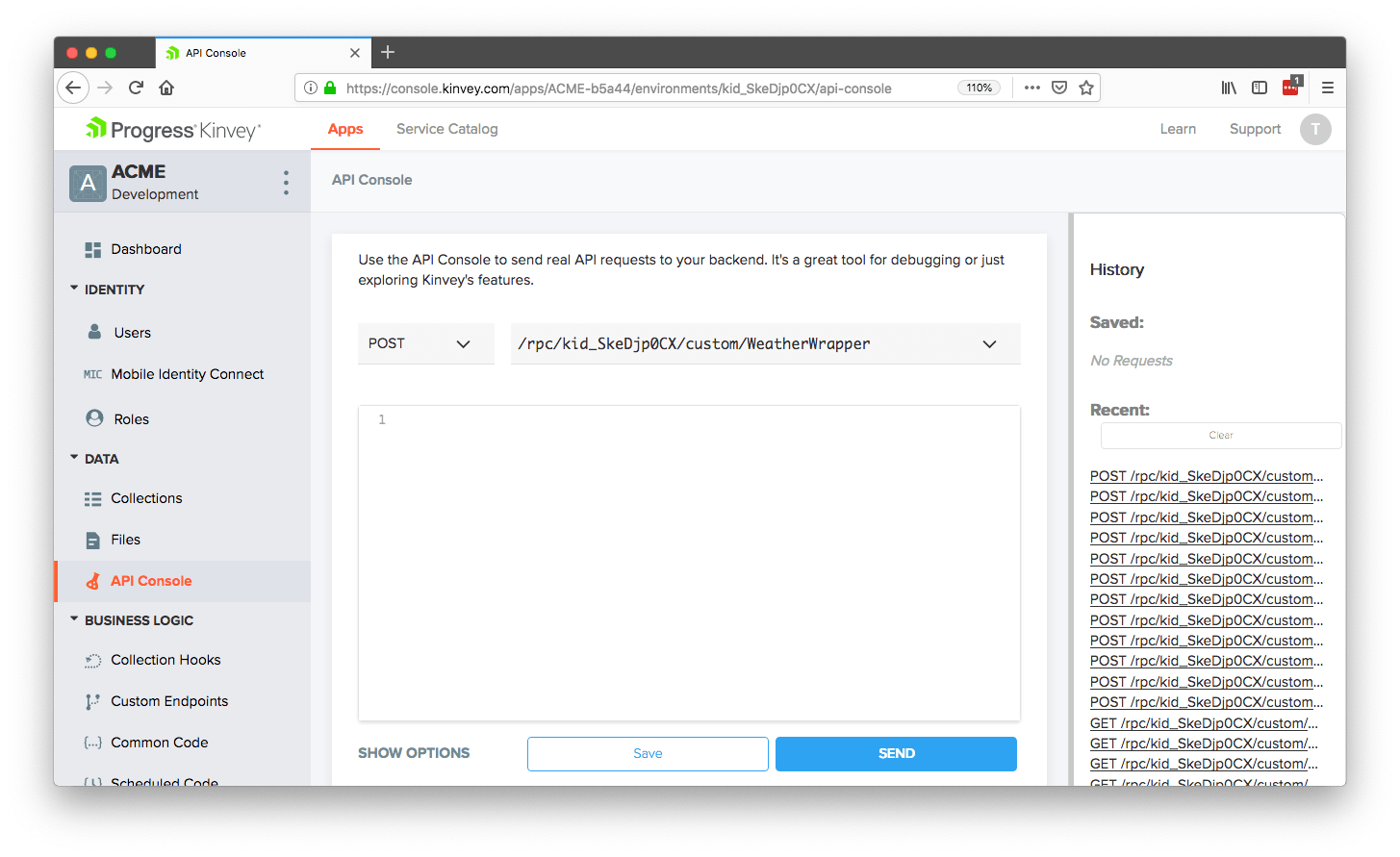
<p>Once you&rsquo;re in the console, change the first dropdown to POST, and the second dropdown to the &ldquo;WeatherWrapper&rdquo; endpoint you just created.</p>
<p><a href="https://www.progress.com/images/default-source/blogs/2019/2019-01/api-console.png?sfvrsn=8c169ea8_3"><img src="https://www.progress.com/images/default-source/blogs/2019/2019-01/api-console.png?sfvrsn=8c169ea8_3" data-displaymode="Original" alt="API Console" title="API Console" data-openoriginalimageonclick="true"></a></p>
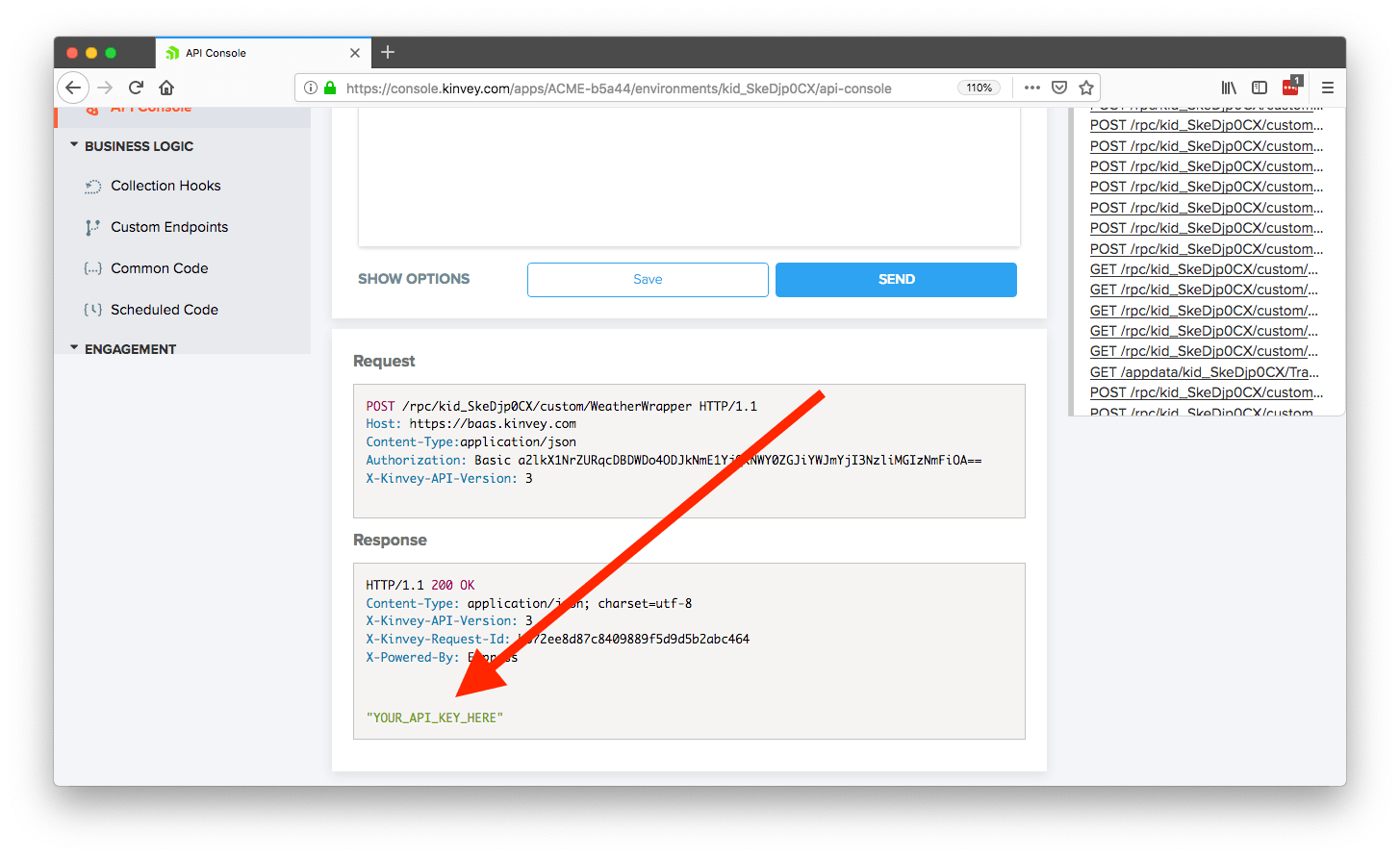
<p>After that, click the blue <strong>SEND</strong> button and scroll down to see your result. If all went well, you should see your placeholder API key.</p>
<p><a href="https://www.progress.com/images/default-source/blogs/2019/2019-01/api-key-result.png?sfvrsn=c125786f_3"><img src="https://www.progress.com/images/default-source/blogs/2019/2019-01/api-key-result.png?sfvrsn=c125786f_3" data-displaymode="Original" alt="API Key Result" title="API Key Result" data-openoriginalimageonclick="true"></a></p>
<p>And it&rsquo;s really that easy! With just a small handful of steps, you&rsquo;ve created a serverless function that can return a third-party API key that you can reuse across several apps.</p>
<p>When it comes to integrating this functionality into your apps you have a few options. You can send a POST request manually, using your HTTP client or APIs of choice, or, you can utilize one of the <a href="https://github.com/Kinvey/js-sdk">many Kinvey SDKs</a> to make your life easier. For example, this is the Kinvey SDK code you need hit the endpoint you just built.</p>
<pre><code class="JavaScript language-JavaScript">const Kinvey = require("kinvey-nativescript-sdk");

Kinvey.CustomEndpoint.execute("WeatherWrapper", {})
  .then((data) =&gt; {
    console.log(data); // This logs your API key
  })
</code></pre>
<p>Now that you have your first first serverless function in place, let&rsquo;s take things one step further to give you an idea of just what&rsquo;s possible in these serverless functions.</p>
<h3 id="makinghttpcallsinserverlessfunctions">Making HTTP Calls in Serverless Functions</h3>
<p>With your current function your apps have to make an HTTP POST request to get your OpenWeatherMap API key, and then make a second HTTP request to actually hit OpenWeatherMap for weather data. While this works, you could simplify things for your apps if you just put the entire call to OpenWeatherMap inside your serverless function.</p>
<p>To do that, all you have to do is go back to the Custom Endpoint editor in Kinvey, select your &ldquo;WeatherWrapper&rdquo; endpoint, and swap out the current code to use the following.</p>
<pre><code class="JavaScript language-JavaScript">function onRequest(request, response, modules) {
  // To test this, you can sign up for a free OpenWeatherMap
  // API key at https://openweathermap.org.
  var appId = "OPEN_WEATHER_MAP_KEY";
  var url = "https://api.openweathermap.org/data/2.5/weather?APPID=" + appId +
      "&amp;units=imperial&amp;lat=" + request.body.lat +
      "&amp;lon=" + request.body.long;

  modules.request.get(url, function(err, result) {
    response.body = result;
    response.complete();
  });
}
</code></pre>
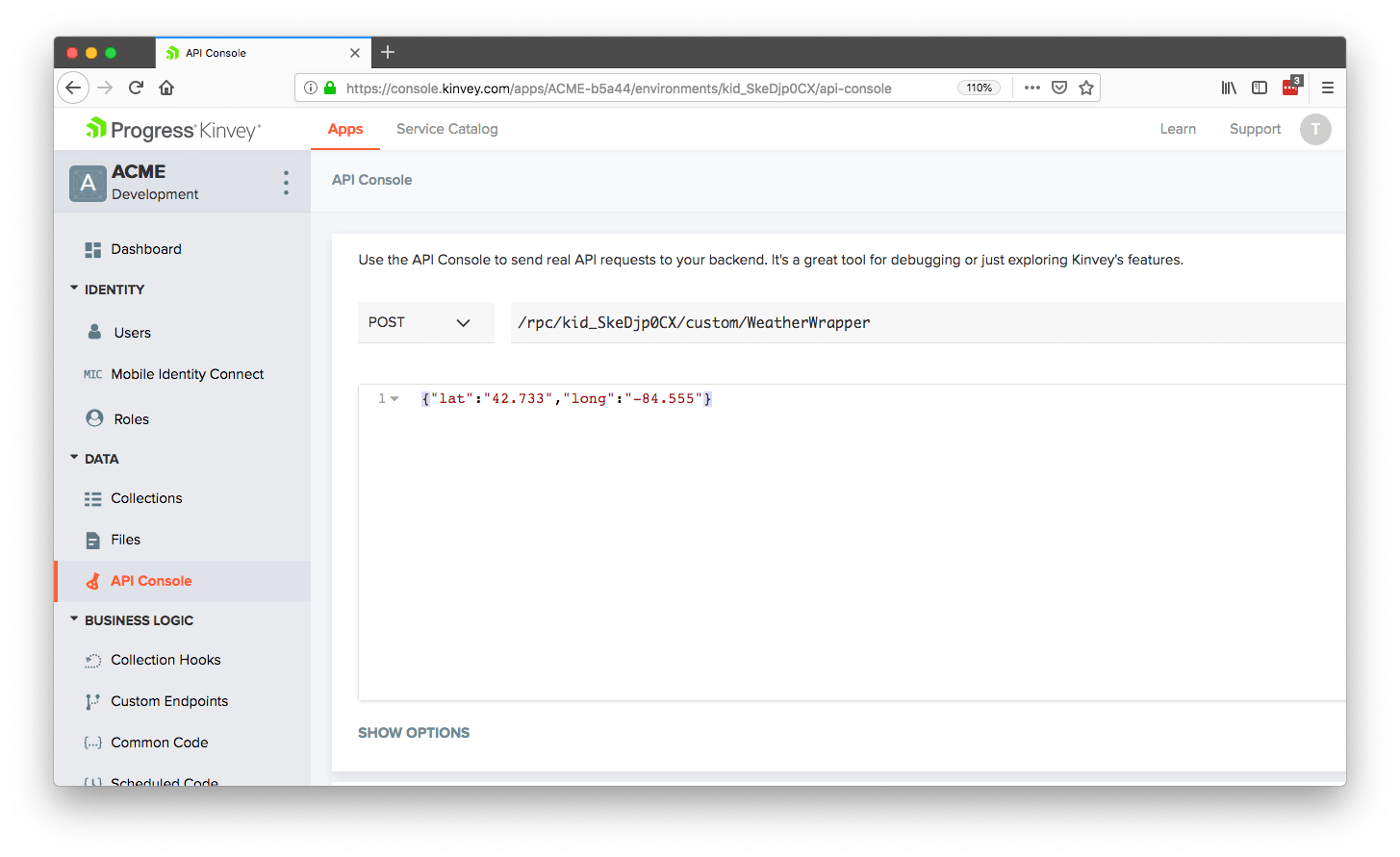
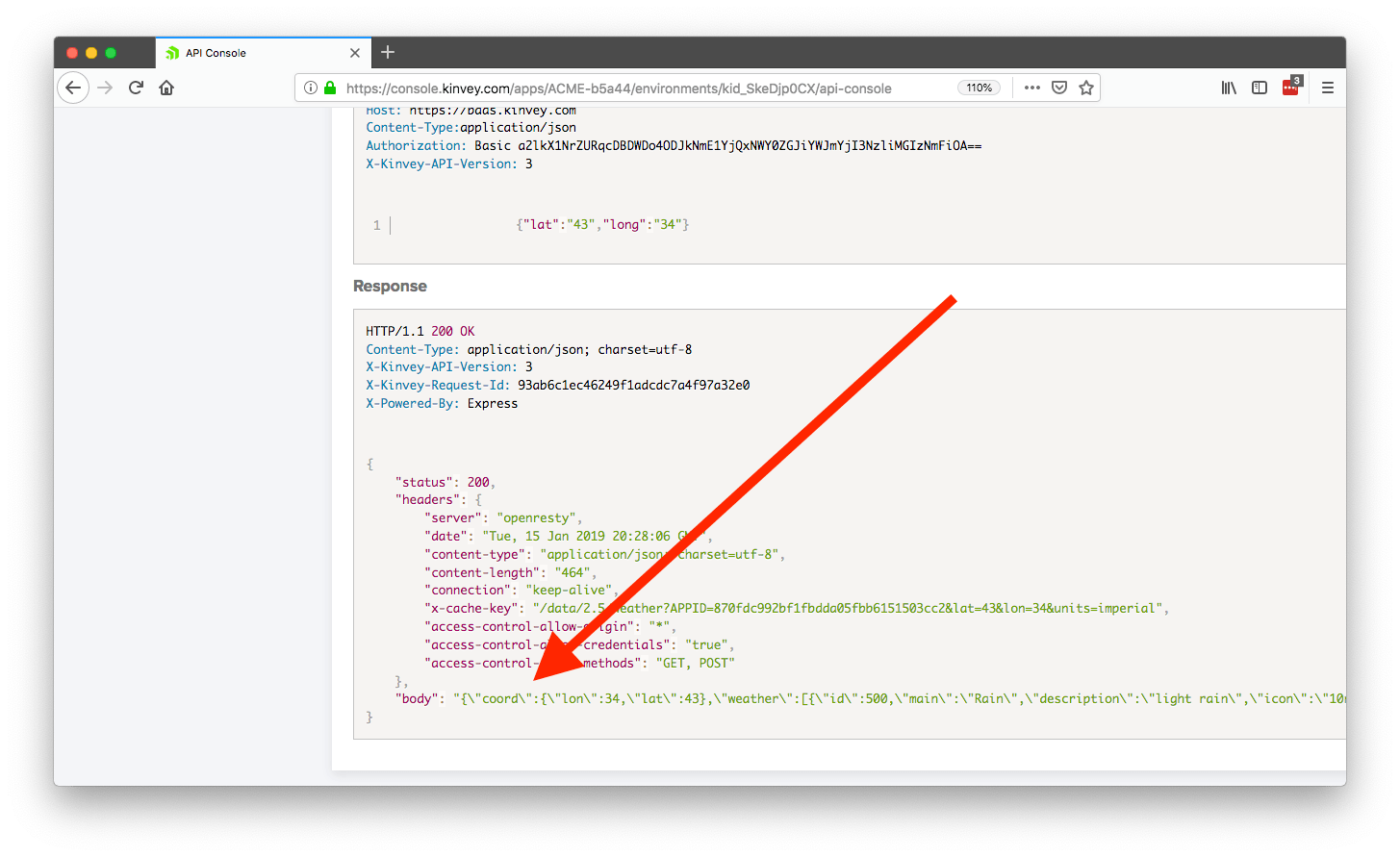
<p>This code expects there to be <code>lat</code> and <code>long</code> parameters in the request body, formats the data as necessary, calls the OpenWeatherMap API directly, and then returns the result in the response body.</p>
<p>To test your updated function, head back to Kinvey&rsquo;s API console, then select &ldquo;POST&rdquo; and the &ldquo;WeatherWrapper&rdquo; endpoint from the two dropdowns (exactly like you did the last time you tested this endpoint). This time though, include a request body that includes both <code>lat</code> and <code>long</code> parameters as shown in the image below.</p>
<p><a href="https://www.progress.com/images/default-source/blogs/2019/2019-01/testing-api-console-weather.png?sfvrsn=87e405c0_3"><img src="https://www.progress.com/images/default-source/blogs/2019/2019-01/testing-api-console-weather.png?sfvrsn=87e405c0_3" data-displaymode="Original" alt="Testing API Console Weather" title="Testing API Console Weather" data-openoriginalimageonclick="true"></a></p>
<p>When you send this request, you should see data coming back from OpenWeatherMap that looks like the data below.</p>
<p><a href="https://www.progress.com/images/default-source/blogs/2019/2019-01/openweathermap-data.png?sfvrsn=8bbf3c61_3"><img src="https://www.progress.com/images/default-source/blogs/2019/2019-01/openweathermap-data.png?sfvrsn=8bbf3c61_3" data-displaymode="Original" alt="OpenWeatherMap Data" title="OpenWeatherMap Data" data-openoriginalimageonclick="true"></a></p>
<p>To integrate this new functionality in your apps, all you need to do change your existing Kinvey SDK call to pass in the <code>lat</code> and <code>long</code> you want to retrieve weather data for. For example, here&rsquo;s how I can get weather data for my hometown.</p>
<pre><code class="JavaScript language-JavaScript">return Kinvey.CustomEndpoint.execute("WeatherWrapper", {
  lat: "42.733",
  long: "-84.555"
}).then(data =&gt; {
  var weatherData = JSON.parse(data);
  console.log(weatherData);
});
</code></pre>
<p>Pretty cool huh? You can try this code out for yourself in <a href="https://play.nativescript.org/?template=play-vue&amp;id=bP9uPN&amp;v=3">this complete weather app sample</a> that utilizes the cloud function you just wrote.</p>
<p>Hopefully this gives you an idea of just what a serverless approach makes possible. In this example you were first able to hide a third-party API key behind a serverless function. Next, you extended that function to hit a third-party API HTTP directly, giving you a secure utility function you can use across several apps. </p>
<p>And we&rsquo;re just getting started. Let&rsquo;s move on to a more advanced way of making serverless calls.</p>
<h2 id="scenario2movingajavascriptalgorithm">Scenario 2: Moving a JavaScript Algorithm</h2>
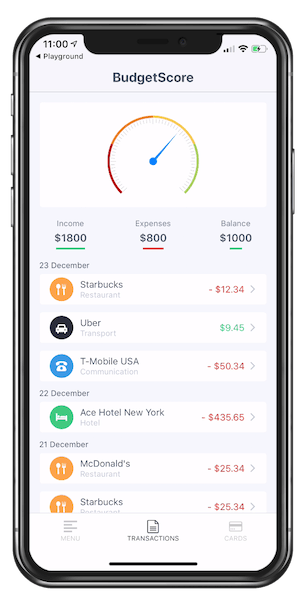
<p>For our second scenario, suppose you&rsquo;re working for a large financial company, and you&rsquo;re getting ready to unveil a new budgeting app called BudgetScore.</p>
<p><a href="https://www.progress.com/images/default-source/blogs/2019/2019-01/budget-score.png?sfvrsn=4e64cb16_3"><img src="https://www.progress.com/images/default-source/blogs/2019/2019-01/budget-score.png?sfvrsn=4e64cb16_3" data-displaymode="Original" alt="BudgetScore" title="BudgetScore" data-openoriginalimageonclick="true"></a></p>
<p>The most important feature of BudgetScore is an algorithm that grades how well a user is budgeting based on their spending habits. The code that determines this grade is something your company doesn&rsquo;t want anyone to get their hands on, and is therefore something you want to move to a server.</p>
<p>In the real world, the algorithm that determines this score would likely be very complex, but to keep things simple for the sake of explanation, let&rsquo;s assume the code to determine the score looks like this.</p>
<pre><code class="JavaScript language-JavaScript">// Assumes transactions is an array of transaction
// data with a numeric amount and a string category.
function determineScore(transactions) {
  var score = 100;
  transactions.forEach((transaction) =&gt; {
    if (transaction.amount &lt; 0) {
      score -= 5;
    }
    if (transaction.amount &gt; 5) {
      score += 10;
    }
    if (transaction.category === 'restaurant') {
      score -= 5;
    }
  });
  return score.toString();
}
</code></pre>
<p>Although this function is simple, it does expect a collection of transaction data, which already makes it more complex than our previous example. And in the real world, there&rsquo;s a good chance an algorithm like this might need to pull information from various data sources, and perhaps from various technologies.</p>
<p>For handing more advanced serverless tasks Kinvey has a feature called Flex Services, which are essentially small Node.js libraries that live and run in Kinvey&rsquo;s cloud infrastructure. Let&rsquo;s look at how to set one up for your BudgetScore app.</p>
<h3 id="creatingyourfirstflexservice">Creating Your First Flex Service</h3>
<p>In Kinvey the way you create and deploy Flex Services is through the <a href="https://github.com/Kinvey/kinvey-cli">Kinvey CLI</a>. Therefore, your first step is to install the Kinvey CLI from npm.</p>
<pre><code class="lang-bash">npm install -g kinvey-cli
</code></pre>
<blockquote>
<p><strong>NOTE</strong>: You need to have Node.js installed on your development machine for the above command to work. If you don&rsquo;t, go ahead and install it from the <a href="https://nodejs.org/en/">Node.js site</a>.</p>
</blockquote>
<p>From there, create a new folder that will contain the code for your new service.</p>
<pre><code class="lang-bash">mkdir BudgetScore
cd BudgetScore
</code></pre>
<p>Next, use the <code>npm init</code> command to create a <code>package.json</code> configuration file for your service. The command will ask you a number of questions, but for now feel free to accept the defaults.</p>
<pre><code class="lang-bash">npm init
</code></pre>
<p>After that, use the command below to install the Kinvey Flex SDK, which contains the code you&rsquo;ll need to register this service with Kinvey&rsquo;s backend console.</p>
<pre><code class="lang-bash">npm install --save kinvey-flex-sdk
</code></pre>
<p>Finally, create an <code>index.js</code> file and give it the following code, which returns a hardcoded number as a string for now.</p>
<pre><code class="lang-javascript">const sdk = require('kinvey-flex-sdk');

sdk.service((err, flex) =&gt; {
  function getBudgetScore(context, complete, modules) {
    complete().setBody({
      score: '80'
    }).done();
  }

  flex.functions.register('getBudgetScore', getBudgetScore);
});
</code></pre>
<p>Most of the code you see here is the boilerplate for any Flex Service you write with Kinvey. The key thing to note here is the <code>flex.functions.register('getBudgetScore')</code> call, as that&rsquo;s what registers the service with the Kinvey backend.</p>
<blockquote>
<p><strong>TIP</strong>: You can read more about the Kinvey Flex Service APIs on the <a href="https://devcenter.kinvey.com/nativescript/guides/flex-services#">Kinvey DevCenter</a>.</p>
</blockquote>
<h3 id="deployingyourservice">Deploying Your Service</h3>
<p>Now that you have the boilerplate code in place, you next have to register the Flex Service in the Kinvey Console backend.</p>
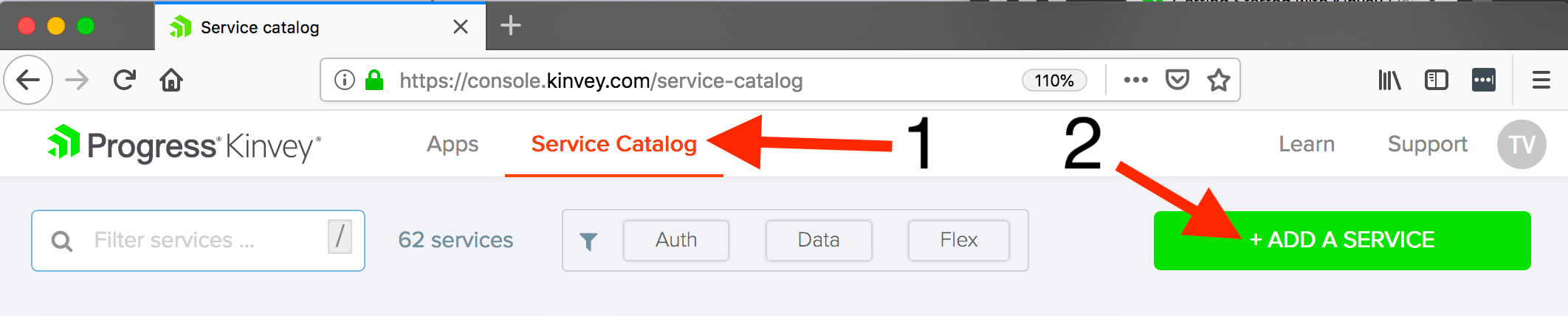
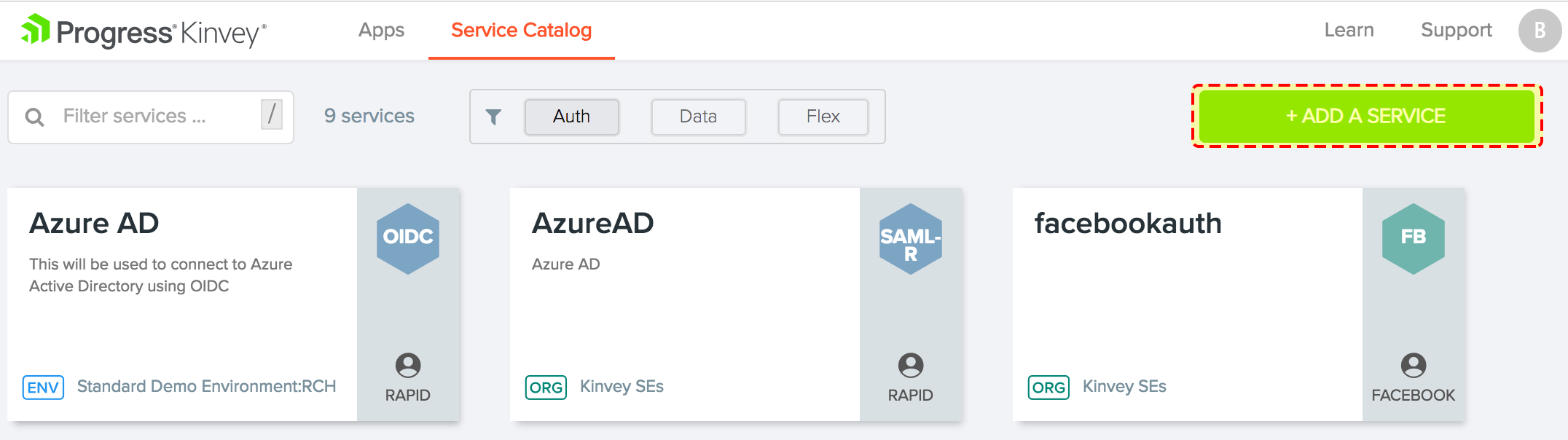
<p>To do so, in <a href="https://console.kinvey.com">your Kinvey Console</a>, choose the <strong>Service Catalog</strong> tab at the top of the page and then click the <strong>Add A SERVICE</strong> button.</p>
<p><a href="https://www.progress.com/images/default-source/blogs/2019/2019-01/add-a-service.png?sfvrsn=66a2d6d6_3"><img src="https://www.progress.com/images/default-source/blogs/2019/2019-01/add-a-service.png?sfvrsn=66a2d6d6_3" data-displaymode="Original" alt="Add A Service" title="Add A Service" data-openoriginalimageonclick="true"></a></p>
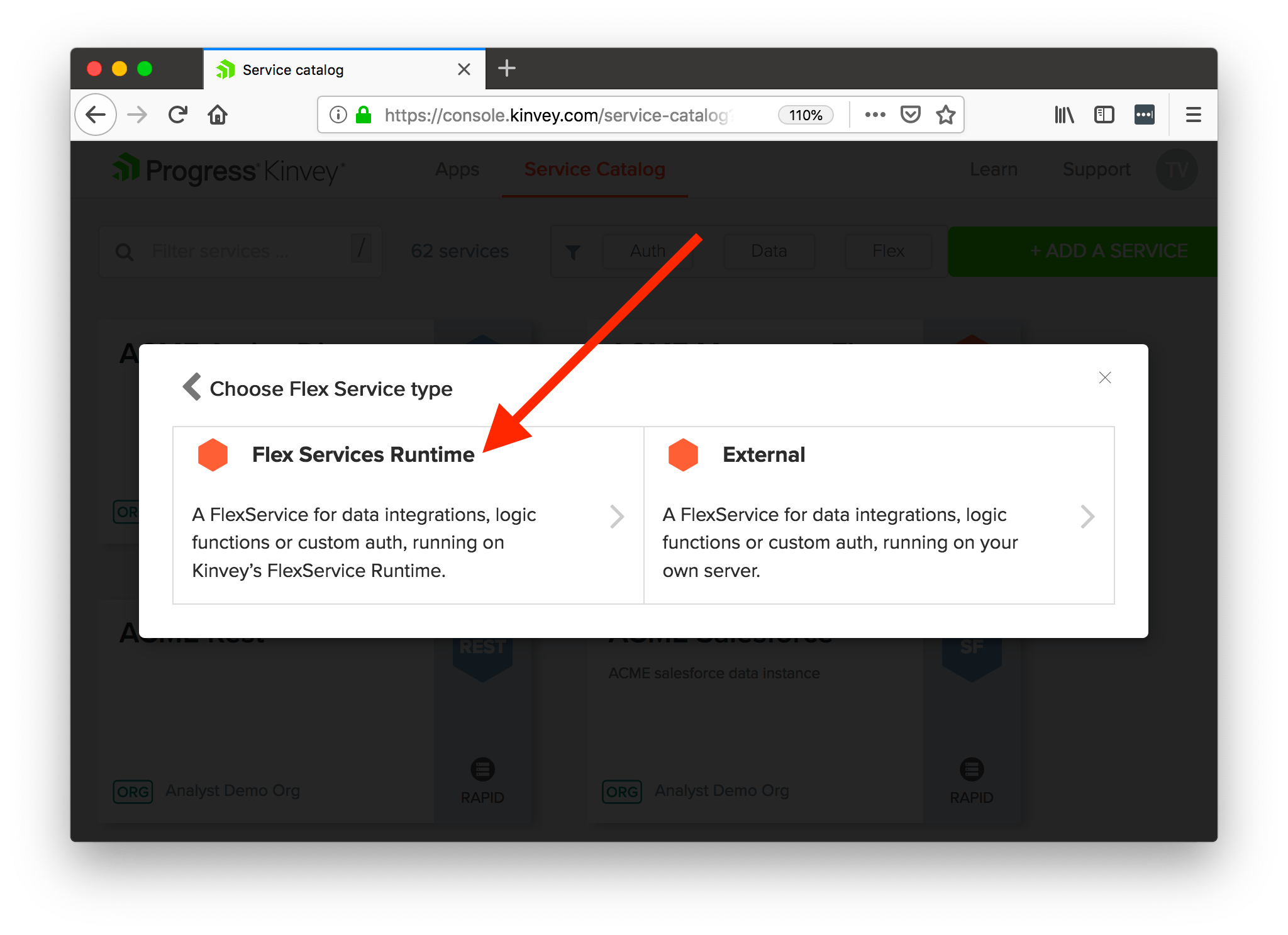
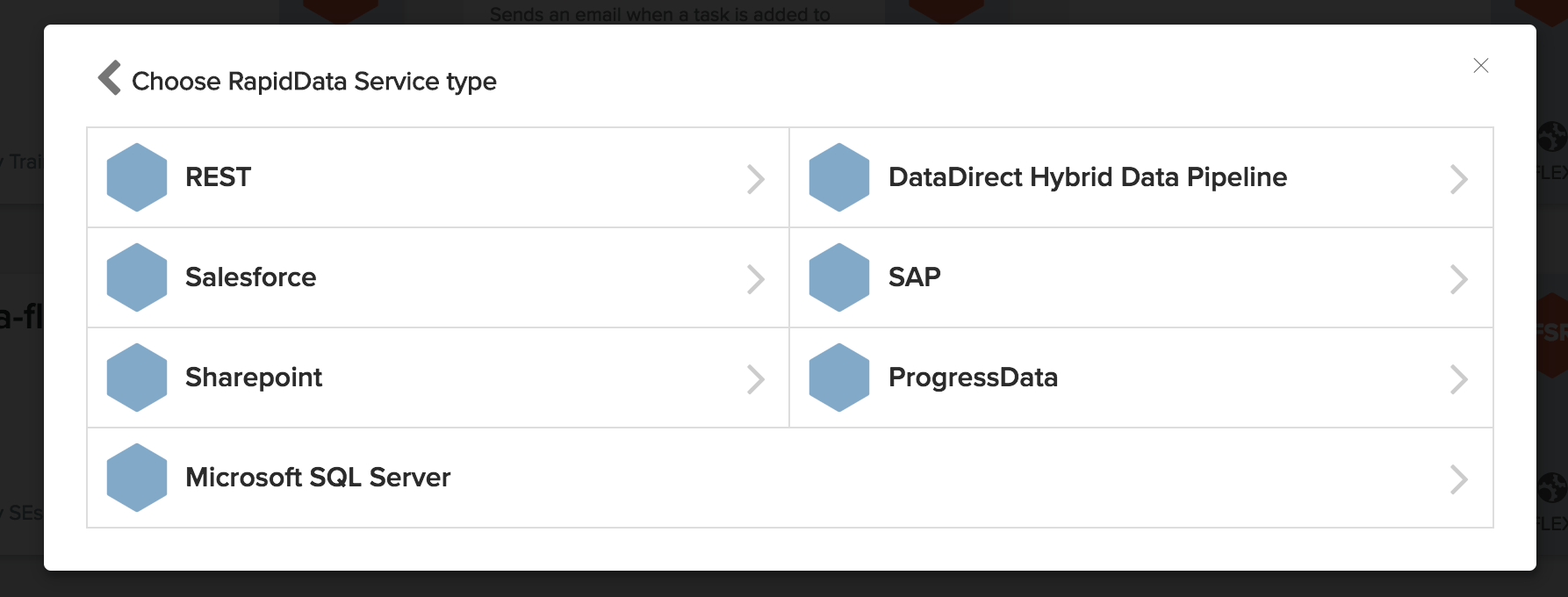
<p>Next, select <strong>Flex</strong> and then <strong>Flex Services Runtime</strong>.</p>
<p><a href="https://www.progress.com/images/default-source/blogs/2019/2019-01/flex-runtime.png?sfvrsn=99e6bb54_3"><img src="https://www.progress.com/images/default-source/blogs/2019/2019-01/flex-runtime.png?sfvrsn=99e6bb54_3" data-displaymode="Original" alt="flex-runtime" title="flex-runtime" data-openoriginalimageonclick="true"></a></p>
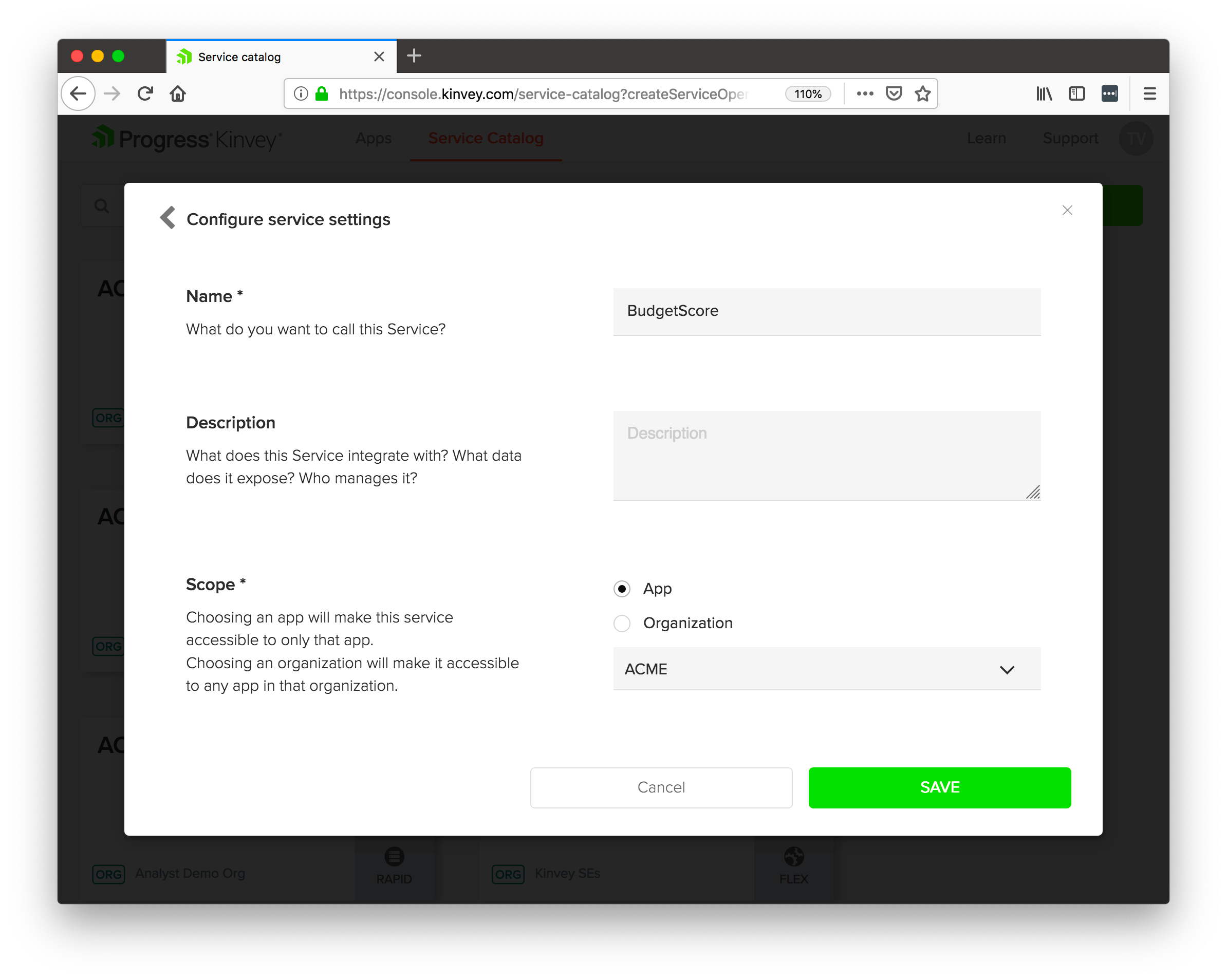
<p>After that, give your service a name (like &ldquo;BudgetScore&rdquo;), and scope the service to an existing app. Hit the <strong>SAVE</strong> button twice (once in the dialog, once on the following screen) to finish creating your service.</p>
<p><a href="https://www.progress.com/images/default-source/blogs/2019/2019-01/name-service.png?sfvrsn=39198361_3"><img src="https://www.progress.com/images/default-source/blogs/2019/2019-01/name-service.png?sfvrsn=39198361_3" data-displaymode="Original" alt="Name Service" title="Name Service" data-openoriginalimageonclick="true"></a></p>
<p>With the service created in the web console, head back to your terminal or command prompt, and use the <code>kinvey flex init</code> command.</p>
<pre><code class="lang-bash">kinvey flex init
</code></pre>
<p>The command will prompt you with a few questions to connect the service you&rsquo;re developing locally to the one you created in the Kinvey web console. For the prompt answers, select <strong>APP</strong>, the app you associated the service with in the web console, and <strong>BudgetScore</strong>.</p>
<p><a href="https://www.progress.com/images/default-source/blogs/2019/2019-01/prompts.png?sfvrsn=d478a18a_3"><img src="https://www.progress.com/images/default-source/blogs/2019/2019-01/prompts.png?sfvrsn=d478a18a_3" data-displaymode="Original" alt="Prompts" title="Prompts" data-openoriginalimageonclick="true"></a></p>
<p>With the connection made, next run <code>kinvey flex deploy</code> to deploy the current version of your local flex service.</p>
<p><a href="https://www.progress.com/images/default-source/blogs/2019/2019-01/flex-deploy.png?sfvrsn=40ef6c41_3"><img src="https://www.progress.com/images/default-source/blogs/2019/2019-01/flex-deploy.png?sfvrsn=40ef6c41_3" data-displaymode="Original" alt="Flex Deploy" title="Flex Deploy" data-openoriginalimageonclick="true"></a></p>
<blockquote>
<p><strong>TIP</strong>: See Brian Rinaldi&rsquo;s article on <a href="https://www.progress.com/blogs/developing-and-testing-of-kinvey-flex-services-the-easier-way">Testing Kinvey Flex Services the Easy Way</a> for help on creating a local testing environment. This will become more necessary as you start developing more advanced serverless functions.</p>
</blockquote>
<p>The deployment will take around a minute, and you can check its status using the <code>kinvey flex status</code> command (look for a <code>deploymentStatus</code> of <code>COMPLETE</code>).</p>
<p>When it&rsquo;s done, let&rsquo;s look at how you can use this new Flex Service in an app.</p>
<h3 id="usingyourservice">Using Your Service</h3>
<p>The steps to using a Flex Service in Kinvey are almost exactly those for the business logic scenarios you used in this article&rsquo;s first scenario.</p>
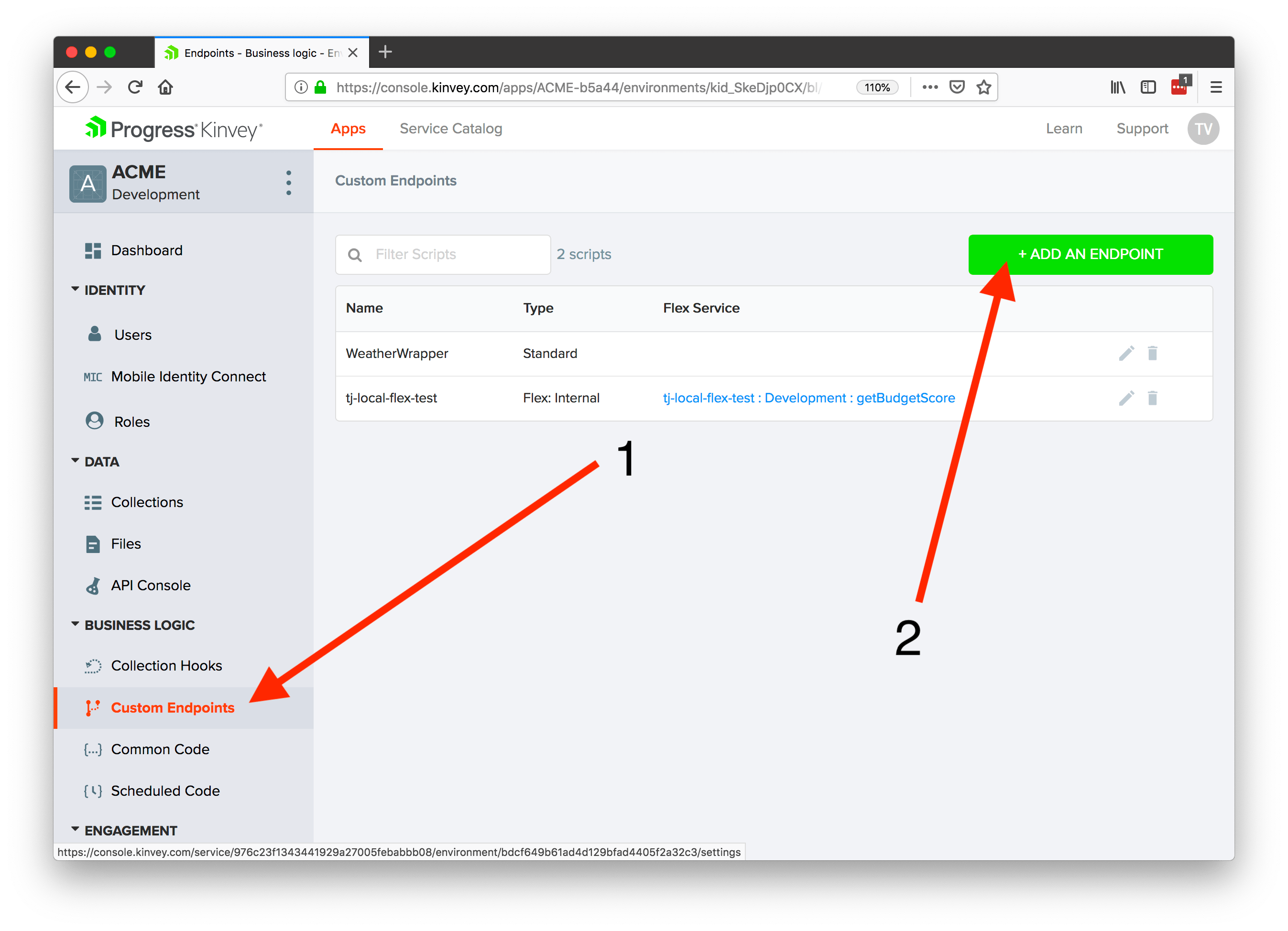
<p>In the Kinvey web console, you&rsquo;ll want to return to the <strong>Custom Endpoints</strong> menu and again click the <strong>ADD AN ENDPOINT</strong> button.</p>
<p><a href="https://www.progress.com/images/default-source/blogs/2019/2019-01/endpoints-2.png?sfvrsn=9e05f2da_3"><img src="https://www.progress.com/images/default-source/blogs/2019/2019-01/endpoints-2.png?sfvrsn=9e05f2da_3" data-displaymode="Original" alt="Endpoints 2" title="Endpoints 2" data-openoriginalimageonclick="true"></a></p>
<p>Give the endpoint a name of &ldquo;BudgetScore,&rdquo; select <strong>Microservice</strong>, and click the <strong>CREATE AN ENDPOINT</strong> button.</p>
<p><a href="https://www.progress.com/images/default-source/blogs/2019/2019-01/budget-score-dialog.png?sfvrsn=9fee0acf_3"><img src="https://www.progress.com/images/default-source/blogs/2019/2019-01/budget-score-dialog.png?sfvrsn=9fee0acf_3" data-displaymode="Original" alt="BudgetScore Dialog" title="BudgetScore Dialog" data-openoriginalimageonclick="true"></a></p>
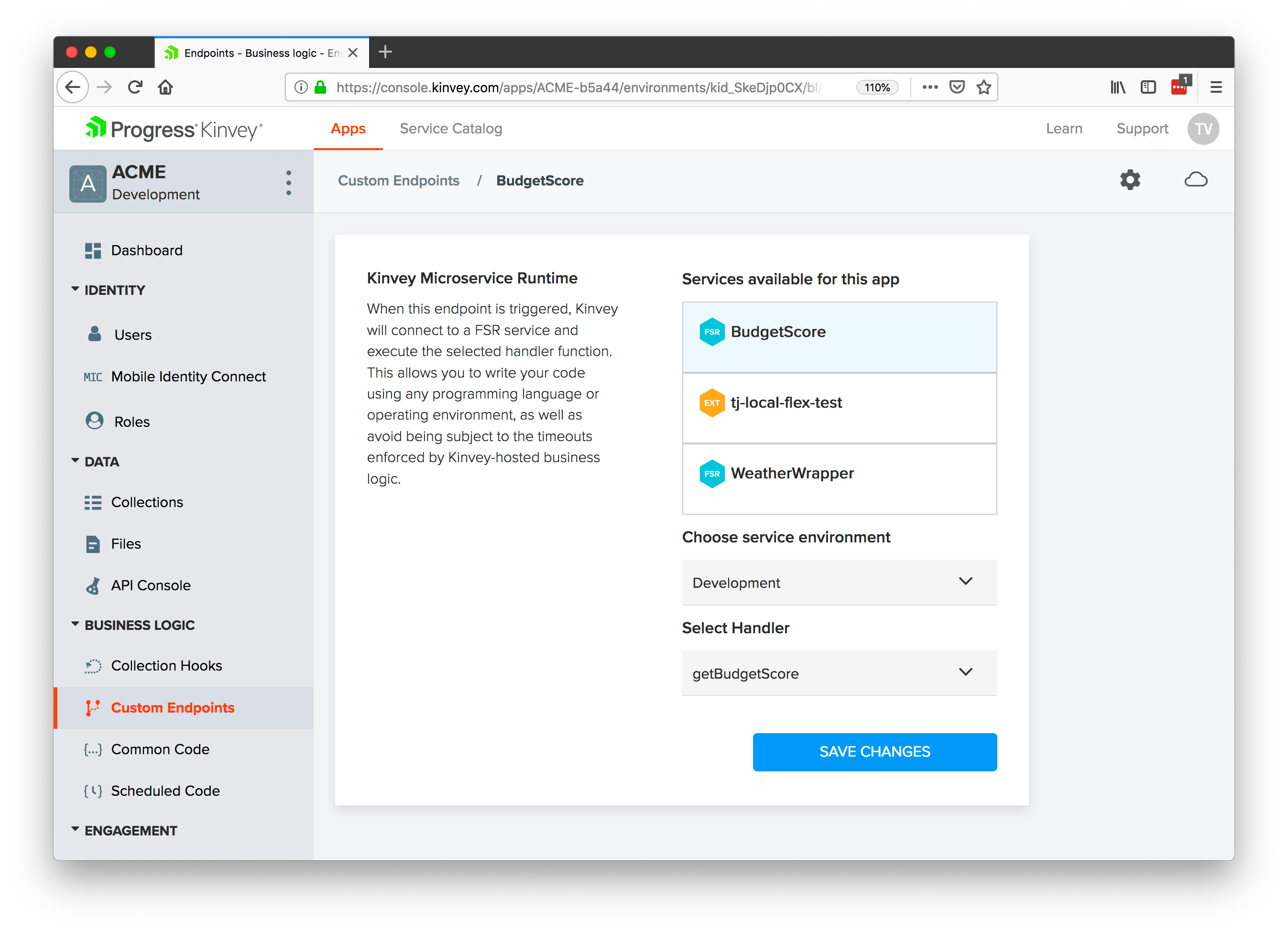
<p>Next, select your <strong>BudgetScore</strong> service, the <strong>Development</strong> environment, and the <code>getBudgetScore()</code> handler. (This is the name of the function you passed to the <code>flex.functions.register</code> in your service&rsquo;s code.)</p>
<p><a href="https://www.progress.com/images/default-source/blogs/2019/2019-01/budget-score-next.png?sfvrsn=74660ccb_3"><img src="https://www.progress.com/images/default-source/blogs/2019/2019-01/budget-score-next.png?sfvrsn=74660ccb_3" data-displaymode="Original" alt="BudgetScore Next" title="BudgetScore Next" data-openoriginalimageonclick="true"></a></p>
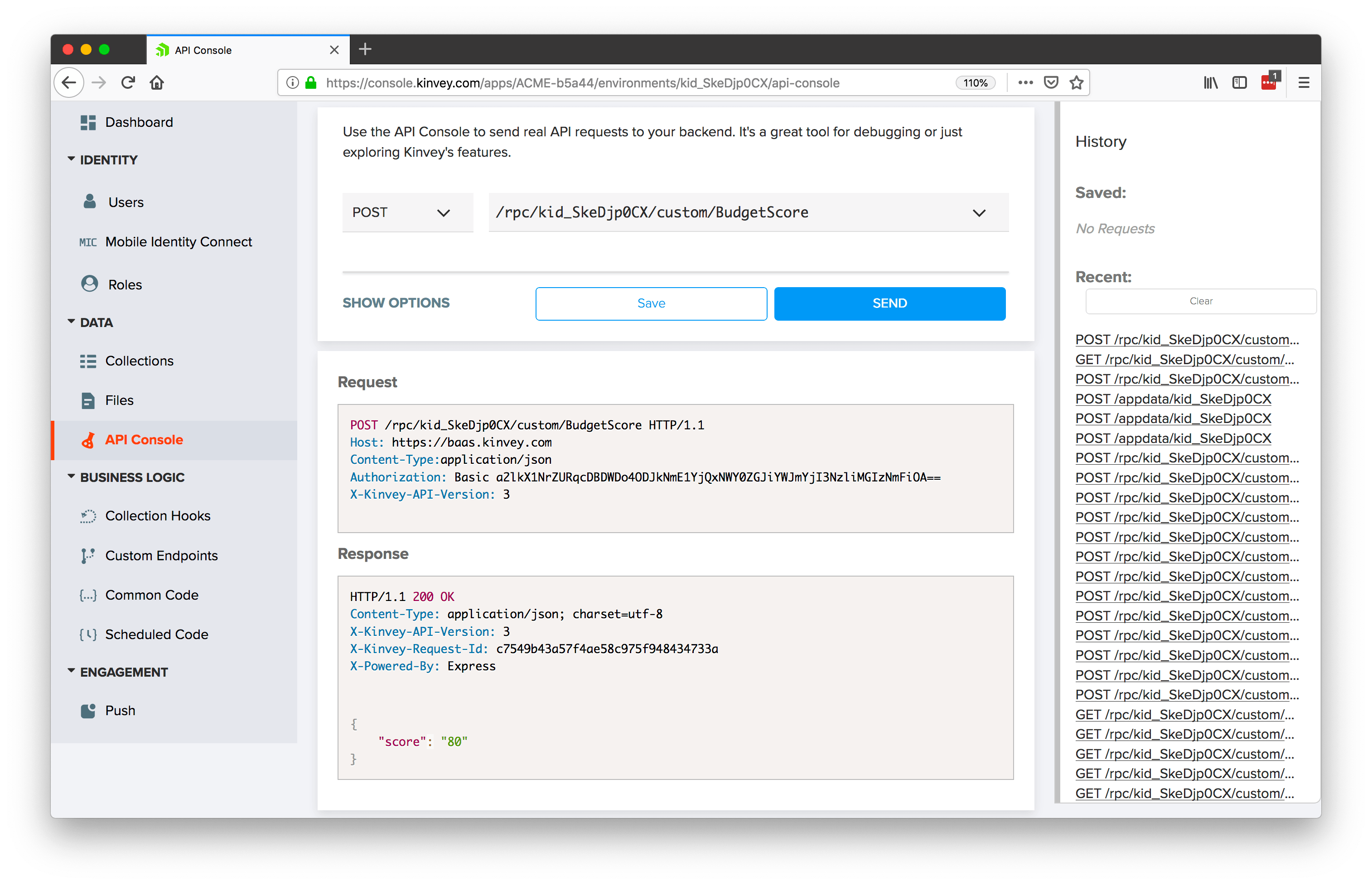
<p>And with that you&rsquo;re ready to go! To test this out, head back to the Kinvey API Console, select POST, select your new &ldquo;BudgetScore&rdquo; endpoint, and click the <strong>SEND</strong> button. If all went well, you should see your hardcoded value of <code>"80"</code> in the response body.</p>
<p><a href="https://www.progress.com/images/default-source/blogs/2019/2019-01/api-console-budget.png?sfvrsn=628c7253_3"><img src="https://www.progress.com/images/default-source/blogs/2019/2019-01/api-console-budget.png?sfvrsn=628c7253_3" data-displaymode="Original" alt="API Console Budget" title="API Console Budget" data-openoriginalimageonclick="true"></a></p>
<p>To use your new flex service in an app you once more have a couple of options. As with the previous example, you could again manually send HTTP post requests in your app, using the endpoints and headers specified in the Kinvey API console. Or, you could again use one of the Kinvey SDKs to make your life easier. For example, the following code uses the Kinvey SDK to hit your new endpoint.</p>
<pre><code class="JavaScript language-JavaScript">CustomEndpoint.execute("BudgetScore", {}, {})
  .then((data) =&gt; {
      console.log(data);
  })
</code></pre>
<p>Let&rsquo;s take a step back and look at the big picture here though. In just a few minutes, you created a secure Node library that lives in the cloud, which gives you all sorts of potential. For one, you&rsquo;ve met the requirement of moving your sensitive code to the cloud&mdash;without having to rewrite your code to a more traditional server-side language like .NET or Java.</p>
<p>But that&rsquo;s just the beginning. With Kinvey Flex Services you have a fully functional Node environment, meaning, you can install npm modules, reuse JavaScript code, and architect your services any way you&rsquo;d like. When you&rsquo;re done, you can deploy and manage your service outside of your applications&mdash;meaning, you can update your production services without having to redeploy your applications.</p>
<p>And there&rsquo;s more! With a Kinvey Flex Service you can access a number of Kinvey&rsquo;s other features, such as its ability to access data in a number of different systems. For example, after you <a href="https://devcenter.kinvey.com/nativescript/guides/rapid-data#">connect to your existing data</a>, here&rsquo;s a Flex Service that reads transaction data and utilizes the algorithm we discussed earlier in this article.</p>
<pre><code class="JavaScript language-JavaScript">const sdk = require('kinvey-flex-sdk');

function getTransactions(modules) {
  return new Promise((resolve, reject) =&gt; {
    const store = modules.dataStore({ useUserContext: false });
    const collection = store.collection('Transactions');
    const query = new modules.Query();

    collection.find(query, (err, result) =&gt; {
      if (err) {
        reject(err);
      } else {
        resolve(result);
      }
    });
  });
}

function determineScore(transactions) {
  var score = 100;
  transactions.forEach((transaction) =&gt; {
    if (transaction.amount &lt; 0) {
      score -= 5;
    }
    if (transaction.amount &gt; 5) {
      score += 10;
    }
    if (transaction.category === "restaurant") {
      score -= 5;
    }
  });
  return score.toString();
}

sdk.service((err, flex) =&gt; {
  function getBudgetScore(context, complete, modules) {
    getTransactions(modules).then((transactions) =&gt; {
      complete().setBody({
        score: determineScore(transactions)
      }).done();
    }).catch((err) =&gt; {
      complete().setBody(new Error(err)).runtimeError().done();
    });
  }

  flex.functions.register('getBudgetScore', getBudgetScore);
});
</code></pre>
<p>Overall, Kinvey Flex Services makes it possible to secure your source code in the cloud, while giving you the potential to do a whole lot more. To see the above Flex Service in action, check out this <a href="https://play.nativescript.org/?template=play-ng&amp;id=4XX1Ox&amp;v=178">complete BudgetScore application</a>.</p>
<blockquote>
<p><strong>TIP</strong>: To get an idea of what else is possible, see <a href="https://www.progress.com/blogs/getting-started-with-kinvey-flexservices">Brian Rinaldi&rsquo;s intro to Flex Services</a>, as well as his <a href="https://github.com/remotesynth/flex-service-samples">collection of Flex Service examples on GitHub</a>. You can also read more about security in Kinvey with this <a href="https://www.progress.com/">security overview of the Kinvey platform</a>.</p>
</blockquote>
<h2 id="wrappingup">Wrapping Up</h2>
<p>It&rsquo;s never been easier to secure your frontend code by moving it to the cloud. Serverless providers make it trivial to not only move your code, but to also leverage powerful backend functionality, such as the ability to hit third-party APIs.</p>
<p>Moving to a serverless approach gives you a number of auxillary benefits, such as not having to worry about server maintenance, giving you the ability to access your code across applications and platforms, and giving you the ability to deploy your code independent of application deployments.</p>
<p>Kinvey is a high productivity serverless platform, designed to accelerate your development in a number of ways. To try serverless with Kinvey, get started today at <a href="https://www.progress.com/kinvey">progress.com/kinvey</a>.</p><img src="https://feeds.progress.com/link/20159/11025922.gif" height="1" width="1"/>]]></content>
  </entry>
  <entry>
    <id>urn:uuid:fbe6e540-521f-416b-b183-46946af19693</id>
    <title type="text">Best Practices: Secure Frontend Code by Moving to Serverless Cloud</title>
    <summary type="text">We look at a modern approach to securely moving frontend code to the cloud using a serverless approach, walking step-by-step through two examples.</summary>
    <published>2019-01-29T20:06:45Z</published>
    <updated>2026-04-09T10:24:19Z</updated>
    <author>
      <name>Danny Shain</name>
    </author>
    <link rel="alternate" href="https://feeds.progress.com/link/20159/11025922/how-to-secure-your-frontend-code-by-moving-it-to-the-cloud"/>
    <content type="text"><![CDATA[<p><span class="featured">We look at a modern approach to securely moving frontend code to the cloud using a serverless approach, walking step-by-step through two examples.</span></p>
<p>Frontend code is inherently insecure. Yes, you can mangle your code with something like <a href="https://github.com/mishoo/UglifyJS">UglifyJS</a>, or use more a more advanced obfuscation tool like <a href="https://jscrambler.com/">Jscrambler</a>, but at the end of the day, the public nature of frontend code means it&rsquo;s accessible to nefarious users.</p>
<p>The tried-and-true solution to this problem has been moving sensitive code to the server, which works, but can be time consuming&mdash;especially in organizations where the server-side infrastructure is a hot mess of Java, .NET, and SAP code that has evolved over many decades.</p>
<p>In this article we&rsquo;ll look at a modern approach to moving frontend code to the cloud using a <a href="https://www.progress.com/blogs/what-is-a-serverless-backend">serverless approach</a>. We&rsquo;ll look at two examples: one where you&rsquo;ll hide a third-party API key in a serverless function, and another where you&rsquo;ll move a JavaScript algorithm to the cloud.</p>
<p>Let&rsquo;s get started.</p>
<h2 id="scenario1hidingathirdpartyapikey">Scenario 1: Hiding a Third-Party API Key Using Serverless Cloud</h2>
<p>For our first scenario, suppose you&rsquo;re working on an app that has a screen that shows the current weather in the user&rsquo;s location.</p>
<p><a href="https://www.progress.com/images/default-source/blogs/2019/2019-01/weather-app.png?sfvrsn=c90d0d1d_3"><img src="https://www.progress.com/images/default-source/blogs/2019/2019-01/weather-app.png?sfvrsn=c90d0d1d_3" data-displaymode="Original" alt="Weather App" title="Weather App" data-openoriginalimageonclick="true"></a></p>
<p>To get this data you use an API provided by <a href="https://openweathermap.org/">OpenWeatherMap</a>, a service which allows you to get weather data after signing up for an API key. Because OpenWeatherMap charges based off the number of calls you make to their backend, you don&rsquo;t want your API key to fall into the wrong hands&mdash;and you therefore don&rsquo;t want to ship that key in your client-side code.</p>
<p>This is a scenario where a serverless approach works really well. By leveraging the cloud, you can quickly and easily move this functionality out of your client-side code. Not only do you get to move your key to a safe location, you also get a cloud function on a server you don&rsquo;t have to maintain, and you get a function you can use across multiple applications.</p>
<p>There are a number of different serverless cloud providers, but for this article's examples we&rsquo;ll use <a href="https://www.progress.com/kinvey">Progress Kinvey</a>. Kinvey is a high productivity serverless platform that makes it easy to build everything from quick serverless functions for hiding API keys, to more advanced serverless scenarios we&rsquo;ll look at later in this article.</p>
<blockquote>
<p><strong>NOTE</strong>: New to Kinvey? <a href="https://www.progress.com/campaigns/kinvey/console-sign-up">Sign up for a free account</a>&nbsp;to follow along with the steps in this article.</p>
</blockquote>
<h3 id="creatingyourfirstserverlessfunction">Creating Your First Serverless Function</h3>
<p>After you <a href="https://www.progress.com/blogs/how-to-get-started-with-kinvey-and-nativescript-fast">set up a Kinvey account and create an app</a>, you&rsquo;ll see a dashboard that looks like the image below. Start by clicking &ldquo;Custom Endpoints,&rdquo; which is the easiest place to get started with serverless in Kinvey.</p>
<p><a href="https://www.progress.com/images/default-source/blogs/2019/2019-01/kinvey-dashboard.png?sfvrsn=16a21a5d_3"><img src="https://www.progress.com/images/default-source/blogs/2019/2019-01/kinvey-dashboard.png?sfvrsn=16a21a5d_3" data-displaymode="Original" alt="Kinvey Dashboard" title="Kinvey Dashboard" data-openoriginalimageonclick="true"></a></p>
<blockquote>
<p><strong>TIP</strong>: Kinvey does a lot more than just serverless. You can store files and data, connect to existing data and authentication providers, and even send push notifications. Learn more on the <a href="https://devcenter.kinvey.com">Kinvey Dev Center</a>.</p>
</blockquote>
<p>At the next screen, click the <strong>ADD AN ENDPOINT</strong> button, give the endpoint a name of &ldquo;WeatherWrapper,&rdquo; select <strong>Code editor</strong>, and finally click the <strong>CREATE AN ENDPOINT</strong> button.</p>
<p><a href="https://www.progress.com/images/default-source/blogs/2019/2019-01/kinvey-dashboard-2.png?sfvrsn=4e3c4969_3"><img src="https://www.progress.com/images/default-source/blogs/2019/2019-01/kinvey-dashboard-2.png?sfvrsn=4e3c4969_3" data-displaymode="Original" alt="Kinvey Dashboard 2" title="Kinvey Dashboard 2" data-openoriginalimageonclick="true"></a></p>
<blockquote>
<p><strong>NOTE</strong>: A Kinvey custom endpoint is a HTTP POST endpoint. You&rsquo;ll try this out momentarily.</p>
</blockquote>
<p>After you finish those steps you&rsquo;ll see the Kinvey business logic editor, which is where you&rsquo;ll write the serverless function that you&rsquo;ll consume in your apps.</p>
<p><a href="https://www.progress.com/images/default-source/blogs/2019/2019-01/business-logic-editor.png?sfvrsn=49b7fe9_3"><img src="https://www.progress.com/images/default-source/blogs/2019/2019-01/business-logic-editor.png?sfvrsn=49b7fe9_3" data-displaymode="Original" alt="Business Logic Editor" title="Business Logic Editor" data-openoriginalimageonclick="true"></a></p>
<p>The default serverless function is a bit of boilerplate code that returns an empty response. For our example scenario you want to include an OpenWeatherMap API key in your response, so to do that, copy the code below, paste it in the Kinvey business logic editor, and then hit the <strong>Save</strong> button. (Feel free to use a placeholder for the API key for now.)</p>
<pre><code class="lang-javascript">function onRequest(request, response, modules) {
  response.body = "YOUR_API_KEY_HERE";
  response.complete();
}
</code></pre>
<p>With this code in place all you need to do is send an HTTP POST request to your new endpoint with the correct headers. The easiest place to do that is in the Kinvey API Console, which you can access using the link shown below.</p>
<p><a href="https://www.progress.com/images/default-source/blogs/2019/2019-01/kinvey-api-console55d1a6a24fc84489aeca3b9dff0d3407.png?sfvrsn=5106f0b6_3"><img src="https://www.progress.com/images/default-source/blogs/2019/2019-01/kinvey-api-console55d1a6a24fc84489aeca3b9dff0d3407.png?sfvrsn=5106f0b6_3" data-displaymode="Original" alt="Kinvey API Console" title="Kinvey API Console" data-openoriginalimageonclick="true"></a></p>
<p>Once you&rsquo;re in the console, change the first dropdown to POST, and the second dropdown to the &ldquo;WeatherWrapper&rdquo; endpoint you just created.</p>
<p><a href="https://www.progress.com/images/default-source/blogs/2019/2019-01/api-console.png?sfvrsn=8c169ea8_3"><img src="https://www.progress.com/images/default-source/blogs/2019/2019-01/api-console.png?sfvrsn=8c169ea8_3" data-displaymode="Original" alt="API Console" title="API Console" data-openoriginalimageonclick="true"></a></p>
<p>After that, click the blue <strong>SEND</strong> button and scroll down to see your result. If all went well, you should see your placeholder API key.</p>
<p><a href="https://www.progress.com/images/default-source/blogs/2019/2019-01/api-key-result.png?sfvrsn=c125786f_3"><img src="https://www.progress.com/images/default-source/blogs/2019/2019-01/api-key-result.png?sfvrsn=c125786f_3" data-displaymode="Original" alt="API Key Result" title="API Key Result" data-openoriginalimageonclick="true"></a></p>
<p>And it&rsquo;s really that easy! With just a small handful of steps, you&rsquo;ve created a serverless function that can return a third-party API key that you can reuse across several apps.</p>
<p>When it comes to integrating this functionality into your apps you have a few options. You can send a POST request manually, using your HTTP client or APIs of choice, or, you can utilize one of the <a href="https://github.com/Kinvey/js-sdk">many Kinvey SDKs</a> to make your life easier. For example, this is the Kinvey SDK code you need hit the endpoint you just built.</p>
<pre><code class="JavaScript language-JavaScript">const Kinvey = require("kinvey-nativescript-sdk");

Kinvey.CustomEndpoint.execute("WeatherWrapper", {})
  .then((data) =&gt; {
    console.log(data); // This logs your API key
  })
</code></pre>
<p>Now that you have your first first serverless function in place, let&rsquo;s take things one step further to give you an idea of just what&rsquo;s possible in these serverless functions.</p>
<h3 id="makinghttpcallsinserverlessfunctions">Making HTTP Calls in Serverless Functions</h3>
<p>With your current function your apps have to make an HTTP POST request to get your OpenWeatherMap API key, and then make a second HTTP request to actually hit OpenWeatherMap for weather data. While this works, you could simplify things for your apps if you just put the entire call to OpenWeatherMap inside your serverless function.</p>
<p>To do that, all you have to do is go back to the Custom Endpoint editor in Kinvey, select your &ldquo;WeatherWrapper&rdquo; endpoint, and swap out the current code to use the following.</p>
<pre><code class="JavaScript language-JavaScript">function onRequest(request, response, modules) {
  // To test this, you can sign up for a free OpenWeatherMap
  // API key at https://openweathermap.org.
  var appId = "OPEN_WEATHER_MAP_KEY";
  var url = "https://api.openweathermap.org/data/2.5/weather?APPID=" + appId +
      "&amp;units=imperial&amp;lat=" + request.body.lat +
      "&amp;lon=" + request.body.long;

  modules.request.get(url, function(err, result) {
    response.body = result;
    response.complete();
  });
}
</code></pre>
<p>This code expects there to be <code>lat</code> and <code>long</code> parameters in the request body, formats the data as necessary, calls the OpenWeatherMap API directly, and then returns the result in the response body.</p>
<p>To test your updated function, head back to Kinvey&rsquo;s API console, then select &ldquo;POST&rdquo; and the &ldquo;WeatherWrapper&rdquo; endpoint from the two dropdowns (exactly like you did the last time you tested this endpoint). This time though, include a request body that includes both <code>lat</code> and <code>long</code> parameters as shown in the image below.</p>
<p><a href="https://www.progress.com/images/default-source/blogs/2019/2019-01/testing-api-console-weather.png?sfvrsn=87e405c0_3"><img src="https://www.progress.com/images/default-source/blogs/2019/2019-01/testing-api-console-weather.png?sfvrsn=87e405c0_3" data-displaymode="Original" alt="Testing API Console Weather" title="Testing API Console Weather" data-openoriginalimageonclick="true"></a></p>
<p>When you send this request, you should see data coming back from OpenWeatherMap that looks like the data below.</p>
<p><a href="https://www.progress.com/images/default-source/blogs/2019/2019-01/openweathermap-data.png?sfvrsn=8bbf3c61_3"><img src="https://www.progress.com/images/default-source/blogs/2019/2019-01/openweathermap-data.png?sfvrsn=8bbf3c61_3" data-displaymode="Original" alt="OpenWeatherMap Data" title="OpenWeatherMap Data" data-openoriginalimageonclick="true"></a></p>
<p>To integrate this new functionality in your apps, all you need to do change your existing Kinvey SDK call to pass in the <code>lat</code> and <code>long</code> you want to retrieve weather data for. For example, here&rsquo;s how I can get weather data for my hometown.</p>
<pre><code class="JavaScript language-JavaScript">return Kinvey.CustomEndpoint.execute("WeatherWrapper", {
  lat: "42.733",
  long: "-84.555"
}).then(data =&gt; {
  var weatherData = JSON.parse(data);
  console.log(weatherData);
});
</code></pre>
<p>Pretty cool huh? You can try this code out for yourself in <a href="https://play.nativescript.org/?template=play-vue&amp;id=bP9uPN&amp;v=3">this complete weather app sample</a> that utilizes the cloud function you just wrote.</p>
<p>Hopefully this gives you an idea of just what a serverless approach makes possible. In this example you were first able to hide a third-party API key behind a serverless function. Next, you extended that function to hit a third-party API HTTP directly, giving you a secure utility function you can use across several apps. </p>
<p>And we&rsquo;re just getting started. Let&rsquo;s move on to a more advanced way of making serverless calls.</p>
<h2 id="scenario2movingajavascriptalgorithm">Scenario 2: Moving a JavaScript Algorithm</h2>
<p>For our second scenario, suppose you&rsquo;re working for a large financial company, and you&rsquo;re getting ready to unveil a new budgeting app called BudgetScore.</p>
<p><a href="https://www.progress.com/images/default-source/blogs/2019/2019-01/budget-score.png?sfvrsn=4e64cb16_3"><img src="https://www.progress.com/images/default-source/blogs/2019/2019-01/budget-score.png?sfvrsn=4e64cb16_3" data-displaymode="Original" alt="BudgetScore" title="BudgetScore" data-openoriginalimageonclick="true"></a></p>
<p>The most important feature of BudgetScore is an algorithm that grades how well a user is budgeting based on their spending habits. The code that determines this grade is something your company doesn&rsquo;t want anyone to get their hands on, and is therefore something you want to move to a server.</p>
<p>In the real world, the algorithm that determines this score would likely be very complex, but to keep things simple for the sake of explanation, let&rsquo;s assume the code to determine the score looks like this.</p>
<pre><code class="JavaScript language-JavaScript">// Assumes transactions is an array of transaction
// data with a numeric amount and a string category.
function determineScore(transactions) {
  var score = 100;
  transactions.forEach((transaction) =&gt; {
    if (transaction.amount &lt; 0) {
      score -= 5;
    }
    if (transaction.amount &gt; 5) {
      score += 10;
    }
    if (transaction.category === 'restaurant') {
      score -= 5;
    }
  });
  return score.toString();
}
</code></pre>
<p>Although this function is simple, it does expect a collection of transaction data, which already makes it more complex than our previous example. And in the real world, there&rsquo;s a good chance an algorithm like this might need to pull information from various data sources, and perhaps from various technologies.</p>
<p>For handing more advanced serverless tasks Kinvey has a feature called Flex Services, which are essentially small Node.js libraries that live and run in Kinvey&rsquo;s cloud infrastructure. Let&rsquo;s look at how to set one up for your BudgetScore app.</p>
<h3 id="creatingyourfirstflexservice">Creating Your First Flex Service</h3>
<p>In Kinvey the way you create and deploy Flex Services is through the <a href="https://github.com/Kinvey/kinvey-cli">Kinvey CLI</a>. Therefore, your first step is to install the Kinvey CLI from npm.</p>
<pre><code class="lang-bash">npm install -g kinvey-cli
</code></pre>
<blockquote>
<p><strong>NOTE</strong>: You need to have Node.js installed on your development machine for the above command to work. If you don&rsquo;t, go ahead and install it from the <a href="https://nodejs.org/en/">Node.js site</a>.</p>
</blockquote>
<p>From there, create a new folder that will contain the code for your new service.</p>
<pre><code class="lang-bash">mkdir BudgetScore
cd BudgetScore
</code></pre>
<p>Next, use the <code>npm init</code> command to create a <code>package.json</code> configuration file for your service. The command will ask you a number of questions, but for now feel free to accept the defaults.</p>
<pre><code class="lang-bash">npm init
</code></pre>
<p>After that, use the command below to install the Kinvey Flex SDK, which contains the code you&rsquo;ll need to register this service with Kinvey&rsquo;s backend console.</p>
<pre><code class="lang-bash">npm install --save kinvey-flex-sdk
</code></pre>
<p>Finally, create an <code>index.js</code> file and give it the following code, which returns a hardcoded number as a string for now.</p>
<pre><code class="lang-javascript">const sdk = require('kinvey-flex-sdk');

sdk.service((err, flex) =&gt; {
  function getBudgetScore(context, complete, modules) {
    complete().setBody({
      score: '80'
    }).done();
  }

  flex.functions.register('getBudgetScore', getBudgetScore);
});
</code></pre>
<p>Most of the code you see here is the boilerplate for any Flex Service you write with Kinvey. The key thing to note here is the <code>flex.functions.register('getBudgetScore')</code> call, as that&rsquo;s what registers the service with the Kinvey backend.</p>
<blockquote>
<p><strong>TIP</strong>: You can read more about the Kinvey Flex Service APIs on the <a href="https://devcenter.kinvey.com/nativescript/guides/flex-services#">Kinvey DevCenter</a>.</p>
</blockquote>
<h3 id="deployingyourservice">Deploying Your Service</h3>
<p>Now that you have the boilerplate code in place, you next have to register the Flex Service in the Kinvey Console backend.</p>
<p>To do so, in <a href="https://console.kinvey.com">your Kinvey Console</a>, choose the <strong>Service Catalog</strong> tab at the top of the page and then click the <strong>Add A SERVICE</strong> button.</p>
<p><a href="https://www.progress.com/images/default-source/blogs/2019/2019-01/add-a-service.png?sfvrsn=66a2d6d6_3"><img src="https://www.progress.com/images/default-source/blogs/2019/2019-01/add-a-service.png?sfvrsn=66a2d6d6_3" data-displaymode="Original" alt="Add A Service" title="Add A Service" data-openoriginalimageonclick="true"></a></p>
<p>Next, select <strong>Flex</strong> and then <strong>Flex Services Runtime</strong>.</p>
<p><a href="https://www.progress.com/images/default-source/blogs/2019/2019-01/flex-runtime.png?sfvrsn=99e6bb54_3"><img src="https://www.progress.com/images/default-source/blogs/2019/2019-01/flex-runtime.png?sfvrsn=99e6bb54_3" data-displaymode="Original" alt="flex-runtime" title="flex-runtime" data-openoriginalimageonclick="true"></a></p>
<p>After that, give your service a name (like &ldquo;BudgetScore&rdquo;), and scope the service to an existing app. Hit the <strong>SAVE</strong> button twice (once in the dialog, once on the following screen) to finish creating your service.</p>
<p><a href="https://www.progress.com/images/default-source/blogs/2019/2019-01/name-service.png?sfvrsn=39198361_3"><img src="https://www.progress.com/images/default-source/blogs/2019/2019-01/name-service.png?sfvrsn=39198361_3" data-displaymode="Original" alt="Name Service" title="Name Service" data-openoriginalimageonclick="true"></a></p>
<p>With the service created in the web console, head back to your terminal or command prompt, and use the <code>kinvey flex init</code> command.</p>
<pre><code class="lang-bash">kinvey flex init
</code></pre>
<p>The command will prompt you with a few questions to connect the service you&rsquo;re developing locally to the one you created in the Kinvey web console. For the prompt answers, select <strong>APP</strong>, the app you associated the service with in the web console, and <strong>BudgetScore</strong>.</p>
<p><a href="https://www.progress.com/images/default-source/blogs/2019/2019-01/prompts.png?sfvrsn=d478a18a_3"><img src="https://www.progress.com/images/default-source/blogs/2019/2019-01/prompts.png?sfvrsn=d478a18a_3" data-displaymode="Original" alt="Prompts" title="Prompts" data-openoriginalimageonclick="true"></a></p>
<p>With the connection made, next run <code>kinvey flex deploy</code> to deploy the current version of your local flex service.</p>
<p><a href="https://www.progress.com/images/default-source/blogs/2019/2019-01/flex-deploy.png?sfvrsn=40ef6c41_3"><img src="https://www.progress.com/images/default-source/blogs/2019/2019-01/flex-deploy.png?sfvrsn=40ef6c41_3" data-displaymode="Original" alt="Flex Deploy" title="Flex Deploy" data-openoriginalimageonclick="true"></a></p>
<blockquote>
<p><strong>TIP</strong>: See Brian Rinaldi&rsquo;s article on <a href="https://www.progress.com/blogs/developing-and-testing-of-kinvey-flex-services-the-easier-way">Testing Kinvey Flex Services the Easy Way</a> for help on creating a local testing environment. This will become more necessary as you start developing more advanced serverless functions.</p>
</blockquote>
<p>The deployment will take around a minute, and you can check its status using the <code>kinvey flex status</code> command (look for a <code>deploymentStatus</code> of <code>COMPLETE</code>).</p>
<p>When it&rsquo;s done, let&rsquo;s look at how you can use this new Flex Service in an app.</p>
<h3 id="usingyourservice">Using Your Service</h3>
<p>The steps to using a Flex Service in Kinvey are almost exactly those for the business logic scenarios you used in this article&rsquo;s first scenario.</p>
<p>In the Kinvey web console, you&rsquo;ll want to return to the <strong>Custom Endpoints</strong> menu and again click the <strong>ADD AN ENDPOINT</strong> button.</p>
<p><a href="https://www.progress.com/images/default-source/blogs/2019/2019-01/endpoints-2.png?sfvrsn=9e05f2da_3"><img src="https://www.progress.com/images/default-source/blogs/2019/2019-01/endpoints-2.png?sfvrsn=9e05f2da_3" data-displaymode="Original" alt="Endpoints 2" title="Endpoints 2" data-openoriginalimageonclick="true"></a></p>
<p>Give the endpoint a name of &ldquo;BudgetScore,&rdquo; select <strong>Microservice</strong>, and click the <strong>CREATE AN ENDPOINT</strong> button.</p>
<p><a href="https://www.progress.com/images/default-source/blogs/2019/2019-01/budget-score-dialog.png?sfvrsn=9fee0acf_3"><img src="https://www.progress.com/images/default-source/blogs/2019/2019-01/budget-score-dialog.png?sfvrsn=9fee0acf_3" data-displaymode="Original" alt="BudgetScore Dialog" title="BudgetScore Dialog" data-openoriginalimageonclick="true"></a></p>
<p>Next, select your <strong>BudgetScore</strong> service, the <strong>Development</strong> environment, and the <code>getBudgetScore()</code> handler. (This is the name of the function you passed to the <code>flex.functions.register</code> in your service&rsquo;s code.)</p>
<p><a href="https://www.progress.com/images/default-source/blogs/2019/2019-01/budget-score-next.png?sfvrsn=74660ccb_3"><img src="https://www.progress.com/images/default-source/blogs/2019/2019-01/budget-score-next.png?sfvrsn=74660ccb_3" data-displaymode="Original" alt="BudgetScore Next" title="BudgetScore Next" data-openoriginalimageonclick="true"></a></p>
<p>And with that you&rsquo;re ready to go! To test this out, head back to the Kinvey API Console, select POST, select your new &ldquo;BudgetScore&rdquo; endpoint, and click the <strong>SEND</strong> button. If all went well, you should see your hardcoded value of <code>"80"</code> in the response body.</p>
<p><a href="https://www.progress.com/images/default-source/blogs/2019/2019-01/api-console-budget.png?sfvrsn=628c7253_3"><img src="https://www.progress.com/images/default-source/blogs/2019/2019-01/api-console-budget.png?sfvrsn=628c7253_3" data-displaymode="Original" alt="API Console Budget" title="API Console Budget" data-openoriginalimageonclick="true"></a></p>
<p>To use your new flex service in an app you once more have a couple of options. As with the previous example, you could again manually send HTTP post requests in your app, using the endpoints and headers specified in the Kinvey API console. Or, you could again use one of the Kinvey SDKs to make your life easier. For example, the following code uses the Kinvey SDK to hit your new endpoint.</p>
<pre><code class="JavaScript language-JavaScript">CustomEndpoint.execute("BudgetScore", {}, {})
  .then((data) =&gt; {
      console.log(data);
  })
</code></pre>
<p>Let&rsquo;s take a step back and look at the big picture here though. In just a few minutes, you created a secure Node library that lives in the cloud, which gives you all sorts of potential. For one, you&rsquo;ve met the requirement of moving your sensitive code to the cloud&mdash;without having to rewrite your code to a more traditional server-side language like .NET or Java.</p>
<p>But that&rsquo;s just the beginning. With Kinvey Flex Services you have a fully functional Node environment, meaning, you can install npm modules, reuse JavaScript code, and architect your services any way you&rsquo;d like. When you&rsquo;re done, you can deploy and manage your service outside of your applications&mdash;meaning, you can update your production services without having to redeploy your applications.</p>
<p>And there&rsquo;s more! With a Kinvey Flex Service you can access a number of Kinvey&rsquo;s other features, such as its ability to access data in a number of different systems. For example, after you <a href="https://devcenter.kinvey.com/nativescript/guides/rapid-data#">connect to your existing data</a>, here&rsquo;s a Flex Service that reads transaction data and utilizes the algorithm we discussed earlier in this article.</p>
<pre><code class="JavaScript language-JavaScript">const sdk = require('kinvey-flex-sdk');

function getTransactions(modules) {
  return new Promise((resolve, reject) =&gt; {
    const store = modules.dataStore({ useUserContext: false });
    const collection = store.collection('Transactions');
    const query = new modules.Query();

    collection.find(query, (err, result) =&gt; {
      if (err) {
        reject(err);
      } else {
        resolve(result);
      }
    });
  });
}

function determineScore(transactions) {
  var score = 100;
  transactions.forEach((transaction) =&gt; {
    if (transaction.amount &lt; 0) {
      score -= 5;
    }
    if (transaction.amount &gt; 5) {
      score += 10;
    }
    if (transaction.category === "restaurant") {
      score -= 5;
    }
  });
  return score.toString();
}

sdk.service((err, flex) =&gt; {
  function getBudgetScore(context, complete, modules) {
    getTransactions(modules).then((transactions) =&gt; {
      complete().setBody({
        score: determineScore(transactions)
      }).done();
    }).catch((err) =&gt; {
      complete().setBody(new Error(err)).runtimeError().done();
    });
  }

  flex.functions.register('getBudgetScore', getBudgetScore);
});
</code></pre>
<p>Overall, Kinvey Flex Services makes it possible to secure your source code in the cloud, while giving you the potential to do a whole lot more. To see the above Flex Service in action, check out this <a href="https://play.nativescript.org/?template=play-ng&amp;id=4XX1Ox&amp;v=178">complete BudgetScore application</a>.</p>
<blockquote>
<p><strong>TIP</strong>: To get an idea of what else is possible, see <a href="https://www.progress.com/blogs/getting-started-with-kinvey-flexservices">Brian Rinaldi&rsquo;s intro to Flex Services</a>, as well as his <a href="https://github.com/remotesynth/flex-service-samples">collection of Flex Service examples on GitHub</a>. You can also read more about security in Kinvey with this <a href="https://www.progress.com/">security overview of the Kinvey platform</a>.</p>
</blockquote>
<h2 id="wrappingup">Wrapping Up</h2>
<p>It&rsquo;s never been easier to secure your frontend code by moving it to the cloud. Serverless providers make it trivial to not only move your code, but to also leverage powerful backend functionality, such as the ability to hit third-party APIs.</p>
<p>Moving to a serverless approach gives you a number of auxillary benefits, such as not having to worry about server maintenance, giving you the ability to access your code across applications and platforms, and giving you the ability to deploy your code independent of application deployments.</p>
<p>Kinvey is a high productivity serverless platform, designed to accelerate your development in a number of ways. To try serverless with Kinvey, get started today at <a href="https://www.progress.com/kinvey">progress.com/kinvey</a>.</p><img src="https://feeds.progress.com/link/20159/11025922.gif" height="1" width="1"/>]]></content>
  </entry>
  <entry>
    <id>urn:uuid:0ad4a40a-3987-4c17-93b7-afaab1e9d58d</id>
    <title type="text">4 Ways to Serverless in Kinvey</title>
    <summary type="text">The serverless functionality within the Kinvey high productivity platform can deliver big benefits for your apps. Learn four ways to create serverless functions with Kinvey and how you can use them.</summary>
    <published>2019-01-25T19:17:58Z</published>
    <updated>2026-04-09T10:24:19Z</updated>
    <author>
      <name>Danny Shain</name>
    </author>
    <link rel="alternate" href="https://feeds.progress.com/link/20159/11017464/4-ways-to-serverless-in-kinvey"/>
    <content type="text"><![CDATA[<p><span class="featured">The serverless functionality within the Kinvey high productivity platform can deliver big benefits for your apps. Learn four ways to create serverless functions with Kinvey and how you can use them.</span></p>
<p>Admittedly, there's a lot to digest around all of the features and functionality within <a href="https://www.progress.com/kinvey">Kinvey</a>. This is no more true than it is for some of "serverless" features. Rather than sell each of these features a la carte, Kinvey includes them all. This is a great benefit, but can also make it hard to know where and how to get started. The goal of this guide is to offer an overview of the various features in order to help you get started.</p>
<p>The first thing to understand is that Kinvey offers a number of features that fall into the category of "serverless" and multiple ways of creating and using serverless features. Let's first focus on how serverless functions can be created, then move on to how to utilize them.</p>
<h2 id="toc_1">Creating Serverless Functions</h2>
<p>In essence, there are four ways to create serverless functions within Kinvey. They are:</p>
<ol>
    <li>Create a custom serverless function using the in-browser editor</li>
    <li>Create a custom serverless function locally using Flex Services</li>
    <li>Create no-code serverless functions using RapidData or RapidAuth</li>
    <li>Create and run custom business logic within your own environment using external business logic</li>
</ol>
<p>Let's briefly explore each of these.</p>
<blockquote>
<p><strong>NOTE</strong>: New to Kinvey? You can <a href="https://www.progress.com/campaigns/kinvey/console-sign-up">get started for free</a>.</p>
</blockquote>
<h3 id="toc_2">Approach #1 - Creating Functions with the In-console Editor</h3>
<p>The Kinvey console includes a simple code editor for you to quickly create services for your app. You can see an example of a function that I wrote within in the editor below:</p>
<p><a href="https://www.progress.com/images/default-source/blogs/2019/2019-01/in-console-editor-3.png?sfvrsn=c5e8fc65_3"><img src="https://www.progress.com/images/default-source/blogs/2019/2019-01/in-console-editor-3.png?sfvrsn=c5e8fc65_3" alt="The in-console editor" data-displaymode="Original" title="The in-console editor" data-openoriginalimageonclick="true"></a></p>
<p>While you do have access to a wide range of Kinvey functionality from within functions written in the in-console editor, it is generally designed for simple functions or small bits of business logic.</p>
<p>You start a new business logic script within the console by first choosing the type of business logic that you want to create from the navigation - collection hook, custom endpoint or common code (more on those in a bit).</p>
<p><a href="https://www.progress.com/images/default-source/blogs/2019/2019-01/biz-logic.png?sfvrsn=6d1c03a6_3"><img src="https://www.progress.com/images/default-source/blogs/2019/2019-01/biz-logic.png?sfvrsn=6d1c03a6_3" alt="business logic" data-displaymode="Original" title="business logic" data-openoriginalimageonclick="true"></a></p>
<p>Once you click "create" on the type of business logic you intend to create, you choose the "code editor" option.</p>
<p><a href="https://www.progress.com/images/default-source/blogs/2019/2019-01/code-editor.png?sfvrsn=dc1fd1ea_3"><img src="https://www.progress.com/images/default-source/blogs/2019/2019-01/code-editor.png?sfvrsn=dc1fd1ea_3" alt="code editor" data-displaymode="Original" title="code editor" data-openoriginalimageonclick="true"></a></p>
<h3 id="toc_3">Approach #2 - Creating Functions Locally with Flex Services</h3>
<p>While the in-console editor works well for simple functions, in most cases you'll want to be able to do things like create multiple files to split out complex portions of code to make it more maintainable or import npm libraries necessary to complete the requirements. In these cases, Kinvey allows you to create and build your business logic locally using <a href="https://devcenter.kinvey.com/guides/flex-services">Flex Services</a>.</p>
<p>Flex services run on the <a href="https://devcenter.kinvey.com/guides/flexservice-runtime">FlexService Runtime</a>, which is built on Node.js. This means that you can install, run and develop on the runtime locally and then deploy your service to the runtime running on the Kinvey cloud. All of this is managed via the <a href="https://github.com/Kinvey/kinvey-cli">Kinvey CLI</a>.</p>
<p>I know I just threw a lot of information and terminology at you right there, so let me clarify by reviewing the key things you need to know:</p>
<ul>
    <li><strong>Flex Services are built in JavaScript</strong> - This means that you may already have all the skills needed to build a Flex Service, since it doesn't require any proprietary language or tooling. You can build and deploy on the 6.x, 8.x, or 10.x branches on Node.js and import and access whatever npm libraries you may need.</li>
    <li><strong>Flex Service functions can access any Kinvey functionality or call external services</strong> - Flex Services are extremely powerful in that you can perform complex operations such as calling external APIs or legacy systems and integrating them with internal Kinvey functionality (collections, authentication, etc.). Because Flex Services run under the master key credentials within Kinvey, they can perform any action necessary to implement the necessary functionality.</li>
</ul>
<p>The key defining aspects to a Flex Service is where and how you intend to plug it into your Kinvey app.</p>
<ul>
    <li>Flex services designed to expand upon or extend Kinvey's built-in data connectors are referred to as <a href="https://devcenter.kinvey.com/guides/flex-services#flex-data">FlexData</a>. These functions must implement all of the various data events such as onGetById, onInsert, onDeleteById, onDeleteAll and <a href="https://devcenter.kinvey.com/reference/flex/reference.html#FlexDataEvents">others</a> as the service essentially becomes the system of record for a Kinvey collection.</li>
    <li>Flex services that will implement custom authentication logic are referred to as <a href="https://devcenter.kinvey.com/guides/flex-services#flex-auth">FlexAuth</a>. These custom functions can be integrated with Kinvey's <a href="https://devcenter.kinvey.com/guides/mobile-identity-connect">Mobile Identity Connect</a> to expand upon or extend the built in authentication connectors.</li>
    <li>Flex services that will be called as HTTP endpoints or integrated via collection hooks are simply referred to as <a href="https://devcenter.kinvey.com/guides/flex-services#flex-functions">FlexFunctions</a>. An HTTP endpoint is simply a serverless function that one would call similarly to any standard REST API request (although, the <a href="https://devcenter.kinvey.com/downloads">Kinvey SDKs</a> also provide simple methods for calling Kinvey endpoints). Rather than being called manually, these can also be run on a schedule set within Kinvey. Hooks are associated with data interactions and can be designed to run at predetermined points before and/or after interacting with data in a Kinvey collection. We'll discuss more about all of these in a moment.</li>
</ul>
<p>I think it is pretty obvious that covering everything you need to know to build and deploy FlexServices is far more than I can cover here. The <a href="https://devcenter.kinvey.com/guides/flex-services">Kinvey DevCenter</a> covers a lot of the information. I also wrote an <a href="https://www.progress.com/blogs/getting-started-with-kinvey-flexservices">extensive tutorial</a> with a number of full, detailed examples that may also be a good reference to help you along.</p>
<p>It should be noted that Flex Services can be built and run on your own internal environment as <a href="https://devcenter.kinvey.com/nodejs/guides/external-flex">External Flex</a> if you choose. All of the above functionality and requirements (i.e. Node.js, Flex SDK) are the same once connected in Kinvey. The benefit would be if security or other application requirements do not allow certain code to be hosted in the cloud. This is also useful for faster local development and testing, a topic I cover in a <a href="https://www.progress.com/blogs/developing-and-testing-of-kinvey-flex-services-the-easier-way">tutorial</a>.</p>
<h3 id="toc_4">Approach #3 - Creating Services Using RapidData and RapidAuth</h3>
<p>The methods I've covered so far require a good deal of coding - and specifically JavaScript - ability. However, some of Kinvey's most powerful serverless features require no code at all. They allow you to build serverless connectors to a long list of external and third-party data sources or authentication sources. These connectors are built through the use of Kinvey's <a href="https://devcenter.kinvey.com/guides/rapid-data">RapidData</a> (for data connectors) and <a href="https://devcenter.kinvey.com/nodejs/guides/mobile-identity-connect#configure-service">RapidAuth</a> (for authentication connectors) functionality.</p>
<p>RapidData services offer built-in connectors to an array of enterprise data sources. To create a new RapidData service, you click on the "Service Catalog" tab in the Kinvey Console and click the "Add a Service" button.</p>
<p><a href="https://www.progress.com/images/default-source/blogs/2019/2019-01/add-service-2.png?sfvrsn=c988409b_3"><img src="https://www.progress.com/images/default-source/blogs/2019/2019-01/add-service-2.png?sfvrsn=c988409b_3" alt="add a service" data-displaymode="Original" title="add a service" data-openoriginalimageonclick="true"></a></p>
<p>Then choose RapidData from the list of service types.</p>
<p><a href="https://www.progress.com/images/default-source/blogs/2019/2019-01/service-type.png?sfvrsn=26b6be17_3"><img src="https://www.progress.com/images/default-source/blogs/2019/2019-01/service-type.png?sfvrsn=26b6be17_3" alt="type of service" data-displaymode="Original" title="type of service" data-openoriginalimageonclick="true"></a></p>
<p>From here, you could choose from any one of the provided data connectors - REST, DataDirect Hybrid Data Pipeline, Salesforce, SAP, Sharepoint, ProgressData or Microsoft SQL Server.</p>
<p><a href="https://www.progress.com/images/default-source/blogs/2019/2019-01/rapiddata.png?sfvrsn=f70996b1_3"><img src="https://www.progress.com/images/default-source/blogs/2019/2019-01/rapiddata.png?sfvrsn=f70996b1_3" alt="data connectors" data-displaymode="Original" title="data connectors" data-openoriginalimageonclick="true"></a></p>
<p>At that point, you'll need to configure the service to connect to the source you've chosen. How that is done depends on the type of source and where it is hosted, but you can walk through an example in <a href="https://www.progress.com/blogs/using-kinveys-rapiddata-connectors">my tutorial</a> to get a sense of how simple it is.</p>
<p>Before I move on to RapidAuth, I should note that, for many enterprises whose data sources are behind a firewall, configuring things like RapidAuth has been historically difficult. However, a new feature called the Kinvey Secure Gateway aims to make it easy to connect to data sitting behind a firewall. <a href="https://www.progress.com/blogs/connecting-to-data-sources-with-kinvey-secure-gateway">Read this post</a> to learn more about it.</p>
<p>RapidAuth functions much the same way but for authentication services. Follow the same initial first two steps laid out above and then choose from the available authentication connectors including Active Directory, LDAP, SAML-Redirect, OAuth2 and OpenID.</p>
<p><a href="https://www.progress.com/images/default-source/blogs/2019/2019-01/rapidauth.png?sfvrsn=e7dc970e_3"><img src="https://www.progress.com/images/default-source/blogs/2019/2019-01/rapidauth.png?sfvrsn=e7dc970e_3" alt="authentication connectors" data-displaymode="Original" title="authentication connectors" data-openoriginalimageonclick="true"></a></p>
<p>Again, configuring these depends upon the nature of the connector that you want to use and where it is hosted, but you can walk through an example that connects to Active Directory in <a href="https://www.progress.com/blogs/enterprise-authentication-kinvey">my tutorial here</a> to get a sense of how easy it can be.</p>
<h3 id="toc_5">Approach #4 - Creating Custom Business Logic on Your Own Environment</h3>
<p>Earlier, I mentioned that you could create and run FlexServices within your own hosted environment rather than on the Kinvey Cloud. However, if you have existing code or infrastructure that you need to utilize or don't have JavaScript expertise, there is one other option that I wanted to briefly mention - <a href="https://devcenter.kinvey.com/guides/external-bl">External Business Logic</a>.</p>
<p>Essentially, External Business Logic functions can be written in any language you like, provided that the service implements the expected interface (as defined by the HTTP RPC API). If you have a specific situation where you think External Business Logic might be a good fit, get more details on how this works and how to use it in <a href="https://devcenter.kinvey.com/guides/external-bl">the documentation</a>.</p>
<h2 id="toc_6">Using Your Serverless Code</h2>
<p>So far, we've talked about all the different ways that you can create, but there are a number of different ways that these services can be utilized within Kinvey. Let's take a look.</p>
<h3 id="toc_7">Collection Hooks</h3>
<p>NoSQL cloud data stores in Kinvey are referred to as collections. Collection hooks are functions that are designed to be called at certain points (events) within the process of interacting with data within a collection. In other words, collection hooks allow you to write code that is event-driven based on data interactions. There are two groupings of collection hooks, those that happen before you interact with the data and those that happen after.</p>
<p>For example, you may want to perform some data cleaning to format data properly to be used by the frontend of your app after it is retrieved. In this case, you'd create a function using one of the methods described above that is intended to be triggered <em>onPostFetch</em>, which is the hook called after the data is retrieved from the collection.</p>
<p>The full list of supported pre and post hook types can be seen in the image below:</p>
<p><a href="https://www.progress.com/images/default-source/blogs/2019/2019-01/collection-hooks.png?sfvrsn=25854720_3"><img src="https://www.progress.com/images/default-source/blogs/2019/2019-01/collection-hooks.png?sfvrsn=25854720_3" alt="collection hooks" data-displaymode="Original" title="collection hooks" data-openoriginalimageonclick="true"></a></p>
<p>Once a collection hook is assigned to a particular collection, it will run automatically whenever the specified type of request (fetch, save, delete) is called on the collection.</p>
<h3 id="toc_8">Custom EndPoints</h3>
<p>A custom endpoint is essentially a function that only executes when called either via the REST API or using one of the <a href="https://devcenter.kinvey.com/downloads">Kinvey SDKs</a>. The function can take parameters and return a value.</p>
<p>REST API calls to a custom endpoint must always be a POST request. However, the easiest way to call a custom endpoint is via one of the SDKs using the  <code>Kinvey.CustomEndpoint.execute()</code> method. For an example of how to use this method, see <a href="https://devcenter.kinvey.com/guides/business-logic#custom-endpoints">the documentation</a> or I also cover it <a href="https://www.progress.com/blogs/understanding-users-kinvey#toc_17">briefly in a prior tutorial</a>.</p>
<h3 id="toc_9">Scheduled Code</h3>
<p>Scheduled code is a custom endpoint that is called on a schedule. Within the Kinvey console, you choose the function you wish to run, choose from one of the interval options (i.e. how frequently should this run) and finally choose a start date and time, as seen below.</p>
<p><a href="https://www.progress.com/images/default-source/blogs/2019/2019-01/scheduled-code.png?sfvrsn=2f81fa79_3"><img src="https://www.progress.com/images/default-source/blogs/2019/2019-01/scheduled-code.png?sfvrsn=2f81fa79_3" alt="scheduled code" data-displaymode="Original" title="scheduled code" data-openoriginalimageonclick="true"></a></p>
<p>The job will continue to run at the provided interval until it is deleted, unless the "once" interval is chosen, in which case it will run only once at the provided date and time.</p>
<h3 id="toc_10">Common Code</h3>
<p>Common code is a simple way to create reusable functions within Kinvey Business Logic. As discussed above, business logic created using the in-console editor is a single file. However, sometimes you'll have shared logic that you need to call across multiple business logic scripts, which is what common code is designed to solve. However, it is recommended that, if you are creating anything reasonably complex, you use FlexServices. For more detail on how to create and use common code, read <a href="https://devcenter.kinvey.com/nodejs/guides/business-logic#common-code">the documentation</a>.</p>
<h2 id="toc_11">Serverless is More</h2>
<p>Ok, you'll forgive me the cheesy play on words, but there's a lot to gain by understanding and using the serverless functionality in Kinvey. You'll get benefits such as the scalability that cloud-based code can offer, the maintainability and reusability of a microservice architecture and the added security of moving business logic code out of your insecure frontend code.</p>
<p>The <a href="https://www.progress.com/kinvey">Kinvey high productivity platform</a>&nbsp;offers the full range of features you'd expect from a serverless platform, but in a way that is both flexible and easy to use. I can't wait to see what you build with it.</p><img src="https://feeds.progress.com/link/20159/11017464.gif" height="1" width="1"/>]]></content>
  </entry>
  <entry>
    <id>urn:uuid:28f59f83-0d08-429e-9566-4e2a93f5192e</id>
    <title type="text">Are Developers Right to Distrust Low-Code Solutions?</title>
    <summary type="text">Professional developers hate so-called “black boxes” that spit out code or full applications but make it difficult or unnatural to customize. Low-code, on the other hand, is simply a tool whose value is derived from the pro developers who use it.</summary>
    <published>2019-01-23T21:16:37Z</published>
    <updated>2026-04-09T10:24:19Z</updated>
    <author>
      <name>Danny Shain</name>
    </author>
    <link rel="alternate" href="https://feeds.progress.com/link/20159/11011943/are-developers-right-to-distrust-low-code-solutions"/>
    <content type="text"><![CDATA[<p><span class="featured">Professional developers hate so-called &ldquo;black boxes&rdquo; that spit out code or full applications but make it difficult or unnatural to customize. Low-code, on the other hand, is simply a tool whose value is derived from the pro developers who use it.&nbsp; Part I of a series.</span></p><p>Low-code gets a bad rap due to an &ldquo;impenetrable black box&rdquo; perception, which is understandable considering developer reluctance to run mission-critical services on something over which they have no control. But low-code isn&rsquo;t no-code, and the right low-code solution based on open standards can be invaluable in an era of &ldquo;more apps&mdash;faster.&rdquo;</p><h2>Developer Tools Are Continuously Developing</h2><p>The application development world is continuously changing, evidenced by the analyst community&rsquo;s frequent revisions of their various categories, definitions and scope of app dev tools and platforms. The continuous state of industry flux is fueled by organizations clamoring for a single platform and tool set that can help them deliver multichannel customer experiences quickly. </p><p>Traditional low-code vendors are struggling to adapt because their dated architectures were initially designed for desktop or web apps, while today&rsquo;s demand is for customer-grade apps spanning desktop, web, mobile, wearables and chatbots.</p><p>&ldquo;More apps, faster&rdquo; really means, &ldquo;more apps, faster, that run anywhere.&rdquo;</p><h2>A True Low-Code Solution is an Open Box</h2><p>The answer to increased productivity in a fast-paced environment shouldn&rsquo;t be the extreme of black boxes, but a low-code solution that&rsquo;s an &ldquo;open box&rdquo;&mdash;based on open standards and with a full view of the source. Low-code at its core is merely a tool whose value is derived from those who use it&mdash;and that calls for a professional developer, not a no-code business user.</p><p><span class="FeaturedQuote">Low-code for pro developers is really about writing once and running across platforms, while maintaining full control over the user experience.</span> Progress embraces that philosophy, producing tools <span><a href="https://www.progress.com/products">by developers for developers</a></span> and embracing open source like <span><a href="https://www.progress.com/nativescript">NativeScript</a></span>, where developers capitalize on their existing JavaScript skillsets. Code-sharing between NativeScript and Angular's platform-neutral architecture across Android, iOS and web increases productivity.</p><p>Then there&rsquo;s the development architecture. App development was already complex; today&rsquo;s expectations include limitless scalability across multiple channels, compounded by a rapid shift to cloud-based development using containers and microservices. Development teams need to meet those expectations while maintaining focus on the user experience.</p><p>Progress gets that, which is why they invested in <span><a href="https://www.progress.com/kinvey">Progress Kinvey</a></span>&mdash;a secure, modern serverless cloud platform that manages and auto-scales all enterprise app infrastructure across cloud services, microservices and functions.</p><h2>Learn More</h2><p>I recommend the Progress whitepaper &ldquo;<span><a href="https://www.progress.com/blogs/what-is-low-code">Low-Code Platforms: What Developers Think and Why</a>.</span>&rdquo; Based on feedback from 5,000+ developers, it answers questions for decision-makers, including:</p><ul style="list-style-type:disc;"><li>What are the biggest challenges in app delivery according to pro developers?</li><li>How do pro developers feel about low-code strategies?</li><li>Where are the opportunities to improve application development?</li></ul><p>I also highly recommend watching this <span><a href="https://www.progress.com/campaigns/kinvey/top-10-things-to-avoid-when-considering-low-code">Progress webinar</a></span> with Mark Troester for practical recommendations relating to serverless microservices and functions, full-stack development, NoOps, modernization, container support, hybrid cloud deployment and more.</p><img src="https://feeds.progress.com/link/20159/11011943.gif" height="1" width="1"/>]]></content>
  </entry>
  <entry>
    <id>urn:uuid:95826bf7-860f-4f4a-8fc2-a3e52f18e0c2</id>
    <title type="text">The Modern Way to Develop Apps on SAP</title>
    <summary type="text">When it comes to building mobile and web apps on top of SAP, what options do you have? How can you make the most out of your investment in SAP?</summary>
    <published>2019-01-22T22:09:51Z</published>
    <updated>2026-04-09T10:24:19Z</updated>
    <author>
      <name>Danny Shain</name>
    </author>
    <link rel="alternate" href="https://feeds.progress.com/link/20159/11009312/the-modern-way-to-develop-apps-on-sap"/>
    <content type="text"><![CDATA[<p><span class="featured">When it comes to building mobile and web apps on top of <a href="https://www.sap.com/index.html">SAP</a>, what options do you have? How can you <em>make the most</em> out of your investment in SAP?</span></p>
<p>As an organization with a significant stake in the success of your SAP deployment, you're likely looking for ways to squeeze every last penny out of it. This may mean finding a <strong>more performant means</strong> of accessing data stored in SAP, <strong>modernizing mobile apps</strong> that are powered by your SAP ERP modules, or even <strong>improving the security</strong> of <em>how</em> end users access your data.</p>
<p>SAP runs at the core of a myriad global organizations, making it a critical business component. However, the problem is on-premise deployments of SAP were not really designed for the "sub-second" data access or horizontal scaling that is considered table stakes for cloud-based infrastructures.</p>
<p><img src="https://www.progress.com/images/default-source/blogs/2019/2019-01/sap-kinvey.png?sfvrsn=c329bda0_1" alt="sap-kinvey" data-displaymode="Original" title="sap-kinvey"></p>
<p>Here on the <a href="https://www.progress.com/kinvey">Progress Kinvey</a> team, these concerns are expressed to us by SAP developers and stakeholders on a regular basis. And as prospective mobility projects increase, company leaders and enterprise architects are faced with a quandary: <em>"How can I get the most out of SAP, without altering my investment, while also taking advantage of modern cloud capabilities?"</em></p>
<p>In this article we will focus on organizations looking to build mobile apps that leverage SAP as its system of record, and what these organizations can do to <strong>build on top of the robust platform</strong> provided by SAP and Progress Kinvey.</p>
<h2 id="howdoyoubuildyourapps">How Do <em>You</em> Build Your Apps?</h2>
<p>SAP provides <a href="https://developers.sap.com/topics/mobile.html">mobile SDKs</a> for developers, making SAP an attractive choice for mobile developer teams. <a href="https://www.sap.com/products/fiori.html">SAP Fiori for iOS</a> also includes impressive, reusable design components.</p>
<p><img src="https://www.progress.com/images/default-source/blogs/2019/2019-01/sap-fiori.png?sfvrsn=9788d3cb_3" alt="sap-fiori" data-displaymode="Original" title="sap-fiori"></p>
<p>The trick for many organizations, is that even with their investment in SAP, they <strong>don't have the in-house expertise</strong> needed to directly support SAP implementations <em>and</em> write the apps that consume data housed in SAP modules. Oftentimes we see these organizations hire expensive contractors, yet receive little in return for their investment. Not to mention, <strong>apps are often re-written multiple times</strong>: once for iOS, once for Android, and once for the web. </p>
<p><strong>That's three times the cost for one app experience!</strong></p>
<h2 id="abetterway">A Better Way</h2>
<p>A viable alternative for these companies is the <a href="https://www.progress.com/kinvey">Progress Kinvey serverless platform</a>. Kinvey provides <a href="https://devcenter.kinvey.com">SDKs for virtually every mobile development framework</a> to deliver engaging, robust, and performant apps built on top of SAP.</p>
<p>When we talk about the "Kinvey Platform," it's more than just another serverless option. Kinvey includes:</p>
<ul>
    <li><strong>Cloud data connectors</strong> for nearly every cloud and on-prem data store (including SAP!)</li>
    <li>Cloud caching to provide you <strong>sub-second response times</strong> for retrieving on-prem data</li>
    <li><strong>Comprehensive security</strong> and compliance considerations (including SOC2 and HIPAA)</li>
    <li>NativeScript: a free and open source framework for <strong>developing native mobile apps</strong></li>
</ul>
<blockquote>
<p>Kinvey offers the security, compliance, and compatibility you need - along with an app dev experience your developers will embrace.</p>
</blockquote>
<p>Not to mention, <a href="https://partneredge.sap.com/content/partnerfinder/search.html#/partner/details/0000331968">Progress is a member of SAP PartnerEdge</a> and a supplier of data access infrastructure for use in SAP business applications.</p>
<p>Laid out simply: <strong>Kinvey adds value to the investment you've already made in SAP.</strong> By delivering on the promise of the cloud, and offering turnkey modernization of data along with cutting-edge mobile and web technologies built on the most popular developer stack in the world: JavaScript.</p>
<blockquote>
<p><a href="https://www.progress.com/customers?product=kinvey">Learn how customers are using Progress Kinvey</a> to improve on their existing investment in another cloud provider.</p>
</blockquote>
<h2 id="buildsapappsforiosandroidandweb">Build SAP Apps for iOS, Android, and Web</h2>
<p>You're investing in developers - external consultants and/or internal staff - and expecting a significant return on these investments. You also can't ever predict the background and knowledge of these developers. So why bet on anything other than the most popular language in the world?</p>
<p><a href="https://www.progress.com/images/default-source/blogs/2019/2019-01/so-survey.png?sfvrsn=165b68cc_3"><img src="https://www.progress.com/images/default-source/blogs/2019/2019-01/so-survey.png?sfvrsn=165b68cc_3" alt="so-survey" data-displaymode="Original" title="so-survey" data-openoriginalimageonclick="true"></a></p>
<p><em>Image source: <a href="https://insights.stackoverflow.com/survey/2018/">Stack Overflow 2018 survey</a>.</em></p>
<p>Likewise, when one development team creates an iOS app and another development team creates an Android app... and yet a <strong>third development team</strong> creates a similar experience on the web, <strong>your costs literally triple</strong>.</p>
<p>This is where <a href="https://www.nativescript.org/">NativeScript</a> shines. NativeScript is a free and open source framework, built and supported by Progress, and a key component of the Kinvey Platform.</p>
<p>NativeScript enables your developers to:</p>
<ul>
    <li>Build <strong>truly native app experiences</strong> on iOS, Android, and the Web (from a single codebase)</li>
    <li>Use the web skills they already know, like <strong>JavaScript</strong> and CSS</li>
    <li>Engage with an <strong>open community</strong> of tens-of-thousands of like-minded developers, solving similar problems</li>
</ul>
<p>Contrast that with alternative methodologies that require repeat investment, with inconsistent results, and, well, there is no comparison.</p>
<blockquote>
<p><a href="https://www.nativescript.org/showcases">See who else</a> is building apps with NativeScript!</p>
</blockquote>
<p><a href="https://blogs.sap.com/2017/05/24/sap-enterprise-app-modeler/">SAP trusts NativeScript</a>, and so should you.</p>
<h2 id="thekinveydifference">The Kinvey Difference</h2>
<p>The <a href="https://www.progress.com/kinvey">Progress Kinvey serverless platform</a> was built to mobilize and modernize enterprise systems like SAP. Rapid Data connectors for SAP are built-in and enable low code (and no code) data integration and authentication. Integration is provided via SAP RFC (remote function call), SAP Netweaver, or API Management Layers. The backend is fully managed to scale out for large numbers of users through advanced data caching, offline sync, security, compliance and more to provide an SAP data experience without disrupting the back end systems of record.</p>
<blockquote>
<p>Read about the extensive <a href="https://www.progress.com/kinvey/enterprise-security">security and compliance considerations</a> that are part of the Kinvey platform.</p>
</blockquote>
<h2 id="whataboutsapcloudplatform">What About SAP Cloud Platform?</h2>
<p>SAP does provide mobile services via the <a href="https://cloudplatform.sap.com/index.html">SAP Cloud Platform</a> to help mobilize SAP S/4 HANA, SAP, and 3rd party systems. But backend services are limited to a handful of features, and platform services likewise are limited to API and identity management, integration, SAP HANA database, and some security considerations.</p>
<p>The Progress Kinvey alternative is engineered to mobilize enterprise systems from the get-go. Included are pre-built <strong>no code</strong> cloud connectors for SAP that enable data integration and authentication. The backend is fully managed to scale out for large numbers of users through advanced data caching, offline sync, security and compliance to provide a full SAP experience without disrupting your on-premise backend system of record.</p>
<p><em>What follows is a quick comparison of the SAP Cloud Platform and Progress Kinvey:</em></p>
<table class="telerik-reTable-1" style="width: 0px;">
    <colgroup><col><col><col></colgroup>
    <tbody>
        <tr class="telerik-reTableHeaderRow-1">
            <td class="telerik-reTableHeaderFirstCol-1"></td>
            <td valign="top" class="telerik-reTableHeaderOddCol-1">
            <p><strong>SAP Cloud Platform</strong></p>
            </td>
            <td valign="top" class="telerik-reTableHeaderLastCol-1">
            <p><strong>Progress Kinvey</strong></p>
            </td>
        </tr>
        <tr class="telerik-reTableOddRow-1">
            <td valign="top" class="telerik-reTableFirstCol-1">
            <p>Developer SDKs</p>
            </td>
            <td valign="top" class="telerik-reTableOddCol-1">
            <p>SAP Mobile Platform SDK</p>
            <p>SAP Mobile Platform SDK for iOS</p>
            </td>
            <td valign="top" class="telerik-reTableLastCol-1">
            <p>NativeScript, iOS, Xamarin, .NET, Node.js, HTML5, Angular, AngularJS, PhoneGap/Cordova/Ionic, Android</p>
            </td>
        </tr>
        <tr class="telerik-reTableEvenRow-1">
            <td valign="top" class="telerik-reTableFirstCol-1">
            <p>SAP Systems</p>
            </td>
            <td valign="top" class="telerik-reTableOddCol-1">
            <p>SAP S/4 HANA, SAP</p>
            </td>
            <td valign="top" class="telerik-reTableLastCol-1">
            <p>SAP RFC, SAP Netweaver, Third Party API Management Layers</p>
            </td>
        </tr>
        <tr class="telerik-reTableOddRow-1">
            <td valign="top" class="telerik-reTableFirstCol-1">
            <p>Mobile Services</p>
            </td>
            <td valign="top" class="telerik-reTableOddCol-1">
            <p>Offline, Push, Business Logic, Logging and Trace, Engagement Analytics</p>
            </td>
            <td valign="top" class="telerik-reTableLastCol-1">
            <p>Offline, Push, SMS, email, social integrations, Serverless Functions for Business Logic Operational Intelligence</p>
            </td>
        </tr>
        <tr class="telerik-reTableEvenRow-1">
            <td valign="top" class="telerik-reTableFirstCol-1">
            <p>Cloud Platform Services</p>
            </td>
            <td valign="top" class="telerik-reTableOddCol-1">
            <p>Identity, Integration, API Management, SAP HANA, Security</p>
            </td>
            <td valign="top" class="telerik-reTableLastCol-1">
            <p>Identity Provider, Mobile Identity Connect, Rapid and Flex integrations, Extensive Security &amp; Compliance</p>
            </td>
        </tr>
    </tbody>
</table>
<style type="text/css" id="telerik-reTable-1">
    .telerik-reTable-1 {
    border-width: 0px;
    border-style: none;
    border-collapse: collapse;
    font-family: Tahoma;
    }
    .telerik-reTable-1 tr.telerik-reTableHeaderRow-1 {
    margin: 10px;
    padding: 10px;
    color: #3F4D6B;
    background: #D6E8FF;
    text-align: left;
    font-size: 10pt;
    font-style: normal;
    font-family: Tahoma;
    text-transform: capitalize;
    font-weight: bold;
    border-spacing: 10px;
    line-height: 14pt;
    vertical-align: top;
    }
    .telerik-reTable-1 td.telerik-reTableHeaderFirstCol-1 {
    padding: 0in 5.4pt 0in 5.4pt;
    color: #3a4663;
    line-height: 14pt;
    }
    .telerik-reTable-1 td.telerik-reTableHeaderLastCol-1 {
    padding: 0in 5.4pt 0in 5.4pt;
    color: #3a4663;
    line-height: 14pt;
    }
    .telerik-reTable-1 td.telerik-reTableHeaderOddCol-1 {
    padding: 0in 5.4pt 0in 5.4pt;
    color: #3a4663;
    line-height: 14pt;
    }
    .telerik-reTable-1 td.telerik-reTableHeaderEvenCol-1 {
    padding: 0in 5.4pt 0in 5.4pt;
    color: #3a4663;
    line-height: 14pt;
    }
    .telerik-reTable-1 tr.telerik-reTableOddRow-1 {
    color: #666666;
    background-color: #F2F3F4;
    font-size: 10pt;
    vertical-align: top;
    }
    .telerik-reTable-1 tr.telerik-reTableEvenRow-1 {
    color: #666666;
    background-color: #E7EBF7;
    font-size: 10pt;
    vertical-align: top;
    }
    .telerik-reTable-1 td.telerik-reTableFirstCol-1 {
    padding: 0in 5.4pt 0in 5.4pt;
    }
    .telerik-reTable-1 td.telerik-reTableLastCol-1 {
    padding: 0in 5.4pt 0in 5.4pt;
    }
    .telerik-reTable-1 td.telerik-reTableOddCol-1 {
    padding: 0in 5.4pt 0in 5.4pt;
    }
    .telerik-reTable-1 td.telerik-reTableEvenCol-1 {
    padding: 0in 5.4pt 0in 5.4pt;
    }
    .telerik-reTable-1 tr.telerik-reTableFooterRow-1 {
    background-color: #D6E8FF;
    color: #4A5A80;
    font-weight: 500;
    font-size: 10pt;
    font-family: Tahoma;
    line-height: 11pt;
    }
    .telerik-reTable-1 td.telerik-reTableFooterFirstCol-1 {
    padding: 0in 5.4pt 0in 5.4pt;
    border-top: solid gray 1.0pt;
    text-align: left;
    }
    .telerik-reTable-1 td.telerik-reTableFooterLastCol-1 {
    padding: 0in 5.4pt 0in 5.4pt;
    border-top: solid gray 1.0pt;
    text-align: left;
    }
    .telerik-reTable-1 td.telerik-reTableFooterOddCol-1 {
    padding: 0in 5.4pt 0in 5.4pt;
    text-align: left;
    border-top: solid gray 1.0pt;
    }
    .telerik-reTable-1 td.telerik-reTableFooterEvenCol-1 {
    padding: 0in 5.4pt 0in 5.4pt;
    text-align: left;
    border-top: solid gray 1.0pt;
    }
</style>
<br>
<h2 id="learnmoreaboutacceleratingsapdevelopment">Learn More about Accelerating SAP Development</h2>
<p>Nobody wants to over-promise and under-deliver on mobility projects, especially those based on SAP. You're already dedicated to SAP as your system of record, so you need to make the most of this investment by taking advantage of the productivity-enhancing capabilities layered on by Progress Kinvey. Turn to a trusted and open app developer ecosystem with proven experience working with SAP and improving mobile app success metrics.</p>
<p><a href="https://www.progress.com/kinvey/contact">Talk to a SAP + Progress Kinvey expert today!</a></p><img src="https://feeds.progress.com/link/20159/11009312.gif" height="1" width="1"/>]]></content>
  </entry>
  <entry>
    <id>urn:uuid:9e4386b0-f7fb-46d0-9890-b0499ff7a7f0</id>
    <title type="text">How to Get Started with Kinvey and NativeScript—Fast</title>
    <summary type="text">In this blog, we look at how to get up and running with NativeScript and Kinvey as fast as possible.</summary>
    <published>2019-01-15T21:27:41Z</published>
    <updated>2026-04-09T10:24:19Z</updated>
    <author>
      <name>Nick Gasse</name>
    </author>
    <link rel="alternate" href="https://feeds.progress.com/link/20159/10987969/how-to-get-started-with-kinvey-and-nativescript-fast"/>
    <content type="text"><![CDATA[<p><span class="featured">In this blog, we look at how to get up and running with NativeScript and Kinvey as fast as possible.</span></p><p><a href="https://www.nativescript.org/" rel="nofollow">NativeScript</a>&nbsp;allows you to build native iOS and Android apps from a single codebase, and&nbsp;<a rel="nofollow" href="https://www.progress.com/kinvey">Progress Kinvey</a>&nbsp;makes it easy to add the backend plumbing that makes your app work. Together, the two technologies let you build modern mobile apps fast.</p><p>In this blog, we&rsquo;ll take an opinionated look at how to get up and running with NativeScript and Kinvey as fast as possible. If you follow along through the whole article, you&rsquo;ll set up a new Kinvey account, configure a NativeScript development environment and start to take advantage of some of the powerful backend features Kinvey offers. At the end, you&rsquo;ll have an app that looks like this:</p><p><a href="https://www.progress.com/images/default-source/blogs/2019/2019-01/final-app.gif?sfvrsn=ebf09c01_4" rel="noopener noreferrer" target="_blank"></a><a href="https://www.progress.com/images/default-source/blogs/2019/2019-01/final-app.gif?sfvrsn=ebf09c01_4"><img src="https://www.progress.com/images/default-source/blogs/2019/2019-01/final-app.gif?sfvrsn=ebf09c01_4" title="Final App" data-displaymode="Original" alt="Final App" data-openoriginalimageonclick="true" /></a></p><p>Let&rsquo;s get started.</p><ul><li><a href="https://www.progress.com#step-1" data-sf-ec-immutable="">Step 1: Set Up Your Kinvey Account</a></li><li><a href="https://www.progress.com#step-2" data-sf-ec-immutable="">Step 2: Set Up Your NativeScript Environment</a></li><li><a href="https://www.progress.com#step-3" data-sf-ec-immutable="">Step 3: Connect Your NativeScript App to Your Kinvey Account</a></li><li><a href="https://www.progress.com#step-4" data-sf-ec-immutable="">Step 4: Configure Your Auth</a></li><li><a href="https://www.progress.com#step-5" data-sf-ec-immutable="">Step 5: Configure Your Data</a></li><li><a href="https://www.progress.com#step-6" data-sf-ec-immutable="">Step 6: Use Your Data</a></li><li><a href="https://www.progress.com#step-7" data-sf-ec-immutable="">Step 7: Do Cool Stuff</a></li></ul><blockquote><p>If you'd like to get an overview of the Kinvey platform, join us for the upcoming <em>Getting Started with Kinvey</em> webinar. <a href="https://devcenter.kinvey.com/rest/guides/getting-started">Register here</a>.</p></blockquote><h2 id="step-1">Step 1: Set Up Your Kinvey Account</h2><p>First things first, to use Kinvey, you first need to create a free Kinvey account. To do so, head to&nbsp;<a href="https://console.kinvey.com/signup" rel="nofollow">console.kinvey.com/signup</a>&nbsp;and provide your information to register.</p><p><a href="https://www.progress.com/images/default-source/blogs/2019/2019-01/start-account.png?sfvrsn=eeaac368_4" rel="noopener noreferrer" target="_blank"></a><a href="https://www.progress.com/images/default-source/blogs/2019/2019-01/kinvey-console-signup.png?sfvrsn=a086c067_1"><img src="https://www.progress.com/images/default-source/blogs/2019/2019-01/kinvey-console-signup.png?sfvrsn=a086c067_1" title="Kinvey Console Signup" data-displaymode="Original" alt="Kinvey Console Signup" data-openoriginalimageonclick="true" /></a></p><p>After you have an account, Kinvey will prompt you to create a new app. You can name your app whatever you&rsquo;d like, but if you&rsquo;d like to follow along with this article, create a new app named&nbsp;Tasks. (You can create additional apps at any time.)</p><p><a href="https://www.progress.com/images/default-source/blogs/2019/2019-01/create-app.png?sfvrsn=68ad1749_4" rel="noopener noreferrer" target="_blank"></a><a href="https://www.progress.com/images/default-source/blogs/2019/2019-01/create-app.png?sfvrsn=68ad1749_4"><img src="https://www.progress.com/images/default-source/blogs/2019/2019-01/create-app.png?sfvrsn=68ad1749_4" title="Create App" data-displaymode="Original" alt="Create App" data-openoriginalimageonclick="true" /></a></p><p>After you create your app, Kinvey will next ask which client platform you&rsquo;d like to use.</p><p>You can use Kinvey on many different platforms (and switch between those platforms at any time), but for this article we&rsquo;ll stick with NativeScript, so go ahead and select the&nbsp;NativeScript&nbsp;platform and click&nbsp;Continue.</p><p><a href="https://www.progress.com/images/default-source/blogs/2019/2019-01/select-platform.png?sfvrsn=120d4f4d_4" rel="noopener noreferrer" target="_blank"></a><a href="https://www.progress.com/images/default-source/blogs/2019/2019-01/select-platform.png?sfvrsn=120d4f4d_4"><img src="https://www.progress.com/images/default-source/blogs/2019/2019-01/select-platform.png?sfvrsn=120d4f4d_4" title="Select Platform" data-displaymode="Original" alt="Select Platform" data-openoriginalimageonclick="true" /></a></p><blockquote><p>TIP:&nbsp;<a href="https://devcenter.kinvey.com/" rel="nofollow">Check out the Kinvey documentation</a>&nbsp;to learn about using Kinvey in other environments, such as in your web apps.</p></blockquote><p>Finally, on the next screen, copy your app key and app secret, and paste them somewhere convenient. (If you do lose these keys, I&rsquo;ll show you where to find them again later in this article.)</p><p><a href="https://www.progress.com/images/default-source/blogs/2019/2019-01/app-keys.png?sfvrsn=d65f7b24_4" rel="noopener noreferrer" target="_blank"></a><a href="https://www.progress.com/images/default-source/blogs/2019/2019-01/app-keys.png?sfvrsn=d65f7b24_4"><img src="https://www.progress.com/images/default-source/blogs/2019/2019-01/app-keys.png?sfvrsn=d65f7b24_4" title="App Keys" data-displaymode="Original" alt="App Keys" data-openoriginalimageonclick="true" /></a></p><p>And with that, you now have your Kinvey account set up and a new app ready to go. We&rsquo;ll return to Kinvey later to start to leverage its features, but for now, let&rsquo;s shift over to getting your NativeScript environment ready.</p><h2 id="step-2">Step 2: Set Up Your NativeScript Environment</h2><p>NativeScript is a framework for building iOS and Android apps using JavaScript, and, as such, to start using NativeScript you must set up an environment to write your code.</p><p>There are a few different ways to do this, but the easiest&mdash;and the one we&rsquo;ll use for this article&mdash;is NativeScript Playground.&nbsp;<a href="https://play.nativescript.org/" rel="nofollow">NativeScript Playground</a>&nbsp;is a browser-based environment for developing NativeScript apps without installing any local dependencies. All you need is an iOS or Android device.</p><p>Go ahead and visit Playground in your browser of choice. You should see a screen that looks like this.</p><p><a href="https://www.progress.com/images/default-source/blogs/2019/2019-01/playground.png?sfvrsn=ba884770_4" rel="noopener noreferrer" target="_blank"></a><a href="https://www.progress.com/images/default-source/blogs/2019/2019-01/playground.png?sfvrsn=ba884770_4"><img src="https://www.progress.com/images/default-source/blogs/2019/2019-01/playground.png?sfvrsn=ba884770_4" title="NativeScript Playground" data-displaymode="Original" alt="NativeScript Playground" data-openoriginalimageonclick="true" /></a></p><blockquote><p>NOTE: If you plan to submit apps to the iOS App Store or Google Play, you&rsquo;ll eventually need to set up a local NativeScript environment using either the&nbsp;<a href="https://v7.docs.nativescript.org/angular/start/quick-setup" rel="nofollow">NativeScript CLI</a>&nbsp;or&nbsp;<a href="https://www.nativescript.org/nativescript-sidekick" rel="nofollow">NativeScript Sidekick</a>. But Playground has everything you need to get started, and we highly recommend using it when you&rsquo;re first learning NativeScript and Kinvey.</p></blockquote><p>To start developing in Playground, you need to download and install two apps on an iOS or Android device&mdash;NativeScript Playground&nbsp;and&nbsp;NativeScript Preview.</p><p>You can find the apps by searching for &ldquo;NativeScript Playground&rdquo; and &ldquo;NativeScript Preview&rdquo; in the iOS App Store or Google Play, or by using the links below.</p><ul><li>NativeScript Playground
        <ul><li><a href="https://itunes.apple.com/us/app/nativescript-playground/id1263543946?mt=8&amp;ls=1" rel="nofollow">iOS</a></li><li><a href="https://play.google.com/store/apps/details?id=org.nativescript.preview.android" rel="nofollow">Android</a></li></ul></li><li>NativeScript Preview
        <ul><li><a href="https://itunes.apple.com/us/app/nativescript-preview/id1264484702?mt=8" rel="nofollow">iOS</a></li><li><a href="https://play.google.com/store/apps/details?id=org.nativescript.preview.android" rel="nofollow">Android</a></li></ul></li></ul><p>Once you have those two apps installed on your device and are ready to go, open the NativeScript Playground app on your device and tap the&nbsp;Scan QR code&nbsp;button.</p><p><a href="https://www.progress.com/images/default-source/blogs/2019/2019-01/scan-qr-code.png?sfvrsn=3f609dfe_4" rel="noopener noreferrer" target="_blank"></a><a href="https://www.progress.com/images/default-source/blogs/2019/2019-01/scan-qr-code.png?sfvrsn=3f609dfe_4"><img src="https://www.progress.com/images/default-source/blogs/2019/2019-01/scan-qr-code.png?sfvrsn=3f609dfe_4" title="Scan QR Code" data-displaymode="Original" alt="Scan QR Code" data-openoriginalimageonclick="true" /></a></p><p>Next, in your browser, find and click the&nbsp;QR code&nbsp;button (shown in the screenshot below). This brings up a QR code that you can scan using the Playground app on your device.</p><p><a href="https://www.progress.com/images/default-source/blogs/2019/2019-01/scan-qr-browser.png?sfvrsn=68458e2b_4" rel="noopener noreferrer" target="_blank"></a><a href="https://www.progress.com/images/default-source/blogs/2019/2019-01/scan-qr-browser.png?sfvrsn=68458e2b_4"><img src="https://www.progress.com/images/default-source/blogs/2019/2019-01/scan-qr-browser.png?sfvrsn=68458e2b_4" title="Scan QR Browser" data-displaymode="Original" alt="Scan QR Browser" data-openoriginalimageonclick="true" /></a></p><p>After you scan the QR code, you should see the following UI on your iOS or Android device.</p><div><a href="https://www.progress.com/images/default-source/blogs/2019/2019-01/ios-1.png?sfvrsn=d31e233b_4" rel="noopener noreferrer" target="_blank"></a><a href="https://www.progress.com/images/default-source/blogs/2019/2019-01/ios-1.png?sfvrsn=d31e233b_4"><img src="https://www.progress.com/images/default-source/blogs/2019/2019-01/ios-1.png?sfvrsn=d31e233b_4" title="iOS NativeScript Playground" data-displaymode="Original" alt="iOS NativeScript Playground" data-openoriginalimageonclick="true" /></a>&nbsp;<a href="https://www.progress.com/images/default-source/blogs/2019/2019-01/android-1.png?sfvrsn=dfc2a392_4" rel="noopener noreferrer" target="_blank"></a><a href="https://www.progress.com/images/default-source/blogs/2019/2019-01/android-1.png?sfvrsn=dfc2a392_4"><img src="https://www.progress.com/images/default-source/blogs/2019/2019-01/android-1.png?sfvrsn=dfc2a392_4" title="Android NativeScript Playground" data-displaymode="Original" alt="Android NativeScript Playground" data-openoriginalimageonclick="true" /></a></div><blockquote><p>TIP: You can connect multiple devices to a NativeScript Playground app and develop on them simultaneously. To do so, just install the NativeScript Playground and NativeScript Preview apps on multiple devices and scan the QR code on all of them.</p></blockquote><p>And with that, you&rsquo;re ready to start developing NativeScript apps!</p><p>If you&rsquo;d like, you can experiment by changing the default app&rsquo;s code in the Playground environment. As soon as you save changes, your device will refresh and you&rsquo;ll be able to see your updates in action right away.</p><p>Now that you have a Kinvey account set up and a NativeScript environment ready, let&rsquo;s look at how to connect the two technologies.</p><h2 id="step-3">Step 3: Connect Your NativeScript App to Your Kinvey Account</h2><p>The easiest way to connect NativeScript apps to Kinvey functionality is through the&nbsp;<a href="https://github.com/Kinvey/nativescript-sdk">Kinvey SDK for NativeScript</a>, which provides a series of easy-to-use JavaScript APIs. NativeScript Playground includes the Kinvey SDK in every app you build, so you can immediately start using the SDK APIs with no additional setup necessary.</p><p>The first API you need to use is&nbsp;<code>Kinvey.init()</code>, which is the method that makes the connection from your NativeScript frontend to your Kinvey backend. Remember the code snippet you copied during the Kinvey sign-up process earlier? That code is a call to&nbsp;<code>Kinvey.init()</code>&nbsp;with the values you need to make the connection. It looked like this but it included your&nbsp;<code>appKey</code>&nbsp;and&nbsp;<code>appSecret</code>&nbsp;values:</p><pre><code>Kinvey.init({
   ...
});</code></pre><p><br />As a next step, you could take this code and paste it into your current Playground app and be on your way, as all Playground apps support the Kinvey SDK out of the box.</p><p>That being said, personally I like starting from a more complete app template that has a bit of scaffolding to make my life easier. My personal favorite starting point for NativeScript and Kinvey apps is the &ldquo;Good-Looking Login Form&rdquo; example from the&nbsp;<a href="https://market.nativescript.org/?tab=samples&amp;framework=all_frameworks&amp;category=all_samples" rel="nofollow">NativeScript Marketplace&rsquo;s code sample listing</a>.<br /></p><p><a target="_blank" rel="noopener noreferrer" href="https://raw.githubusercontent.com/NativeScript/code-samples/master/screens/login-form-ios-2.gif"></a><a href="https://www.progress.com/images/default-source/blogs/2019/2019-01/login-form-ios-22cc9b11f200d41fdbd960d3afa7f2df4.gif?sfvrsn=da75314b_1"><img src="https://www.progress.com/images/default-source/blogs/2019/2019-01/login-form-ios-22cc9b11f200d41fdbd960d3afa7f2df4.gif?sfvrsn=da75314b_1" title="Login Form iOS-2" data-displaymode="Original" alt="Login Form iOS-2" data-openoriginalimageonclick="true" /></a></p><p>It&rsquo;s a simple app, but it has a pre-built, Kinvey-based login form, as well as some of the basic setup necessary to build multi-page NativeScript apps.</p><p>Therefore, to follow along with this article, go ahead&nbsp;<a href="https://play.nativescript.org/?template=play-ng&amp;id=Hqp5UQ&amp;v=2973" rel="nofollow">open the login form sample</a>&nbsp;in your browser, and scan that app&rsquo;s QR code on your device.</p><blockquote><p>NOTE: The version of the sample we&rsquo;ll be using is Angular-based, but if you&rsquo;re a Vue.js fan, you can use&nbsp;<a href="https://play.nativescript.org/?template=play-vue&amp;id=HdDm9M&amp;v=786" rel="nofollow">this Vue.js-based version of the same login sample</a>.</p></blockquote><p>Next, open the sample&rsquo;s&nbsp;<code>shared/backend.service.ts</code>&nbsp;file, find the&nbsp;<code>kinveyAppKey</code>&nbsp;and&nbsp;<code>kinveyAppSecret</code>&nbsp;properties, and replace those properties&rsquo; values with the values you copied from your Kinvey backend earlier. If you lost those keys, you can find them using the three dots next to your app&rsquo;s name in&nbsp;<a href="https://console.kinvey.com/" rel="nofollow">the Kinvey console</a>.</p><p><a href="https://www.progress.com/images/default-source/blogs/2019/2019-01/keys.png?sfvrsn=f9f0fc93_4" rel="noopener noreferrer" target="_blank"></a><a href="https://www.progress.com/images/default-source/blogs/2019/2019-01/keys.png?sfvrsn=f9f0fc93_4"><img src="https://www.progress.com/images/default-source/blogs/2019/2019-01/keys.png?sfvrsn=f9f0fc93_4" title="Keys" data-displaymode="Original" alt="Keys" data-openoriginalimageonclick="true" /></a></p><p>With those values in place, you have now made the connection between your NativeScript front end and your Kinvey backend. Now that you&rsquo;re done with the setup, let&rsquo;s look at how to start using Kinvey to do some awesome stuff.</p><blockquote><p>TIP: If you have the NativeScript CLI or NativeScript Sidekick set up, there are additional Kinvey-based templates you can start new apps from. To see them, head to the&nbsp;<a href="https://market.nativescript.org/?tab=templates&amp;category=all_templates" rel="nofollow">NativeScript Marketplace&rsquo;s template listing</a>&nbsp;and search for &ldquo;Kinvey&rdquo;.</p></blockquote><h2 id="step-4">Step 4: Configure Your Auth</h2><p>Authorization and user management are often some of the more&nbsp;<em>fun</em>&nbsp;requirements of your average app, but Kinvey makes them easy. In fact, the sample app you&rsquo;re using already has a fully functional user management system.</p><p>To test it, open your app on your device, tap "Sign Up," and register a new user. After you do, you should see a screen that looks like this.</p><p><a href="https://www.progress.com/images/default-source/blogs/2019/2019-01/registration-success.png?sfvrsn=469cc321_4" rel="noopener noreferrer" target="_blank"></a><a href="https://www.progress.com/images/default-source/blogs/2019/2019-01/registration-success.png?sfvrsn=469cc321_4"><img src="https://www.progress.com/images/default-source/blogs/2019/2019-01/registration-success.png?sfvrsn=469cc321_4" title="Registration Success" data-displaymode="Original" alt="Registration Success" data-openoriginalimageonclick="true" /></a></p><p>To confirm the registration worked, head to the&nbsp;<a href="https://console.kinvey.com/" rel="nofollow">Kinvey Console</a>, and click the&nbsp;Users&nbsp;option in the navigation. Here, you should see the new user you just registered.</p><p><a href="https://www.progress.com/images/default-source/blogs/2019/2019-01/console-users.png?sfvrsn=b0bfa572_4" rel="noopener noreferrer" target="_blank"></a><a href="https://www.progress.com/images/default-source/blogs/2019/2019-01/console-users.png?sfvrsn=b0bfa572_4"><img src="https://www.progress.com/images/default-source/blogs/2019/2019-01/console-users.png?sfvrsn=b0bfa572_4" title="Console Users" data-displaymode="Original" alt="Console Users" data-openoriginalimageonclick="true" /></a></p><p>There are a few things you can do to customize how user management for your apps works. To see a few of them, head to the user settings in Console using the button shown in the screenshot below.</p><p><a href="https://www.progress.com/images/default-source/blogs/2019/2019-01/user-settings.png?sfvrsn=49a7ecfe_4" rel="noopener noreferrer" target="_blank"></a><a href="https://www.progress.com/images/default-source/blogs/2019/2019-01/user-settings.png?sfvrsn=49a7ecfe_4"><img src="https://www.progress.com/images/default-source/blogs/2019/2019-01/user-settings.png?sfvrsn=49a7ecfe_4" title="User Settings" data-displaymode="Original" alt="User Settings" data-openoriginalimageonclick="true" /></a></p><p>On the&nbsp;Email Verification&nbsp;portion of the settings, you can control whether users need to verify their email addresses before logging in and customize the emails Kinvey will send out on your behalf.</p><p><a href="https://www.progress.com/images/default-source/blogs/2019/2019-01/email-verification.png?sfvrsn=8051bb6f_4" rel="noopener noreferrer" target="_blank"></a><a href="https://www.progress.com/images/default-source/blogs/2019/2019-01/email-verification.png?sfvrsn=8051bb6f_4"><img src="https://www.progress.com/images/default-source/blogs/2019/2019-01/email-verification.png?sfvrsn=8051bb6f_4" title="Email Verification" data-displaymode="Original" alt="Email Verification" data-openoriginalimageonclick="true" /></a></p><p>On the&nbsp;Password Reset&nbsp;portion of the settings you can similarly configure your password reset processes, or just let Kinvey take care of everything for you.</p><p><a href="https://www.progress.com/images/default-source/blogs/2019/2019-01/password-reset.png?sfvrsn=427a18c3_4" rel="noopener noreferrer" target="_blank"></a><a href="https://www.progress.com/images/default-source/blogs/2019/2019-01/password-reset.png?sfvrsn=427a18c3_4"><img src="https://www.progress.com/images/default-source/blogs/2019/2019-01/password-reset.png?sfvrsn=427a18c3_4" title="Password Reset" data-displaymode="Original" alt="Password Reset" data-openoriginalimageonclick="true" /></a></p><p>While all of this is functionality is powerful, perhaps Kinvey&rsquo;s most powerful feature is its&nbsp;Mobile Identity Connect, which allows you to connect to a wide variety of existing authentication providers, such as LDAP, Active Directory, Facebook, or really, any provider that supports common protocols like SAML, OpenID or OAuth.</p><p>A full in-depth discussion of Mobile Identity Connect is out of the scope of this article, but if you&rsquo;re interested, check out&nbsp;<a href="https://devcenter.kinvey.com/nativescript/guides/mobile-identity-connect#" rel="nofollow">Kinvey&rsquo;s documentation on setting up MIC</a>&nbsp;or this&nbsp;<a href="https://www.progress.com/blogs/enterprise-authentication-kinvey" rel="nofollow">tutorial by Brian Rinaldi</a>. When you&rsquo;re done, you&rsquo;ll be able to leverage your existing auth provider directly in your apps. For example, here&rsquo;s what the workflow looks like with an Active Directory setup.</p><p><a href="https://www.progress.com/images/default-source/blogs/2019/2019-01/mic-sample.gif?sfvrsn=a91a06c4_4" rel="noopener noreferrer" target="_blank"></a><a href="https://www.progress.com/images/default-source/blogs/2019/2019-01/mic-sample.gif?sfvrsn=a91a06c4_4"><img src="https://www.progress.com/images/default-source/blogs/2019/2019-01/mic-sample.gif?sfvrsn=a91a06c4_4" title="Mic Sample" data-displaymode="Original" alt="Mic Sample" data-openoriginalimageonclick="true" /></a></p><blockquote><p>NOTE: You can&nbsp;<a href="https://github.com/ignaciofuentes/nativescript-acme-sample/">view the source of the above application on GitHub</a>&nbsp;if you&rsquo;re looking for a high-quality NativeScript and Kinvey sample to reference.</p></blockquote><p>Regardless of how you choose to implement authentication for your apps, Kinvey has you covered. When you&rsquo;re all set, let&rsquo;s move on to look at how you can start to leverage data from Kinvey.</p><blockquote><p>TIP: For a more in-depth look at how users work in Kinvey, check out&nbsp;<a href="https://www.progress.com/blogs/understanding-users-kinvey" rel="nofollow"><em>Understanding Users in Kinvey</em></a>&nbsp;by Brian Rinaldi.</p></blockquote><h2 id="step-5">Step 5: Configure Your Data</h2><p>Now that you have Kinvey and NativeScript set up, and you have your user management in place, let&rsquo;s look at how to work with data.</p><p>In Kinvey the building blocks for working with data are called Collections, and you can find yours in the Kinvey Console by tapping on the Collections link shown in the screenshot below.</p><p><a href="https://www.progress.com/images/default-source/blogs/2019/2019-01/collections-menu.png?sfvrsn=e395017c_4" rel="noopener noreferrer" target="_blank"></a><a href="https://www.progress.com/images/default-source/blogs/2019/2019-01/collections-menu.png?sfvrsn=e395017c_4"><img src="https://www.progress.com/images/default-source/blogs/2019/2019-01/collections-menu.png?sfvrsn=e395017c_4" title="Collections Menu" data-displaymode="Original" alt="Collections Menu" data-openoriginalimageonclick="true" /></a></p><p>To start working with data you need to create collections, so let&rsquo;s do just that by clicking the&nbsp;Add a Collection&nbsp;button.</p><p><a href="https://www.progress.com/images/default-source/blogs/2019/2019-01/collection-add-button.png?sfvrsn=d95da64e_4" rel="noopener noreferrer" target="_blank"></a><a href="https://www.progress.com/images/default-source/blogs/2019/2019-01/collection-add-button.png?sfvrsn=d95da64e_4"><img src="https://www.progress.com/images/default-source/blogs/2019/2019-01/collection-add-button.png?sfvrsn=d95da64e_4" title="Collection Add Button" data-displaymode="Original" alt="Collection Add Button" data-openoriginalimageonclick="true" /></a></p><p>Give your collection a name (use &ldquo;Tasks&rdquo; if you want to follow along with this article), and then tap&nbsp;Save.</p><p><a href="https://www.progress.com/images/default-source/blogs/2019/2019-01/collection-name.png?sfvrsn=8bdf9d18_4" rel="noopener noreferrer" target="_blank"></a><a href="https://www.progress.com/images/default-source/blogs/2019/2019-01/collection-name.png?sfvrsn=8bdf9d18_4"><img src="https://www.progress.com/images/default-source/blogs/2019/2019-01/collection-name.png?sfvrsn=8bdf9d18_4" title="Collection Name" data-displaymode="Original" alt="Collection Name" data-openoriginalimageonclick="true" /></a></p><p>On the next screen you&rsquo;ll see a UI allows you to select between Kinvey&rsquo;s built-in cloud-based data store, and Kinvey&rsquo;s data connectors, which allow you to connect to data you already have.</p><p>Kinvey data connectors are known as&nbsp;RapidData, and they&rsquo;re worth checking out if you have existing data in&nbsp;<a href="https://devcenter.kinvey.com/nativescript/guides/rapid-data#ConnectorforSharePoint" rel="nofollow">SharePoint</a>,&nbsp;<a href="https://devcenter.kinvey.com/nativescript/guides/rapid-data#ConnectorforMicrosoftSQLServer" rel="nofollow">SQL Server</a>,&nbsp;<a href="https://devcenter.kinvey.com/nativescript/guides/rapid-data#ConnectorforSalesforce" rel="nofollow">Salesforce</a>,&nbsp;<a href="https://devcenter.kinvey.com/nativescript/guides/rapid-data#ConnectorforSAP" rel="nofollow">SAP</a>&nbsp;or if you have&nbsp;<a href="https://devcenter.kinvey.com/nativescript/guides/rapid-data#ConnectorforRESTAPIs" rel="nofollow">existing REST APIs</a>. For the purposes of this article, we&rsquo;ll keep things simple and use Kinvey&rsquo;s built-in data for the new &ldquo;Tasks&rdquo; collection you just started.</p><p>As one last step before we use this collection, let&rsquo;s configure its permissions. Kinvey offers a robust set of role-based permissions that determine which users are able to access collections, and also what actions they&rsquo;re allowed to take on that data. To enter this configuration for your new collection, find and click the gear icon in the Kinvey Console UI (see screenshot below).</p><p><a href="https://www.progress.com/images/default-source/blogs/2019/2019-01/permissions-1.png?sfvrsn=d022a2_4" rel="noopener noreferrer" target="_blank"></a><a href="https://www.progress.com/images/default-source/blogs/2019/2019-01/permissions-1.png?sfvrsn=d022a2_4"><img src="https://www.progress.com/images/default-source/blogs/2019/2019-01/permissions-1.png?sfvrsn=d022a2_4" title="Permissions-1" data-displaymode="Original" alt="Permissions-1" data-openoriginalimageonclick="true" /></a></p><p>On the following screen, first click the permissions menu option, and then the pencil that allows you to change your collection&rsquo;s default permissions.</p><p><a href="https://www.progress.com/images/default-source/blogs/2019/2019-01/permissions-2.png?sfvrsn=15d57bc9_4" rel="noopener noreferrer" target="_blank"></a><a href="https://www.progress.com/images/default-source/blogs/2019/2019-01/permissions-2.png?sfvrsn=15d57bc9_4"><img src="https://www.progress.com/images/default-source/blogs/2019/2019-01/permissions-2.png?sfvrsn=15d57bc9_4" title="Permissions 2" data-displaymode="Original" alt="Permissions 2" data-openoriginalimageonclick="true" /></a></p><p>On this screen, you can view and change your new collection&rsquo;s permissions for creating, reading, updating and deleting. Find the read dropdown, change its value from&nbsp;Grant&nbsp;to&nbsp;Entity, and then click the&nbsp;Update Role Access&nbsp;button. This makes it so that users can only read tasks that they created, and not other users tasks.</p><p><a href="https://www.progress.com/images/default-source/blogs/2019/2019-01/permissions-3.png?sfvrsn=ae82f31a_4" rel="noopener noreferrer" target="_blank"></a><a href="https://www.progress.com/images/default-source/blogs/2019/2019-01/permissions-3.png?sfvrsn=ae82f31a_4"><img src="https://www.progress.com/images/default-source/blogs/2019/2019-01/permissions-3.png?sfvrsn=ae82f31a_4" title="Permissions-3" data-displaymode="Original" alt="Permissions-3" data-openoriginalimageonclick="true" /></a></p><blockquote><p>TIP: You can&nbsp;<a href="https://devcenter.kinvey.com/nativescript/guides/security#" rel="nofollow">read a detailed write up on exactly how access control works in Kinvey in the Kinvey docs</a>.</p></blockquote><p>And with that, your collection is now setup and ready to go. In the next step, let&rsquo;s look at how you can use your new collection in your app.</p><h2 id="step-6">Step 6: Use Your Data</h2><p>Like with authentication, using Kinvey data in NativeScript apps is as easy as making a few simple calls to the Kinvey SDK. To see this, head back to your app in NativeScript Playground.</p><p>There are a few changes you need to make to use your new collection. Start by creating a new&nbsp;<code>tasks.service.ts</code>&nbsp;file in your app&rsquo;s&nbsp;<code>shared</code>&nbsp;folder. In Playground, you can do this by giving focus, to the&nbsp;<code>shared</code>&nbsp;folder, clicking the&nbsp;+&nbsp;button in the explorer, and selecting&nbsp;Add File&nbsp;and then&nbsp;TypeScript.</p><p><a href="https://www.progress.com/images/default-source/blogs/2019/2019-01/create-new-file.png?sfvrsn=d5f6072f_4" rel="noopener noreferrer" target="_blank"></a><a href="https://www.progress.com/images/default-source/blogs/2019/2019-01/create-new-file.png?sfvrsn=d5f6072f_4"><img src="https://www.progress.com/images/default-source/blogs/2019/2019-01/create-new-file.png?sfvrsn=d5f6072f_4" title="Create New File" data-displaymode="Original" alt="Create New File" data-openoriginalimageonclick="true" /></a></p><p>Paste the following code into your new&nbsp;<code>tasks.service.ts</code>&nbsp;file, which creates a simple service for interacting with your Tasks collection using the Kinvey SDK.</p><pre><code class="language-typescript">import { Injectable } from "@angular/core";
import { Kinvey } from "kinvey-nativescript-sdk";

@Injectable()
export class TasksService {
    private dataStore;

    constructor() {
        this.dataStore = Kinvey.DataStore.collection("Tasks");
    }

    get() {
        const query = new Kinvey.Query();
        // Sort by descending &ldquo;entity created time&rdquo; to put new items on top.
        query.descending("_kmd.ect");
        return this.dataStore.find(query);
    }

    save(task) {
        return this.dataStore.save(task);
    }

    handleErrors(error: Kinvey.BaseError) {
        console.error(error.message);
        return Promise.reject(error.message);
    }
}</code></pre><p><br />It&rsquo;s worth taking a moment to appreciate just how simple the Kinvey SDK makes it to interact with your data. Retrieving data is as easy as calling&nbsp;<code>find()</code>&nbsp;and updating data is as easy as calling&nbsp;<code>save()</code>. (Check out your app&rsquo;s&nbsp;<code>user.service.ts</code>&nbsp;file if you want to see how simple Kinvey makes it to handling the authentication features we looked at in this article&rsquo;s previous step.)</p><p>Next, open your app&rsquo;s&nbsp;<code>app.module.ts</code>&nbsp;file and add your new&nbsp;<code>TasksService</code>&nbsp;as a provider. The full code should look like this.</p><pre><code class="language-typescript">import { NgModule, NgModuleFactoryLoader, NO_ERRORS_SCHEMA } from "@angular/core";
import { NativeScriptModule } from "nativescript-angular/nativescript.module";
import { NativeScriptHttpClientModule } from "nativescript-angular/http-client";
import { NativeScriptFormsModule } from "nativescript-angular/forms";

import { AppRoutingModule } from "./app-routing.module";
import { AppComponent } from "./app.component";
import { LoginComponent } from "./login/login.component";

import { UserService } from "./shared/user.service";
import { TasksService } from "./shared/tasks.service";

@NgModule({
    bootstrap: [
        AppComponent
    ],
    imports: [
        NativeScriptModule,
        NativeScriptFormsModule,
        NativeScriptHttpClientModule,
        AppRoutingModule
    ],
    declarations: [
        AppComponent,
        LoginComponent
    ],
    providers: [
        UserService,
        TasksService
    ],
    schemas: [
        NO_ERRORS_SCHEMA
    ]
})
export class AppModule { }</code></pre><blockquote><p>TIP: Need help learning the Angular syntax in this code? Check out&nbsp;<a href="https://play.nativescript.org/?template=groceries-ng&amp;tutorial=groceries-ng&amp;autoStart=true" rel="nofollow">our NativeScript Angular tutorial in NativeScript Playground</a>.</p></blockquote><p>Now that you have a service for working with your Kinvey Collection ready to go, you have to alter your app to use it. To do so, open your&nbsp;<code>home.component.ts</code>&nbsp;file and replace its contents with the following code.&nbsp;</p><pre><code class="language-typescript">import { Component, OnInit } from "@angular/core";
import { RouterExtensions } from "nativescript-angular/router";
import { alert } from "tns-core-modules/ui/dialogs";

import { TasksService } from "../shared/tasks.service";
import { UserService } from "../shared/user.service";

declare var UITableViewCellSelectionStyle: any;

@Component({
    selector: "app-home",
    moduleId: module.id,
    templateUrl: "./home.component.html",
    styleUrls: ['./home.component.css']
})
export class HomeComponent implements OnInit {
    tasks = [];
    textFieldValue = "";

    constructor(private userService: UserService, private tasksService: TasksService, private routerExtensions: RouterExtensions) {
    }

    ngOnInit(): void {
        this.tasksService.get().subscribe((data) =&gt; {
            this.tasks = data;
        }, () =&gt; {
            alert({
                title: "Tasks",
                message: "An error occurred retrieving your data"
            });
        });
    }

    onItemLoading(args) {
        if (args &amp;&amp; args.ios) {
            // Prevent default iOS behavior of highlighting a tapped item in a UITableView
            // See https://stackoverflow.com/questions/46299915/remove-listview-item-highlight-on-tap-nativescript-angular-ios
            args.ios.selectionStyle = UITableViewCellSelectionStyle.None;
        }
    }

    onTaskCircleTap(task) {
        const index = this.tasks.indexOf(task);
        this.tasks[index].completed = !this.tasks[index].completed;
        this.tasksService.save(task);
    }

    onReturnPress() {
        if (this.textFieldValue.trim() !== "") {
            this.onButtonTap();
        }
    }

    onButtonTap() {
        if (this.textFieldValue.trim() === "") {
            alert({
                title: "Tasks",
                message: "Please input a task.",
                okButtonText: "OK"
            });
            return;
        }

        var task = {
            name: this.textFieldValue,
            completed: false
        };

        this.tasksService.save(task).then((newTask) =&gt; {
            this.tasks.unshift(newTask);
        })
        this.textFieldValue = "";
    }

    logout() {
        this.userService.logout();
        this.routerExtensions.navigate(["/login"], { clearHistory: true });
    }
}

</code></pre><p>There&rsquo;s a bit of code here that requires some background in NativeScript to understand. If you&rsquo;re new to NativeScript and having trouble following along with some of the syntax, it might be worth taking a minute to&nbsp;<a href="https://play.nativescript.org/?template=groceries-ng&amp;tutorial=groceries-ng&amp;autoStart=true" rel="nofollow">go through the NativeScript getting started tutorial on NativeScript Playground</a>.</p><p>The code that interacts with your new service is pretty straightforward though. To see them, make note of the call to&nbsp;<code>tasksService.get()</code>&nbsp;when your component loads, and the call to&nbsp;<code>tasksService.save()</code>&nbsp;when it chooses to add a new task.</p><p>To define the UI for this app, open your&nbsp;<code>home.component.html</code>&nbsp;file, and replace its contents with the following markup, which builds a list UI for working with your tasks collection.&nbsp;</p><pre><code class="lang-xml">&lt;ActionBar title="" flat="true"&gt;
    &lt;ActionItem text="Logout" (tap)="logout()" ios.position="right"&gt;
        &lt;Label text="Logout" color="white"&gt;&lt;/Label&gt;
    &lt;/ActionItem&gt;
&lt;/ActionBar&gt;

&lt;GridLayout rows="auto, auto, *"&gt;
    &lt;Label row="0" class="header" text="My Tasks"&gt;&lt;/Label&gt;

    &lt;GridLayout row="1" class="input-bar" rows="auto" columns="auto, *"&gt;
        &lt;Button id="add-task-button" class="list-entry-icon" col="0" text="+"
            (tap)="onButtonTap()"&gt;&lt;/Button&gt;
        &lt;TextField col="1" [(ngModel)]="textFieldValue" hint="Type new task..."
            editable="true" returnKeyType="done" (returnPress)="onReturnPress()"&gt;&lt;/TextField&gt;
    &lt;/GridLayout&gt;

    &lt;ListView row="2" [items]="tasks" (itemLoading)="onItemLoading($event)"&gt;
        &lt;ng-template let-item="item"&gt;
            &lt;GridLayout columns="auto, *" class="list-entry" [class.completed]="item.completed"&gt;
                &lt;Label col="0" (tap)="onTaskCircleTap(item)" class="list-entry-icon"
                    text=""&gt;&lt;/Label&gt;
                &lt;Label col="1" class="list-entry-text" [text]="item.name"&gt;&lt;/Label&gt;
            &lt;/GridLayout&gt;
        &lt;/ng-template&gt;
    &lt;/ListView&gt;
&lt;/GridLayout&gt;</code></pre>And finally, so that this app looks polished, paste the following code into your&nbsp;<code>home.component.css</code>&nbsp;file, which styles the UI controls you just added.
<p>&nbsp;</p><pre><code class="language-css">ActionBar {
    background-color: #35495E;
}
ActionItem {
    color: white;
}

.header {
    background-color: #35495E;
    color: white;
    font-size: 34;
    font-weight: 600;
    padding: 0 15 15 15;
    margin: 0;
}

.input-bar {
    border-width: 0 0 1 0;
    border-color: #E0E0E0;
}
TextField {
    font-size: 16;
    color: black;
    placeholder-color: #C1C1C1;
    padding-left: 0;
}
#add-task-button {
    margin: 15 10 15 15;
    padding-bottom: 3;
}

.list-entry {
    padding: 15;
}
.list-entry-icon {
    width: 30;
    height: 30;
    color: #42B883;
    font-size: 25;
    border-color: #42B883;
    border-width: 2;
    border-radius: 50;
    margin-right: 10;
}
.completed .list-entry-icon {
    background-color: #42B883;
}
.list-entry-text {
    font-size: 17;
    vertical-align: middle;
    color: #35495E;
}
.completed .list-entry-text {
    text-decoration: line-through;
    color: #D3D3D3;
}</code></pre><p><br />Save all these changes, and you should now see the following UI on your device for managing tasks.</p><p><a href="https://www.progress.com/images/default-source/blogs/2019/2019-01/tasks-in-action.gif?sfvrsn=bd48bc0_4" rel="noopener noreferrer" target="_blank"></a><a href="https://www.progress.com/images/default-source/blogs/2019/2019-01/tasks-in-action.gif?sfvrsn=bd48bc0_4"><img src="https://www.progress.com/images/default-source/blogs/2019/2019-01/tasks-in-action.gif?sfvrsn=bd48bc0_4" title="Tasks in Action" data-displaymode="Original" alt="Tasks in Action" data-openoriginalimageonclick="true" /></a></p><p>And what&rsquo;s cool is that if you look at your Kinvey backend, you&rsquo;ll see that all your changes are saved there as well&mdash;even if you used Kinvey&rsquo;s RapidData to connect to an existing data store like Salesforce or SQL Server.</p><p><a href="https://www.progress.com/images/default-source/blogs/2019/2019-01/kinvey-backend.png?sfvrsn=b1d2d50c_4" rel="noopener noreferrer" target="_blank"></a><a href="https://www.progress.com/images/default-source/blogs/2019/2019-01/kinvey-backend.png?sfvrsn=b1d2d50c_4"><img src="https://www.progress.com/images/default-source/blogs/2019/2019-01/kinvey-backend.png?sfvrsn=b1d2d50c_4" title="Kinvey Backend" data-displaymode="Original" alt="Kinvey Backend" data-openoriginalimageonclick="true" /></a></p><p>Cool, huh? Starting with a simple to-do list app like this is a great way to learn what Kinvey and NativeScript can do. With that in mind, here are a few features you could try adding to this sample as a learning exercise.</p><ul><li><strong>Deleting</strong>&mdash;Give users a way to delete tasks. You could do this by providing buttons in each list item, or by allowing users to swipe-to-delete using the&nbsp;<a href="https://docs.telerik.com/devtools/nativescript-ui/Controls/Angular/ListView/swipe-actions" rel="nofollow">NativeScript RadListView control</a>.</li><li><strong>Editing</strong>&mdash;Allow users to do inline edits of the text of each item in the list.</li><li><strong>Activity Indicators</strong>&mdash;Use the&nbsp;<a href="https://v7.docs.nativescript.org/angular/ui/ng-ui-widgets/activity-indicator" rel="nofollow">NativeScript ActivityIndicator</a>&nbsp;component to show users when their data is loading.</li><li><strong>Offline</strong>&mdash;Make the form work even when users are offline. Kinvey makes implementing this functionality trivial;&nbsp;<a href="https://devcenter.kinvey.com/nativescript/guides/datastore#CachingandOffline" rel="nofollow">check out the Kinvey documentation on the topic</a>.</li></ul><p>If you got lost at all during this section, here&rsquo;s a&nbsp;<a href="https://play.nativescript.org/?template=play-ng&amp;id=Hqp5UQ&amp;v=2978" rel="nofollow">complete version of the sample app in Playground</a>&nbsp;you can refer to.</p><h2 id="step-7">Step 7: Do Cool Stuff</h2><p>In this article we looked at how to get up and running with NativeScript and Kinvey fast. But we&rsquo;re only scratching the surface of what these two technologies can do.</p><p>Now that you have the basics in place, you&rsquo;re ready to dive deeper and leverage some of the powerful functionality Kinvey has to offer. Specifically, you might want to check out the following:</p><ul><li><a href="https://devcenter.kinvey.com/nativescript/guides/flex-services#" rel="nofollow">FlexServices</a>&mdash;FlexServices are low code, lightweight Node.js microservices that are used for data integrations and functional business logic. They&rsquo;re a great way to add custom logic to your apps without needing to worry about infrastructure, deployment, scaling, or maintenance.</li><li><a href="https://devcenter.kinvey.com/nativescript/guides/push#" rel="nofollow">Push notifications</a>&mdash;Kinvey makes it easy to configure and send push notifications in your iOS and Android applications.</li><li><a href="https://devcenter.kinvey.com/nativescript/guides/files#" rel="nofollow">File storage</a>&mdash;Kinvey lets you store and retrieve files up to 5TB in size, and serves them using a Content Delivery Network (CDN) for performance.</li><li><a href="https://devcenter.kinvey.com/nativescript/guides#" rel="nofollow">And more</a>&mdash;Kinvey can do a lot, so make sure to check out the Kinvey documentation for a full list of just what&rsquo;s possible.</li></ul><p>So what are you waiting for? If you haven&rsquo;t already,&nbsp;<a href="https://console.kinvey.com/signup" rel="nofollow">sign up for a free Kinvey account</a>, visit the&nbsp;<a href="https://play.nativescript.org/" rel="nofollow">NativeScript Playground</a>, and start building awesome apps. </p><p>And if you want to learn more, don't forget to register for the upcoming <a href="https://devcenter.kinvey.com/rest/guides/getting-started">Getting Started with Kinvey webinar</a>.</p><img src="https://feeds.progress.com/link/20159/10987969.gif" height="1" width="1"/>]]></content>
  </entry>
  <entry>
    <id>urn:uuid:33b987c0-172c-4081-9a52-48c7b007fceb</id>
    <title type="text">The Modern Way to Connect to Salesforce for Web, Mobile and Chat Applications</title>
    <summary type="text">Learn how you can easily get fast, reliable and secure access to your Salesforce data and build your apps in less time.</summary>
    <published>2019-01-10T18:49:55Z</published>
    <updated>2026-04-09T10:24:19Z</updated>
    <author>
      <name>Danny Shain</name>
    </author>
    <link rel="alternate" href="https://feeds.progress.com/link/20159/10975868/modern-way-to-connect-to-salesforce-web-mobile-chat-applications"/>
    <content type="text"><![CDATA[<p id="themodernwaytoconnecttosalesforceforwebmobileandchatapplications"><span class="featured">Learn how you can easily get fast, reliable and secure access to your Salesforce data and build your apps in less time.</span></p><p>Clearly positioned as the dominant CRM (Customer Relationship Management) product today, Salesforce powers countless businesses and, often times, the apps that power those businesses. But unless you are Certified Salesforce Expert Genius (yes, I just made that title up), figuring out <em>how</em> to access data housed in Salesforce (much less managing security considerations, offline data sync, and performance issues) can be a very intimidating prospect.</p><p>Thankfully Progress Kinvey helps to abstract away the technical complexities of Salesforce, while also providing a variety of value-added features on top of what you get out of the box with Salesforce.</p><h2 id="thekinveyadvantage">The Kinvey Advantage</h2><p>If you're new to Kinvey, you should know that at its core, Kinvey simplifies securely accessing data from a variety of cloud and on-premise data providers (even allowing you to <em>combine data</em> from disparate sources). But more than that, Kinvey layers on features like cloud caching that dramatically speed up access to data (incredibly important in today's mobile environments).</p><p>Let's take a look at how you can easily expose your Salesforce data within Kinvey&mdash;but first we'll investigate <em>why</em> we might want to use Salesforce with Kinvey.</p><h3 id="cloudcaching">Cloud Caching</h3><p>The speed of data retrieval is without a doubt a critical component of every app. Enter what is arguably my favorite Kinvey feature: Cloud Caching.</p><p>Cloud Caching allows Kinvey to maintain a high speed cached version of your Salesforce data, <strong>allowing your apps to run at the speed of your business</strong>. When dealing with legacy databases, or cloud backend providers with huge data sets like Salesforce, latency is an extremely common problem these days. Cloud Caching solves this, plain and simple, with a simple toggle:</p><p><a href="https://www.progress.com/images/default-source/blogs/2019/2019-01/kinvey-cloud-caching.png?sfvrsn=7e68baf6_1"><img src="https://www.progress.com/images/default-source/blogs/2019/2019-01/kinvey-cloud-caching.png?sfvrsn=7e68baf6_1" title="Kinvey Cloud Caching" data-displaymode="Original" alt="Kinvey Cloud Caching" data-openoriginalimageonclick="true" /></a></p><blockquote><p>Read some success stories about how cloud caching (and other Kinvey features) benefit a variety of real world customers.</p></blockquote><h3 id="liveservice">Live Service</h3><p>In today's ultra-connected world, what could be more important than getting a real time view of your data without delay? Kinvey Live Service enables an event-driven way to receive data on your device, in real time.</p><p>Normally, when an entity is updated in a Kinvey collection, a user would have to perform an operation (reload/refresh) to get any updated data. Using Kinvey Live Service, <strong>updates from the Kinvey backend can be pushed down to the device!</strong></p><h3 id="offlinesync">Offline Sync</h3><p>As connected as our apps are today, <em>losing</em> connectivity can cause our end users an extreme amount of frustration. Lost data and stuttering app performance are major concerns for developers and stakeholders. This is where Kinvey shines, with offline data sync options. Kinvey gives you the control of <em>how</em> your offline data is synced, with full conflict resolution baked in.</p><blockquote><p>If you're developing a mobile app, take a look at this article on Going Offline with NativeScript and Kinvey.</p></blockquote><h3 id="sdksfordays">SDKs for Days</h3><p>Regardless of the type of app you or your developers are building, rest assured Kinvey has a fully-vetted SDK to match their skillsets:</p><ul><li>iOS</li><li>Android</li><li>NativeScript</li><li>HTML5</li><li>AngularJS</li><li>Angular</li><li>PhoneGap/Cordova/Ionic</li><li>Node.js</li><li>Xamarin</li><li>.NET</li><li>REST API</li></ul><h3 id="securityandcompliance">Security and Compliance</h3><p>Security and compliance considerations are no joke. That's why Kinvey is an industry leader in terms of data security and integrity. SOC2, HIPAA, GDPR, Sarbanes-Oxley, and other compliance activities are just the start of what Kinvey covers.</p><p><img src="https://www.progress.com/images/default-source/blogs/2019/2019-01/kinvey-hipaa.png?sfvrsn=5851ddea_3" title="Kinvey HIPAA" data-displaymode="Original" alt="Kinvey HIPAA" /></p><p>Be sure to read more about how Kinvey keeps enterprises secure (and compliant), helping build the next great generation of desktop, mobile, and web apps.</p><h2 id="letsintegratesalesforcewithkinvey">Let's Integrate Salesforce with Kinvey!</h2><p>Ok, time to put on your technical hat and dive into the <em>how</em> part of this tutorial. Let's look at the details of accessing our Salesforce data from Kinvey to take advantage of just some of the features we've already mentioned.</p><p>If you don't have a Kinvey account yet, sign up for your free account.</p><blockquote><p>The "Evaluation Edition" is free forever, but you can check out Kinvey pricing to get an idea of the differences between account types.</p></blockquote><h2 id="setupyourappandservice">Setup Your App and Service</h2><p>Everything in Kinvey revolves around the concept of an "app." You can roughly correlate an app in Kinvey to the app (web/desktop/mobile) you are creating outside of Kinvey.</p><p>Create a new app by clicking the big green <strong>ADD AN APP</strong> button, and enter any name you like:</p><p><a href="https://www.progress.com/images/default-source/blogs/2019/2019-01/kinvey-create-app.png?sfvrsn=9a6dd26a_3"><img src="https://www.progress.com/images/default-source/blogs/2019/2019-01/kinvey-create-app.png?sfvrsn=9a6dd26a_3" title="Kinvey Create App" data-displaymode="Original" alt="Kinvey Create App" data-openoriginalimageonclick="true" /></a></p><p>With your app created, you'll now want to add a <em>service</em> to your app. (One <em>service</em> can contain multiple <em>service objects</em> as we will see in a bit.)</p><p>Navigate to your <strong>Service Catalog</strong>:</p><p><a href="https://www.progress.com/images/default-source/blogs/2019/2019-01/kinvey-service-catalog.png?sfvrsn=988fd514_3"><img src="https://www.progress.com/images/default-source/blogs/2019/2019-01/kinvey-service-catalog.png?sfvrsn=988fd514_3" title="Kinvey Service Catalog" data-displaymode="Original" alt="Kinvey Service Catalog" data-openoriginalimageonclick="true" /></a></p><p>Click on the big green <strong>ADD A SERVICE</strong> button. From the Service Type dialog, choose <strong>RapidData</strong> (this is what lets us connect to remote data stores - you can also read more about RapidData here).</p><p>Since we are dealing with Salesforce data today, you'll obviously want to choose <strong>Salesforce</strong> on the next screen.</p><blockquote><p>Here you'll start to get an idea of the types of data sources Kinvey can handle. Sharepoint, Microsoft SQL Server, Oracle, SAP are just a handful of the supported databases. Learn more about the RapidData connectors in this blog post.</p></blockquote><p>On the following screen, you'll want to <strong>name</strong> your service (whatever you like!), enter an optional <strong>description</strong>, and set the <strong>scope</strong> of the service (usually it's just the "app" scope). If you choose "app," you'll want to select the app you created in the previous step.</p><h2 id="salesforceconnectionproperties">Salesforce Connection Properties</h2><p>Now the fun starts! With our generic service created, we now need to hook it up to our Salesforce instance via the <strong>Connection Options</strong> pane:</p><p><a href="https://www.progress.com/images/default-source/blogs/2019/2019-01/kinvey-connection-settings-for-salesforce.png?sfvrsn=2a6befc6_3"><img src="https://www.progress.com/images/default-source/blogs/2019/2019-01/kinvey-connection-settings-for-salesforce.png?sfvrsn=2a6befc6_3" title="Kinvey Connection Settings for Salesforce" data-displaymode="Original" alt="Kinvey Connection Settings for Salesforce" data-openoriginalimageonclick="true" /></a></p><p>For Salesforce, the <strong>host</strong> is usually <code>https://login.salesforce.com</code> for the cloud-hosted version. You can then choose to authenticate via:</p><ul><li>Mobile Identity Connect (MIC) - If you're already using Mobile Identity Connect, this is your best option</li><li>Service Account - If you want to utilize a Salesforce service account</li><li>Service Account - If you want to utilize the Salesforce OAuth authentication flow</li></ul><blockquote><p>Note that you may need to reach out to your Salesforce account administrator to help you figure out which option is best here!</p></blockquote><h2 id="kinveyserviceobjects">Kinvey Service Objects</h2><p>Assuming you were able to authenticate properly, your next step will be to start creating <em>service objects</em> for each remote Salesforce data object that you want to consume with Kinvey.</p><blockquote><p><em>What is a service object?</em> A service object is a data object or set of records on a remote system that Kinvey can access!</p></blockquote><p>Click on the big green <strong>ADD A SERVICE OBJECT</strong> button, choose <strong>Discover</strong> to have Kinvey automagically find all the remote data objects you can consume, and choose the data object you'd like from the list provided. Finally, give the service object a <strong>name</strong> (remember this for later).</p><p>You'll then want to enable some operations that you'd like to be able to access with this app. For instance, with some data objects you might want to restrict the app to a read-only view of the data.</p><p><a href="https://www.progress.com/images/default-source/blogs/2019/2019-01/kinvey-salesforce-operations.png?sfvrsn=37c3d16f_3"><img src="https://www.progress.com/images/default-source/blogs/2019/2019-01/kinvey-salesforce-operations.png?sfvrsn=37c3d16f_3" title="Kinvey Salesforce Operations" data-displaymode="Original" alt="Kinvey Salesforce Operations" data-openoriginalimageonclick="true" /></a></p><p>Finally, you'll need to <em>map</em> remote fields, which lets you choose which fields you'd like this service object to expose. You can also (optionally) customize the corresponding field name on the Kinvey side.</p><p><a href="https://www.progress.com/images/default-source/blogs/2019/2019-01/kinvey-field-mapping.png?sfvrsn=9f220001_3"><img src="https://www.progress.com/images/default-source/blogs/2019/2019-01/kinvey-field-mapping.png?sfvrsn=9f220001_3" title="Kinvey Field Mapping" data-displaymode="Original" alt="Kinvey Field Mapping" data-openoriginalimageonclick="true" /></a></p><h2 id="addakinveycollection">Add a Kinvey Collection</h2><p>At this point, provided everything went well, you should head back to your <em>app</em> and click on the big green <strong>ADD A COLLECTION</strong> button:</p><p><a href="https://www.progress.com/images/default-source/blogs/2019/2019-01/kinvey-add-a-collection.png?sfvrsn=8e095aac_3"><img src="https://www.progress.com/images/default-source/blogs/2019/2019-01/kinvey-add-a-collection.png?sfvrsn=8e095aac_3" title="Kinvey Add a Collection" data-displaymode="Original" alt="Kinvey Add a Collection" data-openoriginalimageonclick="true" /></a></p><blockquote><p><strong>TIP:</strong> When you add a <strong>name</strong> for your collection, name it the same as your service object. The matched name serves as a mapping between the collection and the service object!</p></blockquote><p>On the following screen, choose <strong>Use a Data Service</strong> from the two options provided, since we are connecting to a <em>service</em> created earlier. Choose the service you created, and activate it!</p><h2 id="testyourconnection">Test Your Connection</h2><blockquote><p>Still with us? Great! If you run into any troubles you can consult the RapidData docs and the Kinvey forums for help.</p></blockquote><p>Now it's time to test our our Salesforce connection with Kinvey's <strong>API Console</strong>:</p><p><a href="https://www.progress.com/images/default-source/blogs/2019/2019-01/kinvey-api-console.png?sfvrsn=31e2957a_3"><img src="https://www.progress.com/images/default-source/blogs/2019/2019-01/kinvey-api-console.png?sfvrsn=31e2957a_3" title="Kinvey API Console" data-displaymode="Original" alt="Kinvey API Console" data-openoriginalimageonclick="true" /></a></p><p>In the dropdown provided, choose the service object name you want to test and click <strong>send</strong>.</p><blockquote><p>Yes, you can also use a tool like Postman to test your API calls!</p></blockquote><p>If you don't see any error messages from Salesforce, you should get a nice little json data set, something like this:</p><pre><code>HTTP/1.1 200 OK
Content-Type: application/json; charset=utf-8
X-Kinvey-API-Version: 3
X-Kinvey-Request-Id: bcac700073ac42d385b7436c5e68612e
X-Powered-By: Express

[
    {
        "CaseNumber": "00001002",
        "Type": "Electrical",
        "Status": "New",
        "Reason": "Installation",
        "Origin": "Web",
        "Subject": "Seeking guidance on electrical wiring installation for GC5060",
        "Priority": "Low",
        "Description": "electrical wiring installation for GC5060 is working oddly",
        "_id": "50061000000oTqpAAE",
        "_kmd": {
            "ect": "2015-08-14T14:37:13.000+0000",
            "lmt": "2018-12-13T16:19:28.682Z"
        },
        "_acl": {}
    },
</code></pre><p>Any troubles? Be sure to consult the RapidData documentation and the Kinvey forums for assistance!</p><h2 id="whatsnext">What's Next?</h2><p>The Progress Kinvey platform is your first step on the road to building better apps, that run faster, in less time than ever before. This is the root value of the high productivity message we talk so much about and we're delighted to have an opportunity to prove this to you.</p><p>If you don't yet have a Kinvey account, you can sign up here and instantly access your account. In addition, be sure to consult the Kinvey DevCenter for any and every technical question you may have.</p><img src="https://feeds.progress.com/link/20159/10975868.gif" height="1" width="1"/>]]></content>
  </entry>
  <entry>
    <id>urn:uuid:1887066f-32ca-4604-a798-11240aeccf5c</id>
    <title type="text">Serverless App Strategies for Enterprise Architects </title>
    <summary type="text">There’s a new approach to app development that gives developers new freedom to focus on frontend functionality and deliver better, more innovative user experiences.</summary>
    <published>2019-01-07T21:51:37Z</published>
    <updated>2026-04-09T10:24:19Z</updated>
    <author>
      <name>Nick Gasse</name>
    </author>
    <link rel="alternate" href="https://feeds.progress.com/link/20159/10976009/serverless-app-strategies-for-enterprise-architects"/>
    <content type="text"><![CDATA[<p><span class="featured">There&rsquo;s a new approach to app development that gives developers new freedom to focus on frontend functionality and deliver better, more innovative user experiences.</span><br /><br />At the Enterprise Architecture Strategies conference in Chicago hosted by CAMP IT, I had the pleasure to present on how serverless architectures enable high productivity application development for enterprises. The audience was comprised of mostly enterprise architects from Fortune 500 companies, which provided some great insights for me in exchange.
</p><p>&nbsp;</p><h2>Abstract: What Serverless Means to Enterprise Apps</h2><p><em>There&rsquo;s a new approach to app development ripe with misconceptions and more buzzwords to translate to business sponsors. Industry analysts call it serverless, but it&rsquo;s also known as backend as a service (BaaS), function as a service (FaaS), cloud-native architectures or microservices&mdash;just to name a few. Whatever you call it, this approach is giving developers new freedom to focus on frontend functionality and deliver better, more innovative user experiences and ultimately establish value faster. Let&rsquo;s discuss the pros and cons of serverless in enterprise architectures.</em></p><p>During the presentation, I ran a live poll asking the audience what slows app delivery in their enterprises and below are the results.</p><p><img src="https://www.progress.com/images/default-source/default-album/sumit123.jpg?sfvrsn=94854514_1" align="middle" title="Sumit123" data-displaymode="Original" alt="Sumit123" /><br /></p><p>There was a theme around talent being a constraint from 28% of the responses. And overall, 50% of these can be addressed with a high productivity, serverless platform.</p><p>In contrast, we asked the same question to 5,500+ app professionals in a Progress-sponsored survey and got very different answers. However, despite that, the theme of talent surfaced again with 12% citing a need for more of it.</p><p><img src="https://www.progress.com/images/default-source/default-album/sumit4.png?sfvrsn=e6b4589c_1" align="middle" title="Sumit4" data-displaymode="Original" alt="Sumit4" /><br /></p><p>Next, I asked how many web or mobile apps will your business need to deliver over the next 12 months?</p><p><img src="https://www.progress.com/images/default-source/default-album/sumit5.jpg?sfvrsn=3ca1f2b3_1" title="Sumit5" data-displaymode="Original" alt="Sumit5" /><br /></p><p>The majority of these enterprises expect to deliver 2-4 apps over the next 12 months, but 35% plan to deliver 5+ apps. This is consistent with the problem my team has observed in our research, which is that application development is becoming increasingly complex for established enterprises while internal demand is outpacing existing capabilities&mdash;a critical business problem.</p><h2>How Serverless Accelerates Modern App Capabilities</h2><p>Serverless is not a magic bullet, but it is an architecture pattern that shifts value creation from delivering infrastructure to delivering innovation. Enterprise architects have shared with me that a lot of their job is spent explaining buzzwords to various stakeholders. So, what does &ldquo;serverless&rdquo; actually mean in the context of enterprise app development?</p><p><span class="featured"><em>Serverless refers to any cloud-native service for implementing application logic that allows the developer to focus on the app and not think about servers.</em></span></p><p>Let&rsquo;s unpack this a little:</p><ul><li><p>Could-native means that it&rsquo;s not client-side and not installed anywhere, and that it&rsquo;s provisioned on-demand with automatic scaling. Developers should never have to actively worry about infrastructure concerns or scaling. </p></li><li><p>Application logic refers to any tasks that need to be offloaded from the client to a server, like accessing data, responding to events or messaging. </p></li><li><p>The most critical part is last&mdash;serverless allows you to focus entirely on the app itself and what will make it a success, so you don&rsquo;t have to worry about the technical details of the servers powering it.</p></li></ul><p>As you can see, there are a lot of advantages to a serverless approach to app development.</p><h2>How Does Serverless Increase Enterprise Agility?</h2><p>Serverless functionality allows you to focus your application development processes on the value and experience of your app. What do you provide that&rsquo;s different? How will the user experience it? Begin with these essential building blocks and don&rsquo;t worry about resource or scaling needs.</p><p>Once the user experience is designed, you can then begin to offload app functions one at a time. To use serverless effectively, you need to get into a serverless mindset, and think small and modular. What are your individual functions, and how can they be implemented across a range of tasks that you require?</p><p>In addition to freeing you to focus on your key differentiators when developing your app, a significant advantage of this approach is that it enables high productivity. There&rsquo;s no provisioning or waiting on IT or DevOps for resources. Because functions are broken down at a small level, it is easier to make frequent and low-risk iterations as you improve and upgrade your app. As a result, it lends itself very well to modern agile or lean methodologies.<br /></p><h2></h2><h2>How Does Serverless Work?</h2><p>There are four major components that comprise a serverless architecture:<br /></p><ul><li><p><strong>Cloud Functions, or Functions-as-a-Service (FaaS):</strong> Each function is singular and atomic and scales independently, based on the needs of the business logic</p></li><li><p><strong>Microservices:</strong> These are very small, lightweight single-purpose services (but a little larger than a single function)</p></li><li><strong>Cloud Services: </strong>Cloud services refers to any service in the cloud that lets developers do something without thinking about servers<br /></li><li><p><strong>Events: </strong>This is the logic that responds to various events, such as creating or deleting entities, or in response to client-side events (such as geofencing)</p></li></ul><h2>Focus on What&rsquo;s Important</h2><p>When it comes down to it, the most powerful effect a serverless architecture will have on your development processes is that it enables you to focus on what&rsquo;s most important about your app experiences. By focusing on the value your app provides and the user experience, knowing that your infrastructure needs are taken care of, you will be more productive and able to produce differentiated apps at the speed of your business.</p><p>To learn more about what this means, you can watch this on-demand webinar on <a href="https://www.progress.com/blogs/what-serverless-means-separating-fact-from-fiction">What Serverless Means for Enterprise Apps</a></p><p><a href="https://www.progress.com/blogs/what-serverless-means-separating-fact-from-fiction" class="Btn Btn--prim">Watch: Serverless for Enterprise Apps</a></p><h3>A Serverless Platform</h3><p>When reviewing app determination methodologies, complex enterprise app requests from digital business initiatives will require modern, serverless platforms. <a href="https://www.progress.com/kinvey">Progress Kinvey</a> is the leading high productivity serverless platform for building enterprise applications. With Kinvey, enterprise architects deliver best practices for app development that reduce risk while increasing agility. While architects and developers may not always agree, this architecture is second most loved platform by developers according to the 2018 stackoverflow survey. It&rsquo;s easy to move quickly with minimal coding, all without losing developer control when it is needed.</p><p>Please contact us if you&rsquo;re interested in a whiteboard session with your team on how established enterprises are transforming their capabilities to deliver modern app experiences faster.</p><p><a href="https://www.progress.com/campaigns/kinvey/console-sign-up" class="Btn Btn--prim">Get Started with Kinvey</a></p><img src="https://feeds.progress.com/link/20159/10976009.gif" height="1" width="1"/>]]></content>
  </entry>
  <entry>
    <id>urn:uuid:24c515d7-721c-4d55-82e3-91f5ca3aaad1</id>
    <title type="text">How to Use Continuous Integration to Automate Kinvey Flex Services</title>
    <summary type="text">Repeatedly deploying new versions of a Kinvey Flex Service you’re developing can be a chore. Learn how to automate the process with Continuous Integration.</summary>
    <published>2018-12-28T23:39:22Z</published>
    <updated>2026-04-09T10:24:19Z</updated>
    <author>
      <name>Nick Gasse</name>
    </author>
    <link rel="alternate" href="https://feeds.progress.com/link/20159/10976010/how-to-use-continuous-integration-to-automate-kinvey-flex-services"/>
    <content type="text"><![CDATA[<p> <span class="featured">Repeatedly deploying new versions of a Kinvey Flex Service you&rsquo;re developing can be a chore. Learn how to automate the process with Continuous Integration.</span></p>
<p> <a href="https://www.progress.com/kinvey">Progress&nbsp;Kinvey</a>&nbsp;is a high productivity development platform for rapidly building modern mobile apps and experiences at consumer-scale. Developer productivity is dramatically accelerated using open-source frontend frameworks integrated with a low-code backend that enables out-of-the-box integrations with enterprise and legacy systems.&nbsp;</p>
<p> Kinvey <a href="https://devcenter.kinvey.com/rest/guides/flex-services">FlexServices</a> are low code, lightweight NodeJS microservices that are used for data integrations and functional business logic. Flex Services utilize the&nbsp;Flex SDK&nbsp;and can consist of FlexData for data integrations, FlexFunctions for trigger-based data pre/post hooks or custom endpoints and FlexAuth for custom authentication through Mobile Identity Connect (MIC).</p>
<p> If you are not yet a Kinvey customer, head to our&nbsp;<a href="https://www.progress.com/kinvey"><span style="text-decoration: underline;">Kinvey product page</span></a>&nbsp;to learn about the platform and <a href="https://www.progress.com/campaigns/kinvey/console-sign-up">sign up</a> for a free account. In addition, this tutorial assumes some knowledge about SOA (Service Oriented Architecture) and automation (Continuous Integration/Deployment).</p>
<p> When a FlexService is in active development, it may become a chore to constantly deploy new versions for testing or production purposes. Luckily, you can use a Continuous Integration (CI) tool like Travis CI to fully automate the process&mdash;from triggering a build on each repository commit, to deploying the FlexService on FSR (FlexService Runtime&mdash;cloud-based infrastructure managed by Kinvey).&nbsp;</p>
<p> This document goes through all the steps, including setting up a repository, Travis CI configuration, and a local Flex Service, as well as making sure that the necessary service is set up in the Kinvey Console.</p>
<p> Travis CI is a hosted, distributed CI service used to build and test software projects hosted on GitHub. It is completely free for public repositories while using it with private repositories entails charges.</p>
<p> You need the following to successfully complete the instructions in this article:</p>
<ul>
    <li>
    <p> GitHub account</p>
    </li>
    <li>
    <p> Travis CI account (you can log in with your GitHub account)</p>
    </li>
    <li>
    <p> Kinvey account with two-factor authentication (2FA)&mdash;Single-factor authentication accounts can still benefit from this tutorial although some steps will require changes</p>
    </li>
</ul>
<p> The GitHub repository used in this tutorial is available at:&nbsp;<span style="text-decoration: underline;"><a href="https://github.com/bilger-progress/flex-automation-article">https://github.com/bilger-progress/flex-automation-article</a></span></p>
<h2>Kinvey Console</h2>
<p> Start by creating a Kinvey app and a Flex Service using the Kinvey Console. First, log in to&nbsp;<a href="https://console.kinvey.com/">the Kinvey console&nbsp;</a>using your Kinvey account and create a new application. We will call our app&nbsp;<strong>flex-automation-article</strong>. Then navigate to&nbsp;<em>Service Catalog&nbsp;</em>from the upper left corner and add a new service. It needs to be a&nbsp;<em>Flex&nbsp;Service</em>&nbsp;with<em>&nbsp;Flex Services Runtime</em>. You need to give it a name such as&nbsp;<strong>flex-automation-article-service&nbsp;</strong>and choose the app you just created to allow it to access the service.</p>
<h2>GitHub Repository</h2>
<p> You will need a public GitHub repository where Travis CI will access your project. For the purposes of this tutorial, we will call both the repository and the NodeJS project&nbsp;<strong>flex-automation-article</strong>. After you clone the repository on your development machine, create a subfolder with the same name which will be the actual project folder. This convention helps keep your folder structure clear and in separating your files. Next, create a&nbsp;<em>.gitignore&nbsp;</em>file inside the repo folder (not inside the project directory) and add the following entries in it. The files they represent will be kept away from source control. Don&rsquo;t forget to replace&nbsp;<em>"flex-automation-article"</em>&nbsp;with the actual folder name you&rsquo;ve chosen.</p>
<div class="reCodeBlock" style="border:solid 1px #7f9db9;width:;height:;overflow-y:auto;">
<div style=" background-color: #fff;"><span style="margin-left: 0px !important;"><code style="color: #000;">flex-automation-article/node_modules</code></span></div>
<div style=" background-color: #F8F8F8;"><span style="margin-left: 0px !important;"><code style="color: #000;">flex-automation-article/package-lock.json</code></span></div>
<div style=" background-color: #fff;"><span style="margin-left: 0px !important;"><code style="color: #000;">flex-automation-article/.kinvey</code></span></div>
<div style=" background-color: #F8F8F8;"><span style="margin-left: 0px !important;"><code style="color: #000;">flex-automation-article/output.log</code></span></div>
</div>
<p>&nbsp;</p>
<p> The&nbsp;<em>.kinvey</em>&nbsp;file, which stores information about configured Flex Services, is excluded from version control because the automation process reads that information from environment variables on the Travis CI platform which we will set up further down the tutorial.&nbsp;</p>
<p> It is important to also create a&nbsp;<em>README.md</em>&nbsp;file on the same folder level as .gitignore. We will need it later when we display the build status.</p>
<h2>NodeJS Project</h2>
<p> At this point, we have the basic structure needed for our Flex Service and it&rsquo;s time to initialize it. Navigate to the project directory and initialize a simple NodeJS project&nbsp;<a href="https://docs.npmjs.com/cli/init"><span style="text-decoration: underline;">using NPM</span></a>. When asked for the entry point, specify&nbsp;<em>src/index.js</em>. &nbsp;For the test command, specify&nbsp;<em>./node_modules/mocha/bin/mocha</em>. Having done that, it is probably a good idea to commit the current state to GitHub.</p>
<p> Next up are dependencies. Add the following entries inside&nbsp;<em>package.json</em>&nbsp;and then run&nbsp;<em>npm install</em>&nbsp;to install them.&nbsp;</p>
<p> The purpose of each dependency will be explained later. Package versions are up-to-date as of this writing.<br>
<br>
</p>
<div class="reCodeBlock" style="border:solid 1px #7f9db9;width:;height:;overflow-y:auto;">
<div style=" background-color: #fff;"><span style="margin-left: 0px !important;"><code style="color: blue;">"dependencies"</code><code style="color: #000;">: {</code></span></div>
<div style=" background-color: #F8F8F8;"><span style=" "><code style=" ">&nbsp;&nbsp;&nbsp;&nbsp;</code><span style="margin-left: 12px !important;"><code style="color: blue;">"kinvey-flex-sdk"</code><code style="color: #000;">: </code><code style="color: blue;">"^3.1.2"</code><code style="color: #000;">,</code></span></span></div>
<div style=" background-color: #fff;"><span style=" "><code style=" ">&nbsp;&nbsp;&nbsp;&nbsp;</code><span style="margin-left: 12px !important;"><code style="color: blue;">"mocha"</code><code style="color: #000;">: </code><code style="color: blue;">"^5.2.0"</code><code style="color: #000;">,</code></span></span></div>
<div style=" background-color: #F8F8F8;"><span style=" "><code style=" ">&nbsp;&nbsp;&nbsp;&nbsp;</code><span style="margin-left: 12px !important;"><code style="color: blue;">"otp.js"</code><code style="color: #000;">: </code><code style="color: blue;">"^1.1.0"</code><code style="color: #000;">,</code></span></span></div>
<div style=" background-color: #fff;"><span style=" "><code style=" ">&nbsp;&nbsp;&nbsp;&nbsp;</code><span style="margin-left: 12px !important;"><code style="color: blue;">"request"</code><code style="color: #000;">: </code><code style="color: blue;">"^2.88.0"</code><code style="color: #000;">,</code></span></span></div>
<div style=" background-color: #F8F8F8;"><span style=" "><code style=" ">&nbsp;&nbsp;&nbsp;&nbsp;</code><span style="margin-left: 12px !important;"><code style="color: blue;">"request-promise"</code><code style="color: #000;">: </code><code style="color: blue;">"^4.2.2"</code></span></span></div>
<div style=" background-color: #fff;"><span style=" "><code style=" ">&nbsp;&nbsp;</code><span style="margin-left: 6px !important;"><code style="color: #000;">}</code></span></span></div>
</div>
<br>
<h2>Flex Service Code</h2>
<p> Create a couple of directories inside the project directory (not the parent directory!) and call them&nbsp;<em>src&nbsp;</em>and&nbsp;<em>test</em>. In them, create&nbsp;<em>index.js</em>&nbsp;and&nbsp;<em>index.test.js</em>&nbsp;files respectively. These files will serve as the entry point for the Flex Services&rsquo; code.</p>
<p> Add the following to your&nbsp;<em>index.js</em>&nbsp;source file:</p>
<div class="reCodeBlock" style="border:solid 1px #7f9db9;width:;height:;overflow-y:auto;">
<div style=" background-color: #fff;"><span style="margin-left: 0px !important;"><code style="color: blue;">"use-strict"</code></span></div>
<div style=" background-color: #F8F8F8;"><span style="margin-left: 0px !important;">&nbsp;</span></div>
<div style=" background-color: #fff;"><span style="margin-left: 0px !important;"><code style="color: #000;">const kinveyFlexSDK = require(</code><code style="color: blue;">"kinvey-flex-sdk"</code><code style="color: #000;">);</code></span></div>
<div style=" background-color: #F8F8F8;"><span style="margin-left: 0px !important;">&nbsp;</span></div>
<div style=" background-color: #fff;"><span style="margin-left: 0px !important;"><code style="color: #000;">kinveyFlexSDK.service((err, flex) =&gt; {</code></span></div>
<div style=" background-color: #F8F8F8;"><span style=" "><code style=" ">&nbsp;&nbsp;&nbsp;&nbsp;</code><span style="margin-left: 12px !important;"><code style="color: #069;font-weight: bold;">if</code> <code style="color: #000;">(err) {</code></span></span></div>
<div style=" background-color: #fff;"><span style=" "><code style=" ">&nbsp;&nbsp;&nbsp;&nbsp;&nbsp;&nbsp;&nbsp;</code><span style="margin-left: 21px !important;"><code style="color: #000;">console.log(</code><code style="color: blue;">"Error while initializing Flex!"</code><code style="color: #000;">);</code></span></span></div>
<div style=" background-color: #F8F8F8;"><span style=" "><code style=" ">&nbsp;&nbsp;&nbsp;&nbsp;&nbsp;&nbsp;&nbsp;</code><span style="margin-left: 21px !important;"><code style="color: #069;font-weight: bold;">return</code><code style="color: #000;">; </code></span></span></div>
<div style=" background-color: #fff;"><span style=" "><code style=" ">&nbsp;&nbsp;&nbsp;&nbsp;</code><span style="margin-left: 12px !important;"><code style="color: #000;">}</code></span></span></div>
<div style=" background-color: #F8F8F8;"><span style="margin-left: 0px !important;">&nbsp;</span></div>
<div style=" background-color: #fff;"><span style=" "><code style=" ">&nbsp;&nbsp;&nbsp;&nbsp;</code><span style="margin-left: 12px !important;"><code style="color: #000;">flex.functions.register(</code><code style="color: blue;">"testFunction"</code><code style="color: #000;">, (context, complete, modules) =&gt; {</code></span></span></div>
<div style=" background-color: #F8F8F8;"><span style=" "><code style=" ">&nbsp;&nbsp;&nbsp;&nbsp;&nbsp;&nbsp;&nbsp;&nbsp;</code><span style="margin-left: 24px !important;"><code style="color: #000;">flex.logger.info(</code><code style="color: blue;">"I am a simple test function."</code><code style="color: #000;">);</code></span></span></div>
<div style=" background-color: #fff;"><span style=" "><code style=" ">&nbsp;&nbsp;&nbsp;&nbsp;&nbsp;&nbsp;&nbsp;&nbsp;</code><span style="margin-left: 24px !important;"><code style="color: #000;">flex.logger.warn(</code><code style="color: blue;">"I will do nothing special."</code><code style="color: #000;">);</code></span></span></div>
<div style=" background-color: #F8F8F8;"><span style=" "><code style=" ">&nbsp;&nbsp;&nbsp;&nbsp;&nbsp;&nbsp;&nbsp;&nbsp;</code><span style="margin-left: 24px !important;"><code style="color: #069;font-weight: bold;">return</code> <code style="color: #000;">complete().setBody( { success: </code><code style="color: blue;">"true"</code><code style="color: #000;">, serviceVersion: </code><code style="color: blue;">"1.0.0"</code><code style="color: #000;">} ).ok().next();</code></span></span></div>
<div style=" background-color: #fff;"><span style=" "><code style=" ">&nbsp;&nbsp;&nbsp;&nbsp;</code><span style="margin-left: 12px !important;"><code style="color: #000;">});</code></span></span></div>
<div style=" background-color: #F8F8F8;"><span style="margin-left: 0px !important;"><code style="color: #000;">});</code></span></div>
</div>
<br>
<p> The code snippet does basically two things:</p>
<ul>
    <li>
    <p> Initializes the Kinvey Flex Service</p>
    </li>
    <li>
    <p> Registers a Kinvey Flex Function</p>
    </li>
</ul>
<p> Next, add the following code to your&nbsp;<em>index.test.js</em>&nbsp;test file:</p>
<div class="reCodeBlock" style="border:solid 1px #7f9db9;width:;height:;overflow-y:auto;">
<div style=" background-color: #fff;"><span style="margin-left: 0px !important;"><code style="color: #000;">const assert = require(</code><code style="color: blue;">"assert"</code><code style="color: #000;">);</code></span></div>
<div style=" background-color: #F8F8F8;"><span style="margin-left: 0px !important;">&nbsp;</span></div>
<div style=" background-color: #fff;"><span style="margin-left: 0px !important;"><code style="color: #000;">describe(</code><code style="color: blue;">"Array"</code><code style="color: #000;">, </code><code style="color: #069;font-weight: bold;">function</code><code style="color: #000;">() {</code></span></div>
<div style=" background-color: #F8F8F8;"><span style=" "><code style=" ">&nbsp;&nbsp;</code><span style="margin-left: 6px !important;"><code style="color: #000;">describe(</code><code style="color: blue;">"#indexOf()"</code><code style="color: #000;">, </code><code style="color: #069;font-weight: bold;">function</code><code style="color: #000;">() {</code></span></span></div>
<div style=" background-color: #fff;"><span style=" "><code style=" ">&nbsp;&nbsp;&nbsp;&nbsp;</code><span style="margin-left: 12px !important;"><code style="color: #000;">it(</code><code style="color: blue;">"should return -1 when the value is not present"</code><code style="color: #000;">, </code><code style="color: #069;font-weight: bold;">function</code><code style="color: #000;">() {</code></span></span></div>
<div style=" background-color: #F8F8F8;"><span style=" "><code style=" ">&nbsp;&nbsp;&nbsp;&nbsp;&nbsp;&nbsp;</code><span style="margin-left: 18px !important;"><code style="color: #000;">assert.equal([1,2,3].indexOf(4), -1);</code></span></span></div>
<div style=" background-color: #fff;"><span style=" "><code style=" ">&nbsp;&nbsp;&nbsp;&nbsp;</code><span style="margin-left: 12px !important;"><code style="color: #000;">});</code></span></span></div>
<div style=" background-color: #F8F8F8;"><span style=" "><code style=" ">&nbsp;&nbsp;</code><span style="margin-left: 6px !important;"><code style="color: #000;">});</code></span></span></div>
<div style=" background-color: #fff;"><span style="margin-left: 0px !important;"><code style="color: #000;">});</code></span></div>
</div>
<br>
<p> The test has nothing to do with your function's code. We add it just for the sake of having some tests during the automation process. Once you start using Kinvey Flex Services, you should create proper tests for your source code.&nbsp;</p>
<p> Remember it&rsquo;s always a good idea to include tests in your project.&nbsp;</p>
<p> Run the following command to ensure that the test passes:</p>
<div class="reCodeBlock" style="border:solid 1px #7f9db9;width:;height:;overflow-y:auto;">
<div style=" background-color: #fff;"><span style="margin-left: 0px !important;"><code style="color: #000;">npm test</code></span></div>
</div>
<br>
<p> Following that, you&rsquo;ll want to test if the microservice works properly locally.</p>
<div class="reCodeBlock" style="border:solid 1px #7f9db9;width:;height:;overflow-y:auto;">
<div style=" background-color: #fff;"><span style="margin-left: 0px !important;"><code style="color: #000;">node .</code></span></div>
</div>
<br>
<p> This will start a local service that will listen on port 10001 (which you can see in the console output). Then, using a REST client (like Postman), you can make a simple POST request to&nbsp;<a href="http://localhost:10001/_flexFunctions/testFunction"><span style="text-decoration: underline;">http://localhost:10001/_flexFunctions/testFunction</span></a>&nbsp;and see if you get the expected response. You should see an output similar to the following:</p>
<div class="reCodeBlock" style="border:solid 1px #7f9db9;width:;height:;overflow-y:auto;">
<div style=" background-color: #fff;"><span style="margin-left: 0px !important;"><code style="color: #000;">{</code></span></div>
<div style=" background-color: #F8F8F8;"><span style=" "><code style=" ">&nbsp;&nbsp;&nbsp;&nbsp;</code><span style="margin-left: 12px !important;"><code style="color: blue;">"request"</code><code style="color: #000;">: {</code></span></span></div>
<div style=" background-color: #fff;"><span style=" "><code style=" ">&nbsp;&nbsp;&nbsp;&nbsp;&nbsp;&nbsp;&nbsp;&nbsp;</code><span style="margin-left: 24px !important;"><code style="color: blue;">"method"</code><code style="color: #000;">: </code><code style="color: blue;">"POST"</code><code style="color: #000;">,</code></span></span></div>
<div style=" background-color: #F8F8F8;"><span style=" "><code style=" ">&nbsp;&nbsp;&nbsp;&nbsp;&nbsp;&nbsp;&nbsp;&nbsp;</code><span style="margin-left: 24px !important;"><code style="color: blue;">"headers"</code><code style="color: #000;">: {},</code></span></span></div>
<div style=" background-color: #fff;"><span style=" "><code style=" ">&nbsp;&nbsp;&nbsp;&nbsp;&nbsp;&nbsp;&nbsp;&nbsp;</code><span style="margin-left: 24px !important;"><code style="color: blue;">"username"</code><code style="color: #000;">: </code><code style="color: blue;">""</code><code style="color: #000;">,</code></span></span></div>
<div style=" background-color: #F8F8F8;"><span style=" "><code style=" ">&nbsp;&nbsp;&nbsp;&nbsp;&nbsp;&nbsp;&nbsp;&nbsp;</code><span style="margin-left: 24px !important;"><code style="color: blue;">"userId"</code><code style="color: #000;">: </code><code style="color: blue;">""</code><code style="color: #000;">,</code></span></span></div>
<div style=" background-color: #fff;"><span style=" "><code style=" ">&nbsp;&nbsp;&nbsp;&nbsp;&nbsp;&nbsp;&nbsp;&nbsp;</code><span style="margin-left: 24px !important;"><code style="color: blue;">"objectName"</code><code style="color: #000;">: </code><code style="color: blue;">""</code><code style="color: #000;">,</code></span></span></div>
<div style=" background-color: #F8F8F8;"><span style=" "><code style=" ">&nbsp;&nbsp;&nbsp;&nbsp;&nbsp;&nbsp;&nbsp;&nbsp;</code><span style="margin-left: 24px !important;"><code style="color: blue;">"tempObjectStore"</code><code style="color: #000;">: {},</code></span></span></div>
<div style=" background-color: #fff;"><span style=" "><code style=" ">&nbsp;&nbsp;&nbsp;&nbsp;&nbsp;&nbsp;&nbsp;&nbsp;</code><span style="margin-left: 24px !important;"><code style="color: blue;">"body"</code><code style="color: #000;">: {}</code></span></span></div>
<div style=" background-color: #F8F8F8;"><span style=" "><code style=" ">&nbsp;&nbsp;&nbsp;&nbsp;</code><span style="margin-left: 12px !important;"><code style="color: #000;">},</code></span></span></div>
<div style=" background-color: #fff;"><span style=" "><code style=" ">&nbsp;&nbsp;&nbsp;&nbsp;</code><span style="margin-left: 12px !important;"><code style="color: blue;">"response"</code><code style="color: #000;">: {</code></span></span></div>
<div style=" background-color: #F8F8F8;"><span style=" "><code style=" ">&nbsp;&nbsp;&nbsp;&nbsp;&nbsp;&nbsp;&nbsp;&nbsp;</code><span style="margin-left: 24px !important;"><code style="color: blue;">"status"</code><code style="color: #000;">: 0,</code></span></span></div>
<div style=" background-color: #fff;"><span style=" "><code style=" ">&nbsp;&nbsp;&nbsp;&nbsp;&nbsp;&nbsp;&nbsp;&nbsp;</code><span style="margin-left: 24px !important;"><code style="color: blue;">"headers"</code><code style="color: #000;">: {},</code></span></span></div>
<div style=" background-color: #F8F8F8;"><span style=" "><code style=" ">&nbsp;&nbsp;&nbsp;&nbsp;&nbsp;&nbsp;&nbsp;&nbsp;</code><span style="margin-left: 24px !important;"><code style="color: blue;">"body"</code><code style="color: #000;">: {</code></span></span></div>
<div style=" background-color: #fff;"><span style=" "><code style=" ">&nbsp;&nbsp;&nbsp;&nbsp;&nbsp;&nbsp;&nbsp;&nbsp;&nbsp;&nbsp;&nbsp;&nbsp;</code><span style="margin-left: 36px !important;"><code style="color: blue;">"success"</code><code style="color: #000;">: </code><code style="color: blue;">"true"</code><code style="color: #000;">,</code></span></span></div>
<div style=" background-color: #F8F8F8;"><span style=" "><code style=" ">&nbsp;&nbsp;&nbsp;&nbsp;&nbsp;&nbsp;&nbsp;&nbsp;&nbsp;&nbsp;&nbsp;&nbsp;</code><span style="margin-left: 36px !important;"><code style="color: blue;">"serviceVersion"</code><code style="color: #000;">: </code><code style="color: blue;">"1.0.0"</code></span></span></div>
<div style=" background-color: #fff;"><span style=" "><code style=" ">&nbsp;&nbsp;&nbsp;&nbsp;&nbsp;&nbsp;&nbsp;&nbsp;</code><span style="margin-left: 24px !important;"><code style="color: #000;">},</code></span></span></div>
<div style=" background-color: #F8F8F8;"><span style=" "><code style=" ">&nbsp;&nbsp;&nbsp;&nbsp;&nbsp;&nbsp;&nbsp;&nbsp;</code><span style="margin-left: 24px !important;"><code style="color: blue;">"statusCode"</code><code style="color: #000;">: 200,</code></span></span></div>
<div style=" background-color: #fff;"><span style=" "><code style=" ">&nbsp;&nbsp;&nbsp;&nbsp;&nbsp;&nbsp;&nbsp;&nbsp;</code><span style="margin-left: 24px !important;"><code style="color: blue;">"continue"</code><code style="color: #000;">: </code><code style="color: #069;font-weight: bold;">true</code></span></span></div>
<div style=" background-color: #F8F8F8;"><span style=" "><code style=" ">&nbsp;&nbsp;&nbsp;&nbsp;</code><span style="margin-left: 12px !important;"><code style="color: #000;">}</code></span></span></div>
<div style=" background-color: #fff;"><span style="margin-left: 0px !important;"><code style="color: #000;">}</code></span></div>
</div>
<br>
<p> To stop the local service, please press CTRL + C.</p>
<p> This is a good point to make your next commit.</p>
<h2>Kinvey CLI</h2>
<p> Cool! At this point, we have everything we need to run a Flex Service. All we need to do is to tie together the NodeJS project and the Flex Service we created using Kinvey Console. This is done using the Kinvey CLI command-line utility that we will install next. Open a terminal window and type the following:</p>
<div class="reCodeBlock" style="border:solid 1px #7f9db9;width:;height:;overflow-y:auto;">
<div style=" background-color: #fff;"><span style="margin-left: 0px !important;"><code style="color: #000;">npm install -g kinvey-cli</code></span></div>
</div>
<p><br>
After it finishes installing, open a terminal window inside the project directory (not the parent directory!) and run the following:<br>
</p>
<div class="reCodeBlock" style="border:solid 1px #7f9db9;width:;height:;overflow-y:auto;">
<div style=" background-color: #fff;"><span style="margin-left: 0px !important;"><code style="color: #000;">kinvey init</code></span></div>
</div>
<p> <br>
Use the same credentials that you use to log in to the Kinvey Console when prompted. You also need to name the profile that Kinvey CLI will create for you after it is done. We&rsquo;ll call our profile&nbsp;<em>development</em>&nbsp;because it's on our local machine. If you are a Kinvey customer, you might have a dedicated Kinvey instance. If that's the case, please enter the correct instance ID. If you do not have a dedicated Kinvey instance, you can leave this option empty.&nbsp;</p>
<p> Having done that, let's now tell the Kinvey CLI that we would like to be using that specific&nbsp;<em>development</em>&nbsp;profile, which we just created. To do so, please run the following:<br>
</p>
<div class="reCodeBlock" style="border:solid 1px #7f9db9;width:;height:;overflow-y:auto;">
<div style=" background-color: #fff;"><span style="margin-left: 0px !important;"><code style="color: #000;">kinvey profile use development</code></span></div>
</div>
<p><br>
Next, we want to connect the NodeJS project with the service from the Kinvey Console. To do so, run the following from the project folder:<br>
</p>
<div class="reCodeBlock" style="border:solid 1px #7f9db9;width:;height:;overflow-y:auto;">
<div style=" background-color: #fff;"><span style="margin-left: 0px !important;"><code style="color: #000;">kinvey flex init</code></span></div>
</div>
<p><br>
The command prompts you to choose the application to use the service with, as well as the service you created. It used the provided information to create a Flex profile which it stores in a&nbsp;<em>.kinvey</em>&nbsp;file inside the project folder.&nbsp;<br>
</p>
<p>If you&rsquo;ve reached this point and everything is alright, you can go ahead and deploy the service. Again, it&rsquo;s important to run the command from the project folder.<br>
</p>
<div class="reCodeBlock" style="border:solid 1px #7f9db9;width:;height:;overflow-y:auto;">
<div style=" background-color: #fff;"><span style="margin-left: 0px !important;"><code style="color: #000;">kinvey flex deploy</code></span></div>
</div>
<p>&nbsp;</p>
<p> The output should contain a message to the effect that a deploy job has been initiated. Uploading the code and provisioning server resources to your service may take a minute or two, that&rsquo;s why you need to monitor the progress before you move forward. You can monitor the progress of the job via running the following:<br>
</p>
<div class="reCodeBlock" style="border:solid 1px #7f9db9;width:;height:;overflow-y:auto;">
<div style=" background-color: #fff;"><span style="margin-left: 0px !important;"><code style="color: #000;">kinvey flex status</code></span></div>
</div>
<p><br>
The status will start at&nbsp;<em>NEW,&nbsp;</em>then switch to<em>&nbsp;UPDATING&nbsp;</em>and finish at&nbsp;<em>ONLINE</em>. There will be no automatic notifications when the deploy is finished. So, you will need to manually check the service deployment status via running the command given above (note: you might need to run it couple of times until you see the ONLINE status).<br>
</p>
<h2>Testing the Flex Service</h2>
<p> Once the deploy job has been finished, you can go to the Kinvey Console, navigate to the&nbsp;<em>Service Catalog</em>, choose your correct service, and after you click the&nbsp;<em>FlexFunction Handlers&nbsp;</em>tab you can verify that you see the&nbsp;<em>testFunction&nbsp;</em>handler defined in our code. This means our service is online.</p>
<p> To quickly test the service, we will setup a custom endpoint. We do that by navigating to the&nbsp;<em>Apps&nbsp;</em>section of the Kinvey&nbsp;<em>Console</em>&nbsp;(top left corner), selecting the correct app (click the environment name that you are using for this tutorial), and then going to&nbsp;<em>Custom Endpoints&nbsp;</em>in the left-hand side navigation. Then we create a&nbsp;<em>MicroService</em>-type endpoint, preferably with the same name as the function -&nbsp;<em>testFunction</em>. From the next window, we select the Flex Service we created followed by the handler that we&rsquo;ve registered.</p>
<p><img src="https://www.progress.com/images/default-source/default-album/kinvey1.png?sfvrsn=d755fa54_1" data-displaymode="Original" alt="Kinvey1" title="Kinvey1"><br>
</p>
<p> To call our custom endpoint, we navigate to&nbsp;<em>API Console&nbsp;</em>in the left-hand side navigation. Select the POST request type and then from the drop-down menu select the endpoint (endpoints appear at the bottom of the drop-down menu). Sending the POST request should give you the expected response.</p>
<div class="reCodeBlock" style="border:solid 1px #7f9db9;width:;height:;overflow-y:auto;">
<div style=" background-color: #fff;"><span style="margin-left: 0px !important;"><code style="color: #000;">HTTP/1.1 200 OK</code></span></div>
<div style=" background-color: #F8F8F8;"><span style="margin-left: 0px !important;"><code style="color: #000;">Content-Type: application/json; charset=utf-8</code></span></div>
<div style=" background-color: #fff;"><span style="margin-left: 0px !important;"><code style="color: #000;">X-Kinvey-API-Version: 3</code></span></div>
<div style=" background-color: #F8F8F8;"><span style="margin-left: 0px !important;"><code style="color: #000;">X-Kinvey-Request-Id: ***</code></span></div>
<div style=" background-color: #fff;"><span style="margin-left: 0px !important;"><code style="color: #000;">X-Powered-By: Express</code></span></div>
<div style=" background-color: #F8F8F8;"><span style="margin-left: 0px !important;">&nbsp;</span></div>
<div style=" background-color: #fff;"><span style="margin-left: 0px !important;"><code style="color: #000;">{</code></span></div>
<div style=" background-color: #F8F8F8;"><span style=" "><code style=" ">&nbsp;&nbsp;&nbsp;&nbsp;</code><span style="margin-left: 12px !important;"><code style="color: blue;">"success"</code><code style="color: #000;">: </code><code style="color: blue;">"true"</code><code style="color: #000;">,</code></span></span></div>
<div style=" background-color: #fff;"><span style=" "><code style=" ">&nbsp;&nbsp;&nbsp;&nbsp;</code><span style="margin-left: 12px !important;"><code style="color: blue;">"serviceVersion"</code><code style="color: #000;">: </code><code style="color: blue;">"1.0.0"</code></span></span></div>
<div style=" background-color: #F8F8F8;"><span style="margin-left: 0px !important;"><code style="color: #000;">}</code></span></div>
</div>
<p>&nbsp;</p>
<h2>Travis CI Transcript</h2>
<p> Having reached this far, we are ready to start playing with the real automation. Let's now add a transcript file for Travis CI. This transcript file will tell the automation engine what steps to follow in order to deploy the Flex Service. We do that by creating a&nbsp;<em>.travis.yml&nbsp;</em>file inside the parent folder (not the project directory!). Inside the file, put the following contents:</p>
<div class="reCodeBlock" style="border:solid 1px #7f9db9;width:;height:;overflow-y:auto;">
<div style=" background-color: #fff;"><span style="margin-left: 0px !important;"><code style="color: #000;">language: node_js</code></span></div>
<div style=" background-color: #F8F8F8;"><span style="margin-left: 0px !important;"><code style="color: #000;">node_js:</code></span></div>
<div style=" background-color: #fff;"><span style=" "><code style=" ">&nbsp;&nbsp;</code><span style="margin-left: 6px !important;"><code style="color: #000;">- 8</code></span></span></div>
<div style=" background-color: #F8F8F8;"><span style="margin-left: 0px !important;"><code style="color: #000;">script:</code></span></div>
<div style=" background-color: #fff;"><span style=" "><code style=" ">&nbsp;&nbsp;</code><span style="margin-left: 6px !important;"><code style="color: #000;">- cd ./flex-automation-article/</code></span></span></div>
<div style=" background-color: #F8F8F8;"><span style=" "><code style=" ">&nbsp;&nbsp;</code><span style="margin-left: 6px !important;"><code style="color: #000;">- npm install</code></span></span></div>
<div style=" background-color: #fff;"><span style=" "><code style=" ">&nbsp;&nbsp;</code><span style="margin-left: 6px !important;"><code style="color: #000;">- npm install -g kinvey-cli</code></span></span></div>
<div style=" background-color: #F8F8F8;"><span style=" "><code style=" ">&nbsp;&nbsp;</code><span style="margin-left: 6px !important;"><code style="color: #000;">- npm test</code></span></span></div>
<div style=" background-color: #fff;"><span style=" "><code style=" ">&nbsp;&nbsp;</code><span style="margin-left: 6px !important;"><code style="color: #000;">- node ./buildProcessAuth.js</code></span></span></div>
<div style=" background-color: #F8F8F8;"><span style=" "><code style=" ">&nbsp;&nbsp;</code><span style="margin-left: 6px !important;"><code style="color: #000;">- kinvey profile create $KINVEY_SERVICE_PROFILE --email $KINVEY_USER_EMAIL --password $KINVEY_USER_PASSWORD</code></span></span></div>
<div style=" background-color: #fff;"><span style=" "><code style=" ">&nbsp;&nbsp;</code><span style="margin-left: 6px !important;"><code style="color: #000;">- kinvey flex deploy --service $KINVEY_SERVICE_ID</code></span></span></div>
<div style=" background-color: #F8F8F8;"><span style="margin-left: 0px !important;"><code style="color: #000;">branches:</code></span></div>
<div style=" background-color: #fff;"><span style=" "><code style=" ">&nbsp;&nbsp;</code><span style="margin-left: 6px !important;"><code style="color: #000;">only:</code></span></span></div>
<div style=" background-color: #F8F8F8;"><span style=" "><code style=" ">&nbsp;&nbsp;</code><span style="margin-left: 6px !important;"><code style="color: #000;">- master</code></span></span></div>
</div>
<p>&nbsp;</p>
<p> Don&rsquo;t forget to change the folder name on line five if you used a different name.&nbsp;</p>
<p> To a large extent, the transcript repeats the steps you took when you manually initialized and deployed the Flex Service. In short, it installs the needed packages, runs the tests, and if they are successful, runs the Kinvey-specific commands that result in a service deployment job.</p>
<p> Notice that on line 9 we run a JS script. It is there to take care of authentication in the event of the Kinvey 2FA authentication token expiring.</p>
<p> Paste the script code inside a file called&nbsp;<em>buildProcessAuth.js&nbsp;</em>and place it inside the project directory (not the parent repository folder).</p>
<div class="reCodeBlock" style="border:solid 1px #7f9db9;width:;height:;overflow-y:auto;">
<div style=" background-color: #fff;"><span style="margin-left: 0px !important;"><code style="color: blue;">"use strict"</code></span></div>
<div style=" background-color: #F8F8F8;"><span style="margin-left: 0px !important;">&nbsp;</span></div>
<div style=" background-color: #fff;"><span style="margin-left: 0px !important;"><code style="color: #000;">const otp = require(</code><code style="color: blue;">"otp.js"</code><code style="color: #000;">);</code></span></div>
<div style=" background-color: #F8F8F8;"><span style="margin-left: 0px !important;"><code style="color: #000;">const rp = require(</code><code style="color: blue;">"request-promise"</code><code style="color: #000;">);</code></span></div>
<div style=" background-color: #fff;"><span style="margin-left: 0px !important;">&nbsp;</span></div>
<div style=" background-color: #F8F8F8;"><span style="margin-left: 0px !important;"><code style="color: #000;">const options = {</code></span></div>
<div style=" background-color: #fff;"><span style=" "><code style=" ">&nbsp;&nbsp;&nbsp;&nbsp;</code><span style="margin-left: 12px !important;"><code style="color: #000;">method: </code><code style="color: blue;">"POST"</code><code style="color: #000;">,</code></span></span></div>
<div style=" background-color: #F8F8F8;"><span style=" "><code style=" ">&nbsp;&nbsp;&nbsp;&nbsp;</code><span style="margin-left: 12px !important;"><code style="color: #000;">uri: </code><code style="color: blue;">"<a href="https://console.kinvey.com/_api/v2/session">https://console.kinvey.com/_api/v2/session</a>"</code><code style="color: #000;">,</code></span></span></div>
<div style=" background-color: #fff;"><span style=" "><code style=" ">&nbsp;&nbsp;&nbsp;&nbsp;</code><span style="margin-left: 12px !important;"><code style="color: #000;">body: {</code></span></span></div>
<div style=" background-color: #F8F8F8;"><span style=" "><code style=" ">&nbsp;&nbsp;&nbsp;&nbsp;&nbsp;&nbsp;&nbsp;&nbsp;</code><span style="margin-left: 24px !important;"><code style="color: #000;">email: process.env.KINVEY_USER_EMAIL,</code></span></span></div>
<div style=" background-color: #fff;"><span style=" "><code style=" ">&nbsp;&nbsp;&nbsp;&nbsp;&nbsp;&nbsp;&nbsp;&nbsp;</code><span style="margin-left: 24px !important;"><code style="color: #000;">password: process.env.KINVEY_USER_PASSWORD,</code></span></span></div>
<div style=" background-color: #F8F8F8;"><span style=" "><code style=" ">&nbsp;&nbsp;&nbsp;&nbsp;&nbsp;&nbsp;&nbsp;&nbsp;</code><span style="margin-left: 24px !important;"><code style="color: #000;">twoFactorToken: otp.googleAuthenticator.gen(process.env.KINVEY_USER_SECRET)</code></span></span></div>
<div style=" background-color: #fff;"><span style=" "><code style=" ">&nbsp;&nbsp;&nbsp;&nbsp;</code><span style="margin-left: 12px !important;"><code style="color: #000;">},</code></span></span></div>
<div style=" background-color: #F8F8F8;"><span style=" "><code style=" ">&nbsp;&nbsp;&nbsp;&nbsp;</code><span style="margin-left: 12px !important;"><code style="color: #000;">json: </code><code style="color: #069;font-weight: bold;">true</code></span></span></div>
<div style=" background-color: #fff;"><span style="margin-left: 0px !important;"><code style="color: #000;">};</code></span></div>
<div style=" background-color: #F8F8F8;"><span style=" "><code style=" ">&nbsp;</code><span style="margin-left: 3px !important;">&nbsp;</span></span></div>
<div style=" background-color: #fff;"><span style="margin-left: 0px !important;"><code style="color: #000;">rp(options)</code></span></div>
<div style=" background-color: #F8F8F8;"><span style=" "><code style=" ">&nbsp;&nbsp;&nbsp;&nbsp;</code><span style="margin-left: 12px !important;"><code style="color: #000;">.then(</code><code style="color: #069;font-weight: bold;">function</code> <code style="color: #000;">(data) {</code></span></span></div>
<div style=" background-color: #fff;"><span style=" "><code style=" ">&nbsp;&nbsp;&nbsp;&nbsp;&nbsp;&nbsp;&nbsp;&nbsp;</code><span style="margin-left: 24px !important;"><code style="color: #000;">console.log(</code><code style="color: blue;">"Successfully authenticated to Kinvey!"</code><code style="color: #000;">);</code></span></span></div>
<div style=" background-color: #F8F8F8;"><span style=" "><code style=" ">&nbsp;&nbsp;&nbsp;&nbsp;</code><span style="margin-left: 12px !important;"><code style="color: #000;">})</code></span></span></div>
<div style=" background-color: #fff;"><span style=" "><code style=" ">&nbsp;&nbsp;&nbsp;&nbsp;</code><span style="margin-left: 12px !important;"><code style="color: #000;">.</code><code style="color: #069;font-weight: bold;">catch</code><code style="color: #000;">(</code><code style="color: #069;font-weight: bold;">function</code> <code style="color: #000;">(err) {</code></span></span></div>
<div style=" background-color: #F8F8F8;"><span style=" "><code style=" ">&nbsp;&nbsp;&nbsp;&nbsp;&nbsp;&nbsp;&nbsp;&nbsp;</code><span style="margin-left: 24px !important;"><code style="color: #069;font-weight: bold;">if</code> <code style="color: #000;">(err &amp;&amp; err.message) {</code></span></span></div>
<div style=" background-color: #fff;"><span style=" "><code style=" ">&nbsp;&nbsp;&nbsp;&nbsp;&nbsp;&nbsp;&nbsp;&nbsp;&nbsp;&nbsp;&nbsp;&nbsp;</code><span style="margin-left: 36px !important;"><code style="color: #000;">console.error(err.message);</code></span></span></div>
<div style=" background-color: #F8F8F8;"><span style=" "><code style=" ">&nbsp;&nbsp;&nbsp;&nbsp;&nbsp;&nbsp;&nbsp;&nbsp;</code><span style="margin-left: 24px !important;"><code style="color: #000;">}</code></span></span></div>
<div style=" background-color: #fff;"><span style=" "><code style=" ">&nbsp;&nbsp;&nbsp;&nbsp;&nbsp;&nbsp;&nbsp;&nbsp;</code><span style="margin-left: 24px !important;"><code style="color: #000;">process.exit(1);</code></span></span></div>
<div style=" background-color: #F8F8F8;"><span style=" "><code style=" ">&nbsp;&nbsp;&nbsp;&nbsp;</code><span style="margin-left: 12px !important;"><code style="color: #000;">});</code></span></span></div>
</div>
<p>&nbsp;</p>
<p> The script code creates a session with Kinvey using the environment variables for email, password and user secret (we will come to this in a bit). Creating a session with Kinvey requires a Two-Factor Authentication token, which explains the use of&nbsp;<em>One-Time Password</em>&nbsp;manager&nbsp;<em>(otp.js)</em>.</p>
<p> As this concludes all local edits that we need to make, go ahead and make the final git commit for the project.<br>
</p>
<h2>Travis CI UI</h2>
<p> After creating and committing a transcript file, we can continue setting up Travis CI. Navigate to&nbsp;<a href="https://travis-ci.org/"><span style="text-decoration: underline;">https://travis-ci.org/</span></a>&nbsp;and sign in (preferably with your GitHub account as this will automatically connect the two accounts). On the&nbsp;<em>Settings</em>&nbsp;page you will see your public repositories (you will need the paid version of Travis CI to use it with private repos). You need to turn on Travis CI for your repository. After you do this, open the repository settings page. At least for testing purposes, I recommend only leaving the&nbsp;<em>build-pushed-branches&nbsp;</em>setting enabled. On the&nbsp;<em>auto-cancellation</em>&nbsp;menu, leave everything unchanged.</p>
<p> Next, we start adding the environment variables. They are as follows:</p>
<ul>
    <li>
    <p> KINVEY_USER_EMAIL</p>
    </li>
    <li>
    <p> KINVEY_USER_PASSWORD</p>
    </li>
    <li>
    <p> KINVEY_SERVICE_ID</p>
    </li>
    <li>
    <p> KINVEY_SERVICE_PROFILE</p>
    </li>
    <li>
    <p> KINVEY_USER_SECRET</p>
    </li>
</ul>
<p> For email and password, enter your Kinvey credentials.</p>
<p> You can get the&nbsp;<em>service ID</em>&nbsp;from the&nbsp;<em>.kinvey&nbsp;</em>file created earlier by&nbsp;<em>kinvey flex init</em>.&nbsp;</p>
<p> For the&nbsp;<em>service profile</em>, I would specify&nbsp;<em>testing</em>, since we already have a&nbsp;<em>development</em>&nbsp;profile on our local machine.</p>
<p> The&nbsp;<em>user secret</em>&nbsp;is random string that uniquely identifies you when you enable 2FA (make sure to enable it from your Kinvey Console profile settings). Take these steps to get your&nbsp;<em>user secret</em>:</p>
<ul>
    <li>
    <p> From the Kinvey Console, click the profile icon in the upper-right corner and select&nbsp;<strong>Profile</strong></p>
    </li>
    <li>
    <p> Open your web browser&rsquo;s developer&rsquo;s console and start tracking the network requests</p>
    </li>
    <li>
    <p> Navigate to&nbsp;<em>Two-Factor Authentication&nbsp;</em>in the left-hand navigation and press&nbsp;<em>Change device</em>, then when prompted for your Kinvey password and a 2FA token, enter them</p>
    </li>
    <li>
    <p> In the developer&rsquo;s console, you will see a POST request going out to&nbsp;<a href="https://console.kinvey.com/_api/v2/user/generate-two-factor-auth-key"><span style="text-decoration: underline;">https://console.kinvey.com/_api/v2/user/generate-two-factor-auth-key</span></a>&mdash;copy the response to this request in a simple text editor</p>
    </li>
    <li>
    <p> In the request string, find the word&nbsp;<em><span style="text-decoration: underline;"><strong>secret</strong></span></em>&nbsp;and followed by&nbsp;<em><span style="text-decoration: underline;"><strong>%3D</strong></span></em>&mdash;copy everything starting after this character sequence up to, but excluding, the next&nbsp;<em><span style="text-decoration: underline;"><strong>%</strong></span></em> character</p>
    </li>
    <li>
    <p> Fill in the Travis CI environment variable with the obtained secret</p>
    </li>
    <li>
    <p> Using your smartphone, scan the barcode that appears in the Kinvey Console and enter the 2FA code that you get</p>
    </li>
    <li>
    <p> You will be redirected to the Kinvey Console login page, but <strong>Do NOT</strong>&nbsp;login&mdash;the reason for that being that we want to make sure that login through&nbsp;<em>buildProcessAuth.js&nbsp;</em>works fine (after you see a build passing successfully, you can login to the Console again)</p>
    </li>
</ul>
<p> Congratulations, we are finally there! We can now test our automation setup. Open the source file of the NodeJS project in your favorite IDE or text editor. In the&nbsp;<em>return</em>&nbsp;statement towards the end, bump the version to 2.0.0:<br>
</p>
<div class="reCodeBlock" style="border:solid 1px #7f9db9;width:;height:;overflow-y:auto;">
<div style=" background-color: #fff;"><span style="margin-left: 0px !important;"><code style="color: #000;">serviceVersion: </code><code style="color: blue;">"1.0.0"</code></span></div>
</div>
<br>
<p> to<br>
</p>
<div class="reCodeBlock" style="border:solid 1px #7f9db9;width:;height:;overflow-y:auto;">
<div style=" background-color: #fff;"><span style="margin-left: 0px !important;"><code style="color: #000;">serviceVersion: </code><code style="color: blue;">"2.0.0"</code></span></div>
</div>
<br>
<p>At the same time, we need to make a similar change inside the&nbsp;package.json&nbsp;file. If we don&rsquo;t bump the version there, Kinvey CLI will refuse to deploy a new version of the service. Bump that one to 2.0.0 as well.<br>
</p>
<div class="reCodeBlock" style="border:solid 1px #7f9db9;width:;height:;overflow-y:auto;">
<div style=" background-color: #fff;"><span style="margin-left: 0px !important;"><code style="color: #000;">"version": "2.0.0"</code></span></div>
</div>
<p><br>
Because we have Travis CI set up to track our GitHub repo, a push to its master branch should result in triggering of an automation job in Travis CI.&nbsp;</p>
<p> If you look at the logs, you will see Travis CI setting the environment variables at the beginning, even though their values are masked. If all the steps from the Travis CI transcript have exited with 0, then the automation job is successful. This should result in a deploy of the Flex Service.&nbsp;</p>
<p> Now you can log in back to the Kinvey Console and run the same POST request we ran earlier. The response should now show the updated version number.</p>
<p> One last thing to do: attach a build status icon to the repository for easier tracking. Get the icon URL from the Travis CI UI by clicking the icon next to your repository name and copying it. Now you can paste it at the top of your repo&rsquo;s&nbsp;<em>README.md&nbsp;</em>file in the following format:</p>
<div class="reCodeBlock" style="border:solid 1px #7f9db9;width:;height:;overflow-y:auto;">
<div style=" background-color: #fff;"><span style="margin-left: 0px !important;"><code style="color: #000;">![Build Status](https:</code><code style="color: #008200;">//travis-ci.org/***?branch=master)</code></span></div>
</div>
<p>&nbsp;</p>
<p> <strong>Do not forget</strong> to bump the version on the two places mentioned above.</p>
<p>&nbsp;</p>
<p> Once you push your changes, Travis CI needs to follow the automation transcript. If that passes well, there will be a new deployment job initiated. Please be aware that even if the Travis CI log messages say that everything is "green," this still does not mean that your Kinvey Service is successfully deployed. It just shows that a new deployment job has been initiated. So, it might take another five minutes until your Kinvey Service is up and running with the new changes applied (the time for the actual deploy process). You can follow the deploy process manually from your machine by running the status command as mentioned above.</p>
<p>&nbsp;</p>
<h3>One Last Step</h3>
<p> As you have seen, we used our Kinvey Console User e-mail address and password for the automation process. This is indeed required to be able to successfully deploy the service on&nbsp;<em>Kinvey Flex Services Runtime (FSR)</em>. To make the process more robust, it would be great if you create a secondary Kinvey Console User and use it for the above-described purpose. You will just need to add that user as a collaborator to your Kinvey Application. The process is quite straightforward, you just need to send an invitation to that user's e-mail address, using the Kinvey Application's settings from the Web Console. Once you have the secondary user set-up as a collaborator, you can go ahead and modify the environment variables from the Travis CI project settings. There you will need to add the new user's e-mail address, password, and user secret (follow the same steps as above to get that secret). Having done that, you will have more (better) control on this automation process, and once you no longer wish to have this process automated - you can just go ahead and revoke the secondary user's collaboration access rights.</p>
<p>&nbsp;</p>
<p> Any comments and questions are welcome in the comments below! Or feel free <a href="https://www.progress.com/kinvey/contact">to reach out directly</a> if you have questions about Kinvey, and if you haven&rsquo;t yet, don&rsquo;t forget to check out the <a href="https://www.progress.com/kinvey">Kinvey homepage</a> or <a href="https://devcenter.kinvey.com/rest">Dev Center</a> to learn more.</p><img src="https://feeds.progress.com/link/20159/10976010.gif" height="1" width="1"/>]]></content>
  </entry>
  <entry>
    <id>urn:uuid:020e9405-6563-4e65-bd95-b7bb9344d6e5</id>
    <title type="text">Genius Cloud Uses Kinvey to Increase Productivity</title>
    <summary type="text">Businesses need to balance multiple priorities as they develop their apps, but a serverless backend can help quickly deliver apps with great user experiences. </summary>
    <published>2018-12-26T23:30:40Z</published>
    <updated>2026-04-09T10:24:19Z</updated>
    <author>
      <name>Nick Gasse</name>
    </author>
    <link rel="alternate" href="https://feeds.progress.com/link/20159/10976011/genius-cloud-uses-kinvey-to-increase-productivity"/>
    <content type="text"><![CDATA[<p><span class="featured">Businesses often find themselves trying to balance multiple priorities as they develop their apps. See how Genius Cloud uses Kinvey to quickly deliver apps with great user experiences.&nbsp;</span><br>
<br>
In today&rsquo;s rapidly evolving business environment, opportunities come and go quickly. Regardless of whether you're a startup developing a new concept or an established one seeking to stay ahead of the competition, innovation and user experience are the two main priorities. However, they tend to compete with each other for developer bandwidth, making it hard to build them both out as much as possible. Mobile backend services can help with that.</p>
<p>I wanted to share my experience with selecting a mobile backend for my app. I am part of a <a href="https://www.geniuscloud.us/">web hosting and development company called Genius Cloud</a>. Our mission is to add value to the businesses we touch by creating an environment where we keep innovating consistently, improving our knowledge and bringing new creative processes to deliver the best quality services to all of our clients. </p>
<p>I used to run my applications on Firebase and was not satisfied with the service. I did a stress test with a million nodes in the tree and it really didn&rsquo;t perform well.</p>
<h2>Developing Modern Apps with Ease</h2>
<p>Kinvey makes it ridiculously easy to <a href="https://www.progress.com/kinvey/serverless-architecture">set up enterprise applications and operate a cloud backend for mobile apps</a>. Developers don't have to worry about connecting to various cloud services, setting up servers for their backend or dealing with maintenance and scaling. Kinvey&rsquo;s Developer Edition is my favorite plan for an individual&rsquo;s or startup&rsquo;s application. </p>
<p>Kinvey is very user-friendly with good documentation support. For every one of the multitude of services on offer, the documentation is simplified and easy to understand. It is designed to get developers up and running quickly.</p>
<p>Genius Cloud uses the Kinvey platform in our two cloud applications for Android. Users sync their data with a cloud backup through our applications. Without Kinvey, we would have still been running on a service that was slow and not at all productive.</p>
<p>To learn more about Genius Cloud, check out&nbsp;<a href="http://www.geniuscloud.us">the company's website</a>. You can also <a href="https://www.progress.com/kinvey">learn more about Kinvey at our website</a>&nbsp;or if you want to dive straight in, just sign up for a <a href="https://www.progress.com/campaigns/kinvey/console-sign-up">free trial</a>.</p>
<p>
<a href="https://www.progress.com/campaigns/kinvey/console-sign-up" class="Btn Btn--prim">Start Trial</a></p><img src="https://feeds.progress.com/link/20159/10976011.gif" height="1" width="1"/>]]></content>
  </entry>
  <entry>
    <id>urn:uuid:cef91a75-82c4-4c73-8687-d818306b6a25</id>
    <title type="text">Developers vs. Low-Code—What They Think and Why</title>
    <summary type="text">A new Progress survey of 5,565 web and mobile application developers reveals their daily challenges and how low-code app development platforms could help.</summary>
    <published>2018-12-11T20:05:48Z</published>
    <updated>2026-04-09T10:24:19Z</updated>
    <author>
      <name>Danny Shain</name>
    </author>
    <link rel="alternate" href="https://feeds.progress.com/link/20159/10895725/developers-vs-low-code-what-they-think-why"/>
    <content type="text"><![CDATA[<p><span class="featured">A new Progress survey of 5,565 web and mobile application developers reveals their daily challenges and how low-code app development platforms could help.</span></p><p>Businesses need more consumer-grade apps every day, and time to market is crucial to remain competitive. Developers of all stripes are being asked to deliver more applications faster than ever before and they&rsquo;re calling for tools and platforms to help them keep pace.</p><p>We recently took a survey of 5,565 web and mobile application developers to learn the challenges they were facing in their work and what they needed from a low-code app development platform to be more productive. Here are some brief highlights from <a href="https://www.progress.com/blogs/what-is-low-code">our survey</a>.</p><p><a href="https://www.progress.com/images/default-source/blogs/2018/2018-12/progress-survey-results.png?sfvrsn=c07a8bfb_1"><img src="https://www.progress.com/images/default-source/blogs/2018/2018-12/progress-survey-results.png?sfvrsn=c07a8bfb_1" title="progress survey results" data-displaymode="Original" alt="progress survey results" data-openoriginalimageonclick="true" /></a></p><h2>The Big Challenge&mdash;Deliver More Apps and Do It Quickly</h2><p>Survey respondents indicated that most development teams are being asked to deliver more than one web or mobile app over the next 12 months. This represents a significant demand for apps being delivered by professional developers, with 57% delivering two or more per year. It&rsquo;s more than reasonable to conclude that the demand for apps will only continue to escalate&mdash;further stressing the capabilities of current development teams.</p><h2>The Apps They Build and the Tools They Use</h2><p>The survey data shows that external-facing apps are more commonly delivered than internal LOB apps. That distribution is even greater for mobile-specific teams. Developer control over the user experience becomes critical in this class of applications.</p><p><span>For cross-platform development, Angular 1.x and 2+ are the most popular JavaScript frameworks in enterprise development, followed by React. When looking at larger organizations with more than 500 employees, the percentage of web developers building on Angular (2+) is 44%, AngularJS (1.x) is 45%, React is 38% and Vue is 29%. </span></p><h2>What Do Developers Need to Help Them Meet Demand?</h2><p>Free text survey responses indicated that the need for faster application delivery doesn&rsquo;t vary based on company size in terms of employees or considering the number of apps to be delivered in the next 12 months. The two biggest &ldquo;asks&rdquo; to speed application development and delivery from both web and mobile developers were tools and platforms.</p><h2>Conclusion on Low-Code for Coders</h2><p>Developer talent is scarce, so organizations need to enable the developers they have with tools and platforms, while fostering a culture that can retain and attract talent. Developer sentiment and extended application delivery teams should be considered when making top-down decisions on app strategy.</p><blockquote><p><em>What would help you deliver apps faster?</em>&nbsp; &ldquo;Common code for all mobile platforms with native UI support.&rdquo; &mdash;Survey Respondent</p></blockquote><p>Low-Code for pro developers is really about writing once and running across platforms, while maintaining control over the user experience. Existing JavaScript, Angular and Vue developer teams can rapidly deliver native mobile apps faster by using <a href="https://www.progress.com/nativescript">NativeScript</a>, an open source framework that allows significant code reuse between web and mobile tiers. For React developers, React Native is the equivalent cross-platform framework to NativeScript.</p><p>Download our whitepaper, <a href="https://www.progress.com/blogs/what-is-low-code">&ldquo;Low-Code Platforms&mdash;What Developers Think and Why&rdquo;</a>, which examines the survey results in depth, and its companion <a href="https://www.progress.com/blogs/what-is-low-code">infographic</a>. The critical questions both resources seek to answer for application strategy leaders include:</p><ol><li>How are professional web and mobile dev teams organized across industries?</li><li>What talent is delivering these apps and what are their preferences?</li><li>What are the biggest challenges in app delivery according to pro developers?</li><li>How do existing pro developers feel about low-code strategies?</li><li>Where are the opportunities to improve application development strategies?</li></ol><p>Explore the latest innovation from Progress around high productivity application development suitable for the full range of professional developers:</p><p>Progress Kinvey is a high productivity app platform for professional developers that delivers low-code development processes on a serverless architecture, built-in microservices frameworks, out-of-the-box enterprise integrations, intelligent offline capabilities, cloud cache and security. Developer control is powered by&nbsp;<a href="https://www.nativescript.org/">NativeScript</a>,&nbsp;an&nbsp;open source framework&nbsp;for building native mobile apps&nbsp;with Angular, Vue.js, TypeScript, or JavaScript.</p><img src="https://feeds.progress.com/link/20159/10895725.gif" height="1" width="1"/>]]></content>
  </entry>
  <entry>
    <id>urn:uuid:d03c344b-aac2-4e61-9578-5ce0b51a3be8</id>
    <title type="text">How to Build a Machine Learning Mobile App with Angular</title>
    <summary type="text">It's easier than you might think to utilize machine learning in your next mobile app. See how you can quickly build an app using machine learning in this tutorial.</summary>
    <published>2018-11-30T17:21:20Z</published>
    <updated>2026-04-09T10:24:19Z</updated>
    <author>
      <name>Danny Shain</name>
    </author>
    <link rel="alternate" href="https://feeds.progress.com/link/20159/10859206/how-to-build-a-machine-learning-mobile-app-with-angular"/>
    <content type="text"><![CDATA[<p><span class="featured">It's easier than you might think to utilize machine learning in your next mobile app. See how you can quickly build an app using machine learning in this tutorial.</span></p>
<p>Machine learning is becoming increasingly prevalent in modern applications, and it&rsquo;s easier than you think to incorporate it into your mobile app with minimal coding. To work with machine learning concepts we need data to be analyzed. We can also do funny things with this concept, like analyzing your smile to determine how funny you think something is. Wouldn&rsquo;t it be cool if we could quickly build an app that made using basic machine learning concepts easy? To show you how simple it can be, let&rsquo;s walk through what it takes to create an app using machine learning with the popular JavaScript framework, Angular, and the <a href="https://www.progress.com/kinvey">Progress Kinvey</a> high productivity platform.</p>
<p>Our app will be called the Joke-O-Matic app, where you can check your &ldquo;smile factor&rdquo; just by capturing your picture with your phone, or selecting a picture you&rsquo;ve already taken. The app will display a number of jokes and ask you to upload a picture of your reaction, and it will use machine learning to analyze your smile and tell you just how funny you thought the joke was.</p>
<p>Our app will also be able to find out how funny other users think the joke is, and then visualize our results on a graph, letting us know what the average &ldquo;funniness&rdquo; is for any given joke. I think this app will be gold for standup comedians everywhere. Let&rsquo;s dive in.</p>
<h2>Setting up the Kinvey Console</h2>
<p>This application needs a high-performing backend to store the data we&rsquo;re going to accumulate, and to help us quickly access our data when we need to show graphs or filter the data.</p>
<h3>Kinvey Setup</h3>
<p>Kinvey is fast and easy to use for the backend. Within the Kinvey console you can easily use Business Logic, Custom endpoints, Scheduled code or MIC (Mobile Identity Connect). You can also create a collection through Kinvey&rsquo;s datastore or import other platforms&rsquo; data, and much more. </p>
<p>The first step is to login or sign up on the <a href="https://console.kinvey.com/login">Kinvey console</a>. If you&rsquo;re new to Kinvey, you can sign up for the Developer edition, which is free forever.</p>
<p>Create a new app by clicking <strong>+Add an app</strong> button on top right corner of the screen. After clicking on the button you will see the dialog box just like the image below.</p>
<p><img src="https://www.progress.com/images/default-source/blogs/2018/2018-11/add-app-kinvey-console.png?sfvrsn=541a2946_1" data-displaymode="Original" alt="Add App Kinvey Console" title="Add App Kinvey Console"></p>
<p>And then on the home screen of the Kinvey console create a collection by clicking on <strong>+Add a collection</strong> button. Once you&rsquo;ve done this, you&rsquo;re done with the Kinvey console for now. Your backend is now created, but you don&rsquo;t have anything in your datastore yet. We&rsquo;ll return to the console once you do.</p>
<h2>Setting up the Frontend</h2>
<p>Now let&rsquo;s download NativeScript Sidekick, which will give us an excellent development experience to create this app.</p>
<p>You can download Sidekick from <a href="https://www.nativescript.org/nativescript-sidekick">here</a>. It is also free for development purposes.</p>
<p>Login to/Signup for Sidekick, and then start by clicking the &ldquo;create an app&rdquo; button. After that you will see this screen.</p>
<p><img src="https://www.progress.com/images/default-source/blogs/2018/2018-11/add-app-nativescript-sidekick.png?sfvrsn=811db058_3" data-displaymode="Original" alt="Add App NativeScript Sidekick" title="Add App NativeScript Sidekick"></p>
<p>Sidekick has a wide array of choices for building an app. You can choose from a variety of Templates as well as multiple Project Types, like Angular &amp; TypeScript, TypeScript or JavaScript. Choose whichever options you are most comfortable with.</p>
<p>For this application I have used Angular &amp; Typescript and the Blank Template design.</p>
<p>Next, create your application and open it in a code editor.</p>
<p>Note that we want to use Machine Learning concepts like face detection and image labeling in our app. For that, we will need to use <a href="https://firebase.google.com/docs/ml-kit/">Firebase MLkit</a> in our application.</p>
<h2>Setting up Firebase</h2>
<p>To get started with Firebase first you need to add a plugin to your app. We have an easy way to use a NativeScript plugin for Firebase. </p>
<p>To use this plugin, you&rsquo;ll need to make sure you have a Firebase account first.</p>
<p>Go to &ldquo;<a href="https://console.firebase.google.com/">https://console.firebase.google.com/</a>&rdquo; and either register for an account or sign in if you have not done so already. Add a new project by clicking on the &ldquo;Add project&rdquo; button.</p>
<p><img src="https://www.progress.com/images/default-source/blogs/2018/2018-11/new-firebase-project.png?sfvrsn=d0de633b_3" data-displaymode="Original" alt="New Firebase Project" title="New Firebase Project"></p>
<p>Once you&rsquo;ve created your Firebase account, head back to NativeScript Sidekick. Click on the option to &ldquo;Get started by adding Firebase to your app,&rdquo; and select your platform: iOS, Android or both. </p>
<p>Now navigate through your application&rsquo;s package.json file and copy your nativescript id, which should read: &ldquo;org.nativescript.NAME_of_App&rdquo;.</p>
<p><img src="https://www.progress.com/images/default-source/blogs/2018/2018-11/our-package-json.png?sfvrsn=c0e82710_3" alt="Our Package JSON" data-displaymode="Original" title="Our Package JSON"></p>
<p>Here my package name is &ldquo;org.nativescript.camac&rdquo;.</p>
<p>Next, paste it on iOS bundle id under registering your app with Firebase.
</p>
<p>As you complete registration of the app, Firebase will generate a config file named &ldquo;GoogleService-Info.plist&rdquo;.</p>
<p>Download the &ldquo;GoogleService-Info.plist&rdquo; file and put it in your project path at app/App_Resources/iOS/GoogleService-Info.plist.</p>
<p>Add this plugin by running the following command in your app terminal.</p>
<pre>tns plugin add nativescript-plugin-firebase</pre>
<p>This plugin will ask you specific questions, like which services you would like to install with it. You can say &ldquo;No&rdquo; to every feature except MLkit. MLKit is required to install Face Detection and Image Labeling in your app.</p>
<p>After that open your Kinvey console, and from the Dashboard find your App Key and App Secret.</p>
<p><img src="https://www.progress.com/images/default-source/blogs/2018/2018-11/app-key-app-secret-kinvey-console.png?sfvrsn=f3a0252b_3" data-displaymode="Original" alt="App Key App Secret Kinvey Console" title="App Key App Secret Kinvey Console"><br>
</p>
<p>Go to your app component file and initialize Kinvey by writing this snippet.</p>
<p> </p>
<div class="reCodeBlock" style="border:solid 1px #7f9db9;width:;height:;overflow-y:auto;">
<div style=" background-color: #fff;"><span style=" ;  margin-left: 0px !important;"><code style="color: #000;">import { Kinvey , CacheStore } from </code><code style="color: blue;">'kinvey-nativescript-sdk'</code><code style="color: #000;">;</code></span></div>
<div style=" background-color: #F8F8F8;"><span style=" ;  margin-left: 0px !important;"><code style="color: #000;">Kinvey.init({</code></span></div>
<div style=" background-color: #fff;"><span style=" "><code style=" ">&nbsp;&nbsp;&nbsp;&nbsp;</code><span style=" margin-left: 16px !important;"><code style="color: #000;">appKey: </code><code style="color: blue;">" kid_HJiukDq5X"</code><code style="color: #000;">,</code></span></span></div>
<div style=" background-color: #F8F8F8;"><span style=" "><code style=" ">&nbsp;&nbsp;&nbsp;&nbsp;</code><span style=" margin-left: 16px !important;"><code style="color: #000;">appSecret: </code><code style="color: blue;">" 239cbe5644034b10b77b47469701a1b1"</code><code style="color: #000;">,</code></span></span></div>
<div style=" background-color: #fff;"><span style=" ;  margin-left: 0px !important;"><code style="color: #000;">});</code></span></div>
</div>
<p><br>
We are now all set with configuration, so let&rsquo;s get coding!</p>
<p>Here is the first page of the application. </p>
<p style="text-align: center;"><a href="https://www.progress.com/images/default-source/blogs/2018/2018-11/joke-o-matic.png?sfvrsn=abcf2b1d_3"><img src="https://www.progress.com/images/default-source/blogs/2018/2018-11/joke-o-matic.png?sfvrsn=abcf2b1d_3&amp;MaxWidth=&amp;MaxHeight=450&amp;ScaleUp=false&amp;Quality=High&amp;Method=ResizeFitToAreaArguments&amp;Signature=5FD6CB1D1BAA39E058590845E5F4327E380357A2" data-method="ResizeFitToAreaArguments" data-customsizemethodproperties="{&quot;MaxWidth&quot;:&quot;&quot;,&quot;MaxHeight&quot;:&quot;450&quot;,&quot;ScaleUp&quot;:false,&quot;Quality&quot;:&quot;High&quot;}" data-displaymode="Custom" alt="Joke-O-Matic" title="Joke-O-Matic" data-openoriginalimageonclick="true"></a></p>
<p>This is the list of jokes. So, when a user likes a particular joke, he/she clicks on that joke.</p>
<p>For this list you can use a listview. And in the Array list, you can push each joke so we can display it.</p>
<div>
<pre></pre>
<div class="reCodeBlock" style="border:solid 1px #7f9db9;width:;height:;overflow-y:auto;">
<div style=" background-color: #fff;"><span style=" ;  margin-left: 0px !important;"><code style="color: #069;font-weight: bold;">this</code><code style="color: #000;">.jokes = [];</code></span></div>
<div style=" background-color: #F8F8F8;"><span style=" "><code style=" ">&nbsp;&nbsp;&nbsp;&nbsp;&nbsp;&nbsp;&nbsp;&nbsp;</code><span style=" margin-left: 32px !important;"><code style="color: #069;font-weight: bold;">for</code><code style="color: #000;">(let i=0; i&lt;myjokes.length;i++){</code></span></span></div>
<div style=" background-color: #fff;"><span style=" "><code style=" ">&nbsp;&nbsp;&nbsp;&nbsp;&nbsp;&nbsp;&nbsp;&nbsp;&nbsp;&nbsp;&nbsp;&nbsp;</code><span style=" margin-left: 48px !important;"><code style="color: #069;font-weight: bold;">this</code><code style="color: #000;">.jokes.push(</code><code style="color: #069;font-weight: bold;">new</code> <code style="color: #000;">joke(myjokes[i]));</code></span></span></div>
<div style=" background-color: #F8F8F8;"><span style=" "><code style=" ">&nbsp;&nbsp;&nbsp;&nbsp;&nbsp;&nbsp;&nbsp;&nbsp;</code><span style=" margin-left: 32px !important;"><code style="color: #000;">}</code></span></span></div>
</div>
<p><br>
Note that here you have to be logged in all the time to use the backend with Kinvey.</p>
</div>
<p>To make staying logged in easier, you can add this sample to your home component or app component.</p>
<div>
<pre></pre>
<div class="reCodeBlock" style="border:solid 1px #7f9db9;width:;height:;overflow-y:auto;">
<div style=" background-color: #fff;"><span style=" ;  margin-left: 0px !important;"><code style="color: #069;font-weight: bold;">if</code><code style="color: #000;">(Kinvey.User.getActiveUser()){</code></span></div>
<div style=" background-color: #F8F8F8;"><span style=" "><code style=" ">&nbsp;&nbsp;&nbsp;&nbsp;&nbsp;&nbsp;&nbsp;&nbsp;&nbsp;&nbsp;&nbsp;</code><span style=" margin-left: 44px !important;"><code style="color: #000;">console.log(</code><code style="color: blue;">"Active user"</code><code style="color: #000;">);</code></span></span></div>
<div style=" background-color: #fff;"><span style=" "><code style=" ">&nbsp;&nbsp;&nbsp;&nbsp;&nbsp;&nbsp;&nbsp;&nbsp;&nbsp;&nbsp;&nbsp;</code><span style=" margin-left: 44px !important;"><code style="color: #000;">}</code></span></span></div>
<div style=" background-color: #F8F8F8;"><span style=" "><code style=" ">&nbsp;&nbsp;&nbsp;&nbsp;&nbsp;&nbsp;&nbsp;&nbsp;&nbsp;&nbsp;&nbsp;</code><span style=" margin-left: 44px !important;"><code style="color: #069;font-weight: bold;">else</code><code style="color: #000;">{</code></span></span></div>
<div style=" background-color: #fff;"><span style=" "><code style=" ">&nbsp;&nbsp;&nbsp;&nbsp;&nbsp;&nbsp;&nbsp;&nbsp;&nbsp;&nbsp;&nbsp;&nbsp;</code><span style=" margin-left: 48px !important;"><code style="color: #000;">Kinvey.User.login(</code><code style="color: blue;">"admin"</code><code style="color: #000;">,</code><code style="color: blue;">"admin"</code><code style="color: #000;">).then(()=&gt;{</code></span></span></div>
<div style=" background-color: #F8F8F8;"><span style=" "><code style=" ">&nbsp;&nbsp;&nbsp;&nbsp;&nbsp;&nbsp;&nbsp;&nbsp;&nbsp;&nbsp;&nbsp;&nbsp;&nbsp;&nbsp;&nbsp;&nbsp;</code><span style=" margin-left: 64px !important;"><code style="color: #000;">console.log(</code><code style="color: blue;">"Will be active"</code><code style="color: #000;">);</code></span></span></div>
<div style=" background-color: #fff;"><span style=" "><code style=" ">&nbsp;&nbsp;&nbsp;&nbsp;&nbsp;&nbsp;&nbsp;&nbsp;&nbsp;&nbsp;&nbsp;&nbsp;&nbsp;&nbsp;&nbsp;&nbsp;</code><span style=" margin-left: 64px !important;"><code style="color: #000;">}).</code><code style="color: #069;font-weight: bold;">catch</code><code style="color: #000;">((e)=&gt;{</code></span></span></div>
<div style=" background-color: #F8F8F8;"><span style=" "><code style=" ">&nbsp;&nbsp;&nbsp;&nbsp;&nbsp;&nbsp;&nbsp;&nbsp;&nbsp;&nbsp;&nbsp;&nbsp;&nbsp;&nbsp;&nbsp;&nbsp;&nbsp;&nbsp;&nbsp;&nbsp;</code><span style=" margin-left: 80px !important;"><code style="color: #000;">alert(e);</code></span></span></div>
<div style=" background-color: #fff;"><span style=" "><code style=" ">&nbsp;&nbsp;&nbsp;&nbsp;&nbsp;&nbsp;&nbsp;&nbsp;&nbsp;&nbsp;&nbsp;&nbsp;&nbsp;&nbsp;&nbsp;&nbsp;</code><span style=" margin-left: 64px !important;"><code style="color: #000;">});</code></span></span></div>
<div style=" background-color: #F8F8F8;"><span style=" "><code style=" ">&nbsp;&nbsp;&nbsp;&nbsp;&nbsp;&nbsp;&nbsp;&nbsp;&nbsp;&nbsp;&nbsp;&nbsp;</code><span style=" margin-left: 48px !important;"><code style="color: #000;">}</code></span></span></div>
</div>
<p><br>
To log in using the code snippet you have to create a user in the Kinvey console with both the user and password being &ldquo;admin&rdquo;.<br>
</p>
</div>
<p>Next, when users click on a specific joke it will redirect them to the next component, which is the heart of the app.</p>
<div>
<pre></pre>
<div class="reCodeBlock" style="border:solid 1px #7f9db9;width:;height:;overflow-y:auto;">
<div style=" background-color: #fff;"><span style=" ;  margin-left: 0px !important;"><code style="color: #000;">public onItemTap(args) {</code></span></div>
<div style=" background-color: #F8F8F8;"><span style=" "><code style=" ">&nbsp;&nbsp;&nbsp;&nbsp;&nbsp;&nbsp;&nbsp;&nbsp;&nbsp;&nbsp;&nbsp;&nbsp;</code><span style=" margin-left: 48px !important;"><code style="color: #000;">myGlobals.UrlComponent.urlArray = args.index;</code></span></span></div>
<div style=" background-color: #fff;"><span style=" "><code style=" ">&nbsp;&nbsp;&nbsp;&nbsp;&nbsp;&nbsp;&nbsp;&nbsp;&nbsp;&nbsp;&nbsp;&nbsp;</code><span style=" margin-left: 48px !important;"><code style="color: #069;font-weight: bold;">this</code><code style="color: #000;">._routerExtensions.navigate([</code><code style="color: blue;">'/home'</code><code style="color: #000;">]);</code></span></span></div>
<div style=" background-color: #F8F8F8;"><span style=" "><code style=" ">&nbsp;&nbsp;&nbsp;&nbsp;&nbsp;&nbsp;&nbsp;&nbsp;&nbsp;&nbsp;&nbsp;&nbsp;</code><span style=" margin-left: 48px !important;"><code style="color: #000;">console.log(</code><code style="color: blue;">"Item Tapped at cell index: "</code> <code style="color: #000;">+ args.index);</code></span></span></div>
<div style=" background-color: #fff;"><span style=" "><code style=" ">&nbsp;&nbsp;&nbsp;&nbsp;&nbsp;&nbsp;&nbsp;&nbsp;&nbsp;</code><span style=" margin-left: 36px !important;"><code style="color: #000;">}</code></span></span></div>
</div>
<p><br>
Now you have moved the user to the &lsquo;home&rsquo; component from the &lsquo;list&rsquo; component. Here you&rsquo;ll need to use some plugins again to make it work as it supposed to. These are necessary to natively access the camera and image gallery.<br>
</p>
</div>
<div>
<pre>import * as Camera from "nativescript-camera";</pre>
<pre>import * as ImagePicker from "nativescript-imagepicker";</pre>
</div>
<p>Next you&rsquo;ll add some additional code, so you can capture a picture or select an image from your phone&rsquo;s local storage. This way, when a user reads a joke and clicks on the joke, you can have the app capture or upload a picture of your face to calculate your smile percentage.</p>
<div>
<pre></pre>
<div class="reCodeBlock" style="border:solid 1px #7f9db9;width:;height:;overflow-y:auto;">
<div style=" background-color: #fff;"><span style=" ;  margin-left: 0px !important;"><code style="color: #000;">fromCameraPicture(): void {</code></span></div>
<div style=" background-color: #F8F8F8;"><span style=" "><code style=" ">&nbsp;&nbsp;&nbsp;&nbsp;&nbsp;&nbsp;&nbsp;&nbsp;</code><span style=" margin-left: 32px !important;"><code style="color: #069;font-weight: bold;">if</code> <code style="color: #000;">(!isIOS) {</code></span></span></div>
<div style=" background-color: #fff;"><span style=" "><code style=" ">&nbsp;&nbsp;&nbsp;&nbsp;&nbsp;&nbsp;&nbsp;&nbsp;&nbsp;&nbsp;</code><span style=" margin-left: 40px !important;"><code style="color: #000;">Camera.requestPermissions();</code></span></span></div>
<div style=" background-color: #F8F8F8;"><span style=" "><code style=" ">&nbsp;&nbsp;&nbsp;&nbsp;&nbsp;&nbsp;&nbsp;&nbsp;</code><span style=" margin-left: 32px !important;"><code style="color: #000;">}</code></span></span></div>
<div style=" background-color: #fff;"><span style=" "><code style=" ">&nbsp;&nbsp;&nbsp;&nbsp;&nbsp;&nbsp;&nbsp;&nbsp;</code><span style=" margin-left: 32px !important;"><code style="color: #000;">Camera.takePicture({</code></span></span></div>
<div style=" background-color: #F8F8F8;"><span style=" "><code style=" ">&nbsp;&nbsp;&nbsp;&nbsp;&nbsp;&nbsp;&nbsp;&nbsp;&nbsp;&nbsp;</code><span style=" margin-left: 40px !important;"><code style="color: #000;">width: 800,</code></span></span></div>
<div style=" background-color: #fff;"><span style=" "><code style=" ">&nbsp;&nbsp;&nbsp;&nbsp;&nbsp;&nbsp;&nbsp;&nbsp;&nbsp;&nbsp;</code><span style=" margin-left: 40px !important;"><code style="color: #000;">height: 800,</code></span></span></div>
<div style=" background-color: #F8F8F8;"><span style=" "><code style=" ">&nbsp;&nbsp;&nbsp;&nbsp;&nbsp;&nbsp;&nbsp;&nbsp;&nbsp;&nbsp;</code><span style=" margin-left: 40px !important;"><code style="color: #000;">keepAspectRatio: </code><code style="color: #069;font-weight: bold;">true</code><code style="color: #000;">,</code></span></span></div>
<div style=" background-color: #fff;"><span style=" "><code style=" ">&nbsp;&nbsp;&nbsp;&nbsp;&nbsp;&nbsp;&nbsp;&nbsp;&nbsp;&nbsp;</code><span style=" margin-left: 40px !important;"><code style="color: #000;">saveToGallery: </code><code style="color: #069;font-weight: bold;">true</code><code style="color: #000;">,</code></span></span></div>
<div style=" background-color: #F8F8F8;"><span style=" "><code style=" ">&nbsp;&nbsp;&nbsp;&nbsp;&nbsp;&nbsp;&nbsp;&nbsp;&nbsp;&nbsp;</code><span style=" margin-left: 40px !important;"><code style="color: #000;">cameraFacing: </code><code style="color: blue;">"rear"</code></span></span></div>
<div style=" background-color: #fff;"><span style=" "><code style=" ">&nbsp;&nbsp;&nbsp;&nbsp;&nbsp;&nbsp;&nbsp;&nbsp;</code><span style=" margin-left: 32px !important;"><code style="color: #000;">}).then(imageAsset =&gt; {</code></span></span></div>
<div style=" background-color: #F8F8F8;"><span style=" "><code style=" ">&nbsp;&nbsp;&nbsp;&nbsp;&nbsp;&nbsp;&nbsp;&nbsp;&nbsp;&nbsp;</code><span style=" margin-left: 40px !important;"><code style="color: #069;font-weight: bold;">new</code> <code style="color: #000;">ImageSource().fromAsset(imageAsset).then(imageSource =&gt; {</code></span></span></div>
<div style=" background-color: #fff;"><span style=" "><code style=" ">&nbsp;&nbsp;&nbsp;&nbsp;&nbsp;&nbsp;&nbsp;&nbsp;&nbsp;&nbsp;&nbsp;&nbsp;</code><span style=" margin-left: 48px !important;"><code style="color: #069;font-weight: bold;">this</code><code style="color: #000;">.pickedImage = imageSource;</code></span></span></div>
<div style=" background-color: #F8F8F8;"><span style=" "><code style=" ">&nbsp;&nbsp;&nbsp;&nbsp;&nbsp;&nbsp;&nbsp;&nbsp;&nbsp;&nbsp;&nbsp;&nbsp;</code><span style=" margin-left: 48px !important;"><code style="color: #000;">setTimeout(() =&gt; </code><code style="color: #069;font-weight: bold;">this</code><code style="color: #000;">.selectMLKitFeature(imageSource), 500);</code></span></span></div>
<div style=" background-color: #fff;"><span style=" "><code style=" ">&nbsp;&nbsp;&nbsp;&nbsp;&nbsp;&nbsp;&nbsp;&nbsp;&nbsp;&nbsp;</code><span style=" margin-left: 40px !important;"><code style="color: #000;">});</code></span></span></div>
<div style=" background-color: #F8F8F8;"><span style=" "><code style=" ">&nbsp;&nbsp;&nbsp;&nbsp;&nbsp;&nbsp;&nbsp;&nbsp;</code><span style=" margin-left: 32px !important;"><code style="color: #000;">});</code></span></span></div>
<div style=" background-color: #fff;"><span style=" "><code style=" ">&nbsp;&nbsp;&nbsp;&nbsp;</code><span style=" margin-left: 16px !important;"><code style="color: #000;">}</code></span></span></div>
<div style=" background-color: #F8F8F8;"><span style=" "><code style=" ">&nbsp;&nbsp;&nbsp;&nbsp;</code><span style=" margin-left: 16px !important;"><code style="color: #000;">fromCameraroll(): void {</code></span></span></div>
<div style=" background-color: #fff;"><span style=" "><code style=" ">&nbsp;&nbsp;&nbsp;&nbsp;&nbsp;&nbsp;&nbsp;&nbsp;</code><span style=" margin-left: 32px !important;"><code style="color: #000;">const imagePicker = ImagePicker.create({</code></span></span></div>
<div style=" background-color: #F8F8F8;"><span style=" "><code style=" ">&nbsp;&nbsp;&nbsp;&nbsp;&nbsp;&nbsp;&nbsp;&nbsp;&nbsp;&nbsp;</code><span style=" margin-left: 40px !important;"><code style="color: #000;">mode: </code><code style="color: blue;">"single"</code></span></span></div>
<div style=" background-color: #fff;"><span style=" "><code style=" ">&nbsp;&nbsp;&nbsp;&nbsp;&nbsp;&nbsp;&nbsp;&nbsp;</code><span style=" margin-left: 32px !important;"><code style="color: #000;">});</code></span></span></div>
<div style=" background-color: #F8F8F8;"><span style=" "><code style=" ">&nbsp;&nbsp;&nbsp;&nbsp;&nbsp;&nbsp;&nbsp;&nbsp;</code><span style=" margin-left: 32px !important;"><code style="color: #000;">imagePicker</code></span></span></div>
<div style=" background-color: #fff;"><span style=" "><code style=" ">&nbsp;&nbsp;&nbsp;&nbsp;&nbsp;&nbsp;&nbsp;&nbsp;&nbsp;&nbsp;&nbsp;&nbsp;</code><span style=" margin-left: 48px !important;"><code style="color: #000;">.authorize()</code></span></span></div>
<div style=" background-color: #F8F8F8;"><span style=" "><code style=" ">&nbsp;&nbsp;&nbsp;&nbsp;&nbsp;&nbsp;&nbsp;&nbsp;&nbsp;&nbsp;&nbsp;&nbsp;</code><span style=" margin-left: 48px !important;"><code style="color: #000;">.then(() =&gt; imagePicker.present())</code></span></span></div>
<div style=" background-color: #fff;"><span style=" "><code style=" ">&nbsp;&nbsp;&nbsp;&nbsp;&nbsp;&nbsp;&nbsp;&nbsp;&nbsp;&nbsp;&nbsp;&nbsp;</code><span style=" margin-left: 48px !important;"><code style="color: #000;">.then((selection: Array&lt;ImageAsset&gt;) =&gt; {</code></span></span></div>
<div style=" background-color: #F8F8F8;"><span style=" "><code style=" ">&nbsp;&nbsp;&nbsp;&nbsp;&nbsp;&nbsp;&nbsp;&nbsp;&nbsp;&nbsp;&nbsp;&nbsp;&nbsp;&nbsp;</code><span style=" margin-left: 56px !important;"><code style="color: #069;font-weight: bold;">if</code> <code style="color: #000;">(selection.length === 0) </code><code style="color: #069;font-weight: bold;">return</code><code style="color: #000;">;</code></span></span></div>
<div style=" background-color: #fff;"><span style=" "><code style=" ">&nbsp;&nbsp;&nbsp;&nbsp;</code><span style=" margin-left: 16px !important;">&nbsp;</span></span></div>
<div style=" background-color: #F8F8F8;"><span style=" "><code style=" ">&nbsp;&nbsp;&nbsp;&nbsp;&nbsp;&nbsp;&nbsp;&nbsp;&nbsp;&nbsp;&nbsp;&nbsp;&nbsp;&nbsp;</code><span style=" margin-left: 56px !important;"><code style="color: #000;">const selected = selection[0];</code></span></span></div>
<div style=" background-color: #fff;"><span style=" "><code style=" ">&nbsp;&nbsp;&nbsp;&nbsp;&nbsp;&nbsp;&nbsp;&nbsp;&nbsp;&nbsp;&nbsp;&nbsp;&nbsp;&nbsp;</code><span style=" margin-left: 56px !important;"><code style="color: #000;">selected.options.height = 800;</code></span></span></div>
<div style=" background-color: #F8F8F8;"><span style=" "><code style=" ">&nbsp;&nbsp;&nbsp;&nbsp;&nbsp;&nbsp;&nbsp;&nbsp;&nbsp;&nbsp;&nbsp;&nbsp;&nbsp;&nbsp;</code><span style=" margin-left: 56px !important;"><code style="color: #000;">selected.options.width = 800;</code></span></span></div>
<div style=" background-color: #fff;"><span style=" "><code style=" ">&nbsp;&nbsp;&nbsp;&nbsp;&nbsp;&nbsp;&nbsp;&nbsp;&nbsp;&nbsp;&nbsp;&nbsp;&nbsp;&nbsp;</code><span style=" margin-left: 56px !important;"><code style="color: #000;">selected.options.keepAspectRatio = </code><code style="color: #069;font-weight: bold;">true</code><code style="color: #000;">;</code></span></span></div>
<div style=" background-color: #F8F8F8;"><span style=" "><code style=" ">&nbsp;&nbsp;&nbsp;&nbsp;&nbsp;&nbsp;&nbsp;&nbsp;&nbsp;&nbsp;&nbsp;&nbsp;&nbsp;&nbsp;</code><span style=" margin-left: 56px !important;"><code style="color: #000;">selected.getImageAsync((image: any, error: any) =&gt; {</code></span></span></div>
<div style=" background-color: #fff;"><span style=" "><code style=" ">&nbsp;&nbsp;&nbsp;&nbsp;&nbsp;&nbsp;&nbsp;&nbsp;&nbsp;&nbsp;&nbsp;&nbsp;&nbsp;&nbsp;&nbsp;&nbsp;</code><span style=" margin-left: 64px !important;"><code style="color: #069;font-weight: bold;">if</code> <code style="color: #000;">(error) {</code></span></span></div>
<div style=" background-color: #F8F8F8;"><span style=" "><code style=" ">&nbsp;&nbsp;&nbsp;&nbsp;&nbsp;&nbsp;&nbsp;&nbsp;&nbsp;&nbsp;&nbsp;&nbsp;&nbsp;&nbsp;&nbsp;&nbsp;&nbsp;&nbsp;</code><span style=" margin-left: 72px !important;"><code style="color: #000;">console.log(`Error getting image source from picker: ${error}`);</code></span></span></div>
<div style=" background-color: #fff;"><span style=" "><code style=" ">&nbsp;&nbsp;&nbsp;&nbsp;&nbsp;&nbsp;&nbsp;&nbsp;&nbsp;&nbsp;&nbsp;&nbsp;&nbsp;&nbsp;&nbsp;&nbsp;&nbsp;&nbsp;</code><span style=" margin-left: 72px !important;"><code style="color: #069;font-weight: bold;">return</code><code style="color: #000;">;&nbsp; }</code></span></span></div>
<div style=" background-color: #F8F8F8;"><span style=" "><code style=" ">&nbsp;&nbsp;&nbsp;&nbsp;&nbsp;&nbsp;&nbsp;&nbsp;&nbsp;&nbsp;&nbsp;&nbsp;&nbsp;&nbsp;&nbsp;&nbsp;</code><span style=" margin-left: 64px !important;"><code style="color: #069;font-weight: bold;">if</code> <code style="color: #000;">(!image) {</code></span></span></div>
<div style=" background-color: #fff;"><span style=" "><code style=" ">&nbsp;&nbsp;&nbsp;&nbsp;&nbsp;&nbsp;&nbsp;&nbsp;&nbsp;&nbsp;&nbsp;&nbsp;&nbsp;&nbsp;&nbsp;&nbsp;&nbsp;&nbsp;</code><span style=" margin-left: 72px !important;"><code style="color: #000;">alert({</code></span></span></div>
<div style=" background-color: #F8F8F8;"><span style=" "><code style=" ">&nbsp;&nbsp;&nbsp;&nbsp;&nbsp;&nbsp;&nbsp;&nbsp;&nbsp;&nbsp;&nbsp;&nbsp;&nbsp;&nbsp;&nbsp;&nbsp;&nbsp;&nbsp;&nbsp;&nbsp;</code><span style=" margin-left: 80px !important;"><code style="color: #000;">title: `Invalid image`,</code></span></span></div>
<div style=" background-color: #fff;"><span style=" "><code style=" ">&nbsp;&nbsp;&nbsp;&nbsp;&nbsp;&nbsp;&nbsp;&nbsp;&nbsp;&nbsp;&nbsp;&nbsp;&nbsp;&nbsp;&nbsp;&nbsp;&nbsp;&nbsp;&nbsp;&nbsp;</code><span style=" margin-left: 80px !important;"><code style="color: #000;">message: `Invalid`,</code></span></span></div>
<div style=" background-color: #F8F8F8;"><span style=" "><code style=" ">&nbsp;&nbsp;&nbsp;&nbsp;&nbsp;&nbsp;&nbsp;&nbsp;&nbsp;&nbsp;&nbsp;&nbsp;&nbsp;&nbsp;&nbsp;&nbsp;&nbsp;&nbsp;&nbsp;&nbsp;</code><span style=" margin-left: 80px !important;"><code style="color: #000;">okButtonText: </code><code style="color: blue;">"ok."</code></span></span></div>
<div style=" background-color: #fff;"><span style=" "><code style=" ">&nbsp;&nbsp;&nbsp;&nbsp;&nbsp;&nbsp;&nbsp;&nbsp;&nbsp;&nbsp;&nbsp;&nbsp;&nbsp;&nbsp;&nbsp;&nbsp;&nbsp;&nbsp;</code><span style=" margin-left: 72px !important;"><code style="color: #000;">});</code></span></span></div>
<div style=" background-color: #F8F8F8;"><span style=" "><code style=" ">&nbsp;&nbsp;&nbsp;&nbsp;&nbsp;&nbsp;&nbsp;&nbsp;&nbsp;&nbsp;&nbsp;&nbsp;&nbsp;&nbsp;&nbsp;&nbsp;&nbsp;&nbsp;</code><span style=" margin-left: 72px !important;"><code style="color: #069;font-weight: bold;">return</code><code style="color: #000;">; }</code></span></span></div>
<div style=" background-color: #fff;"><span style=" "><code style=" ">&nbsp;&nbsp;&nbsp;&nbsp;&nbsp;&nbsp;&nbsp;&nbsp;&nbsp;&nbsp;&nbsp;&nbsp;&nbsp;&nbsp;&nbsp;&nbsp;</code><span style=" margin-left: 64px !important;"><code style="color: #000;">const imageSource = </code><code style="color: #069;font-weight: bold;">new</code> <code style="color: #000;">ImageSource();</code></span></span></div>
<div style=" background-color: #F8F8F8;"><span style=" "><code style=" ">&nbsp;&nbsp;&nbsp;&nbsp;&nbsp;&nbsp;&nbsp;&nbsp;&nbsp;&nbsp;&nbsp;&nbsp;&nbsp;&nbsp;&nbsp;&nbsp;</code><span style=" margin-left: 64px !important;"><code style="color: #000;">imageSource.setNativeSource(image);</code></span></span></div>
<div style=" background-color: #fff;"><span style=" "><code style=" ">&nbsp;&nbsp;&nbsp;&nbsp;&nbsp;&nbsp;&nbsp;&nbsp;&nbsp;&nbsp;&nbsp;&nbsp;&nbsp;&nbsp;&nbsp;&nbsp;</code><span style=" margin-left: 64px !important;"><code style="color: #069;font-weight: bold;">this</code><code style="color: #000;">.zone.run(() =&gt; {</code></span></span></div>
<div style=" background-color: #F8F8F8;"><span style=" "><code style=" ">&nbsp;&nbsp;&nbsp;&nbsp;&nbsp;&nbsp;&nbsp;&nbsp;&nbsp;&nbsp;&nbsp;&nbsp;&nbsp;&nbsp;&nbsp;&nbsp;&nbsp;&nbsp;</code><span style=" margin-left: 72px !important;"><code style="color: #069;font-weight: bold;">this</code><code style="color: #000;">.pickedImage = imageSource;</code></span></span></div>
<div style=" background-color: #fff;"><span style=" "><code style=" ">&nbsp;&nbsp;&nbsp;&nbsp;&nbsp;&nbsp;&nbsp;&nbsp;&nbsp;&nbsp;&nbsp;&nbsp;&nbsp;&nbsp;&nbsp;&nbsp;</code><span style=" margin-left: 64px !important;"><code style="color: #000;">});</code></span></span></div>
<div style=" background-color: #F8F8F8;"><span style=" "><code style=" ">&nbsp;&nbsp;&nbsp;&nbsp;&nbsp;&nbsp;&nbsp;&nbsp;&nbsp;&nbsp;&nbsp;&nbsp;&nbsp;&nbsp;&nbsp;&nbsp;</code><span style=" margin-left: 64px !important;">&nbsp;</span></span></div>
<div style=" background-color: #fff;"><span style=" "><code style=" ">&nbsp;&nbsp;&nbsp;&nbsp;&nbsp;&nbsp;&nbsp;&nbsp;&nbsp;&nbsp;&nbsp;&nbsp;&nbsp;&nbsp;&nbsp;&nbsp;</code><span style=" margin-left: 64px !important;"><code style="color: #000;">setTimeout(() =&gt; </code><code style="color: #069;font-weight: bold;">this</code><code style="color: #000;">.selectMLKitFeature(imageSource), 500);</code></span></span></div>
<div style=" background-color: #F8F8F8;"><span style=" "><code style=" ">&nbsp;&nbsp;&nbsp;&nbsp;&nbsp;&nbsp;&nbsp;&nbsp;&nbsp;&nbsp;&nbsp;&nbsp;&nbsp;&nbsp;</code><span style=" margin-left: 56px !important;"><code style="color: #000;">});</code></span></span></div>
<div style=" background-color: #fff;"><span style=" "><code style=" ">&nbsp;&nbsp;&nbsp;&nbsp;&nbsp;&nbsp;&nbsp;&nbsp;&nbsp;&nbsp;&nbsp;&nbsp;</code><span style=" margin-left: 48px !important;"><code style="color: #000;">})</code></span></span></div>
<div style=" background-color: #F8F8F8;"><span style=" "><code style=" ">&nbsp;&nbsp;&nbsp;&nbsp;&nbsp;&nbsp;&nbsp;&nbsp;&nbsp;&nbsp;&nbsp;&nbsp;</code><span style=" margin-left: 48px !important;"><code style="color: #000;">.</code><code style="color: #069;font-weight: bold;">catch</code><code style="color: #000;">(e =&gt; {</code></span></span></div>
<div style=" background-color: #fff;"><span style=" "><code style=" ">&nbsp;&nbsp;&nbsp;&nbsp;&nbsp;&nbsp;&nbsp;&nbsp;&nbsp;&nbsp;&nbsp;&nbsp;&nbsp;&nbsp;</code><span style=" margin-left: 56px !important;"><code style="color: #000;">console.log(`Image Picker error: ${e}`);</code></span></span></div>
<div style=" background-color: #F8F8F8;"><span style=" "><code style=" ">&nbsp;&nbsp;&nbsp;&nbsp;&nbsp;&nbsp;&nbsp;&nbsp;&nbsp;&nbsp;&nbsp;&nbsp;</code><span style=" margin-left: 48px !important;"><code style="color: #000;">});</code></span></span></div>
<div style=" background-color: #fff;"><span style=" "><code style=" ">&nbsp;&nbsp;&nbsp;&nbsp;&nbsp;&nbsp;</code><span style=" margin-left: 24px !important;"><code style="color: #000;">}</code></span></span></div>
</div>
<p><br>
You should be able to either capture or upload a picture now. Here is a screenshot showing what that screen will look like.<br>
</p>
</div>
<p style="text-align: center;"><img src="https://www.progress.com/images/default-source/blogs/2018/2018-11/smile-test.png?sfvrsn=93c32db3_3&amp;MaxWidth=&amp;MaxHeight=450&amp;ScaleUp=false&amp;Quality=High&amp;Method=ResizeFitToAreaArguments&amp;Signature=0B5C14E236CC684C35933744E3E888202ABC341C" data-method="ResizeFitToAreaArguments" data-customsizemethodproperties="{&quot;MaxWidth&quot;:&quot;&quot;,&quot;MaxHeight&quot;:&quot;450&quot;,&quot;ScaleUp&quot;:false,&quot;Quality&quot;:&quot;High&quot;}" data-displaymode="Custom" alt="Smile Test" title="Smile Test"></p>
<p>By clicking on Gallery, you can select any picture from your camera roll. Alternatively, by selecting the camera, the user can open their device&rsquo;s camera. And it will display the percentage and visualize it with a progress bar, to show you how funny it is based on your smile.</p>
<p>You can change it too if you don&rsquo;t like the current picture.</p>
<p>Now let&rsquo;s get back to home page, where you can find the list of jokes. On the list view there is a segmented bar. You can navigate to the &ldquo;most funny&rdquo; segmented page. There will be a graph which shows a bar chart containing each joke and the average value of each users&rsquo; funniness rating. Here&rsquo;s a screenshot of that page.</p>
<p style="text-align: center;"><img src="https://www.progress.com/images/default-source/blogs/2018/2018-11/smile-chart.png?sfvrsn=4cf3266f_3&amp;MaxWidth=&amp;MaxHeight=450&amp;ScaleUp=false&amp;Quality=High&amp;Method=ResizeFitToAreaArguments&amp;Signature=59F4E165D43CDC76803589FE16D202802B2D2C35" data-method="ResizeFitToAreaArguments" data-customsizemethodproperties="{&quot;MaxWidth&quot;:&quot;&quot;,&quot;MaxHeight&quot;:&quot;450&quot;,&quot;ScaleUp&quot;:false,&quot;Quality&quot;:&quot;High&quot;}" data-displaymode="Custom" alt="Smile Chart" title="Smile Chart"></p>
<p>Whenever you tap on a particular bar, it will show up tool-tip with the text of that specific joke. </p>
<h3>Setting up the Chart</h3>
<p>NativeScript also has an amazing UI plugin for adding a variety of different charts, and it is so simple and easy to use. Start by running the following command:</p>
<pre>tns plugin add nativescript-ui-chart</pre>
<p>In order to create a chart, we need to format the data as the chart requires. And to format the data, we will have to first gather it and sync it with our Kinvey datastore. Let&rsquo;s set up our datastore below.</p>
<h4>Syncing your Data with a Kinvey Datastore </h4>
<p>Before we sync data to the datastore we need to add two columns to the datastore: one for jokes number and another for percentage. That way you can store your data in the proper column.</p>
<p>We can store the joke number and its different values in the Kinvey backend.</p>
<div>
<pre></pre>
<div class="reCodeBlock" style="border:solid 1px #7f9db9;width:;height:;overflow-y:auto;">
<div style=" background-color: #fff;"><span style=" ;  margin-left: 0px !important;"><code style="color: #000;">const entity = {_id:</code><code style="color: #069;font-weight: bold;">null</code><code style="color: #000;">, jnum:myGlobals.UrlComponent.urlArray,percentage:</code><code style="color: #069;font-weight: bold;">this</code><code style="color: #000;">.confidence};</code></span></div>
<div style=" background-color: #F8F8F8;"><span style=" "><code style=" ">&nbsp;&nbsp;&nbsp;&nbsp;&nbsp;&nbsp;&nbsp;&nbsp;&nbsp;&nbsp;&nbsp;&nbsp;&nbsp;&nbsp;</code><span style=" margin-left: 56px !important;"><code style="color: #000;">const promise = </code><code style="color: #069;font-weight: bold;">this</code><code style="color: #000;">.dataStore.save(entity)</code></span></span></div>
<div style=" background-color: #fff;"><span style=" "><code style=" ">&nbsp;&nbsp;&nbsp;&nbsp;&nbsp;&nbsp;&nbsp;&nbsp;&nbsp;&nbsp;&nbsp;&nbsp;&nbsp;&nbsp;&nbsp;&nbsp;</code><span style=" margin-left: 64px !important;"><code style="color: #000;">.then((entity: {}) =&gt; {</code></span></span></div>
<div style=" background-color: #F8F8F8;"><span style=" "><code style=" ">&nbsp;&nbsp;&nbsp;&nbsp;&nbsp;&nbsp;&nbsp;&nbsp;&nbsp;&nbsp;&nbsp;&nbsp;&nbsp;&nbsp;&nbsp;&nbsp;&nbsp;&nbsp;</code><span style=" margin-left: 72px !important;"><code style="color: #008200;">// ...</code></span></span></div>
<div style=" background-color: #fff;"><span style=" "><code style=" ">&nbsp;&nbsp;&nbsp;&nbsp;&nbsp;&nbsp;&nbsp;&nbsp;&nbsp;&nbsp;&nbsp;&nbsp;&nbsp;&nbsp;&nbsp;&nbsp;</code><span style=" margin-left: 64px !important;"><code style="color: #000;">})</code></span></span></div>
<div style=" background-color: #F8F8F8;"><span style=" "><code style=" ">&nbsp;&nbsp;&nbsp;&nbsp;&nbsp;&nbsp;&nbsp;&nbsp;&nbsp;&nbsp;&nbsp;&nbsp;&nbsp;&nbsp;&nbsp;&nbsp;</code><span style=" margin-left: 64px !important;"><code style="color: #000;">.</code><code style="color: #069;font-weight: bold;">catch</code><code style="color: #000;">((error: Kinvey.BaseError) =&gt; {</code></span></span></div>
<div style=" background-color: #fff;"><span style=" "><code style=" ">&nbsp;&nbsp;&nbsp;&nbsp;&nbsp;&nbsp;&nbsp;&nbsp;&nbsp;&nbsp;&nbsp;&nbsp;&nbsp;&nbsp;&nbsp;&nbsp;&nbsp;&nbsp;</code><span style=" margin-left: 72px !important;"><code style="color: #008200;">// ...</code></span></span></div>
<div style=" background-color: #F8F8F8;"><span style=" "><code style=" ">&nbsp;&nbsp;&nbsp;&nbsp;&nbsp;&nbsp;&nbsp;&nbsp;&nbsp;&nbsp;&nbsp;&nbsp;&nbsp;&nbsp;&nbsp;&nbsp;</code><span style=" margin-left: 64px !important;"><code style="color: #000;">});</code></span></span></div>
<div style=" background-color: #fff;"><span style=" "><code style=" ">&nbsp;&nbsp;&nbsp;&nbsp;&nbsp;&nbsp;&nbsp;&nbsp;&nbsp;&nbsp;&nbsp;&nbsp;&nbsp;&nbsp;&nbsp;&nbsp;</code><span style=" margin-left: 64px !important;"><code style="color: #000;">const promise1 = </code><code style="color: #069;font-weight: bold;">this</code><code style="color: #000;">.dataStore.sync()</code></span></span></div>
<div style=" background-color: #F8F8F8;"><span style=" "><code style=" ">&nbsp;&nbsp;&nbsp;&nbsp;&nbsp;&nbsp;&nbsp;&nbsp;&nbsp;&nbsp;&nbsp;&nbsp;&nbsp;&nbsp;</code><span style=" margin-left: 56px !important;"><code style="color: #000;">.then(() =&gt; {</code></span></span></div>
<div style=" background-color: #fff;"><span style=" "><code style=" ">&nbsp;&nbsp;&nbsp;&nbsp;&nbsp;&nbsp;&nbsp;&nbsp;&nbsp;&nbsp;&nbsp;&nbsp;&nbsp;&nbsp;</code><span style=" margin-left: 56px !important;"><code style="color: #000;">})</code></span></span></div>
</div>
<p><br>
By using this snippet, you should be able to store and sync data to your backend.<br>
</p>
</div>
<p>And we are passing jokes number index in &lsquo;jnum&rsquo; and its confidence value in &lsquo;percentage&rsquo; under entity.</p>
<p>Note that we should give id as &lsquo;null&rsquo; because we want to store different values, not just one for each joke.</p>
<p>Here is the screenshot of the data.</p>
<p><img src="https://www.progress.com/images/default-source/blogs/2018/2018-11/data-in-the-kinvey-datastore.png?sfvrsn=eab78504_3" data-displaymode="Original" alt="Data in the Kinvey Datastore" title="Data in the Kinvey Datastore"></p>
<p>This is the whole datastore in the Kinvey console.</p>
<p>To get the result and pass it to the graph we can use this code below.</p>
<div>
<pre></pre>
<div class="reCodeBlock" style="border:solid 1px #7f9db9;width:;height:;overflow-y:auto;">
<div style=" background-color: #fff;"><span style=" ;  margin-left: 0px !important;"><code style="color: #000;">const aggregation = Kinvey.Aggregation.average(</code><code style="color: blue;">"percentage"</code><code style="color: #000;">).by(</code><code style="color: blue;">"jnum"</code><code style="color: #000;">);</code></span></div>
<div style=" background-color: #F8F8F8;"><span style=" "><code style=" ">&nbsp;&nbsp;</code><span style=" margin-left: 8px !important;"><code style="color: #069;font-weight: bold;">return</code> <code style="color: #069;font-weight: bold;">this</code><code style="color: #000;">.dataStore.group(aggregation).subscribe(</code></span></span></div>
<div style=" background-color: #fff;"><span style=" "><code style=" ">&nbsp;&nbsp;&nbsp;&nbsp;&nbsp;&nbsp;</code><span style=" margin-left: 24px !important;"><code style="color: #000;">d =&gt; {</code><code style="color: #069;font-weight: bold;">this</code><code style="color: #000;">.myjokes = d});</code></span></span></div>
</div>
<p><br>
Using this code, our collection will be filtered by each joke&rsquo;s average funniness value. And this json format data we can pass to the &lsquo;myjokes.&rsquo;<br>
</p>
</div>
<p>Finally, we can pass this to draw a chart.</p>
<p>And for the tool-tip of each bar we can use this HTML tag.</p>
<div>
<pre></pre>
<div class="reCodeBlock" style="border:solid 1px #7f9db9;width:;height:;overflow-y:auto;">
<div style=" background-color: #fff;"><span style=" ;  margin-left: 0px !important;"><code style="color: #000;">&lt;</code><code style="color: #069;font-weight: bold;">Trackball</code> <code style="color: #000;">tkCartesianTrackball </code><code style="color: #808080;">snapMode</code><code style="color: #000;">=</code><code style="color: blue;">"AllClosestPoints"</code> <code style="color: #808080;">showIntersectionPoints</code><code style="color: #000;">=</code><code style="color: blue;">"true"</code> <code style="color: #808080;">textWrap</code><code style="color: #000;">=</code><code style="color: blue;">"true"</code> <code style="color: #000;">(trackBallContentRequested)="onTrackBallContentRequested($event)"&gt;&lt;/</code><code style="color: #069;font-weight: bold;">Trackball</code><code style="color: #000;">&gt;</code></span></div>
</div>
</div>
<h2>We&rsquo;ve Just Built a Machine Learning App with Kinvey</h2>
<p>That&rsquo;s how quickly we can build a mobile app that utilizes machine learning. Combining <a href="https://www.progress.com/kinvey">Kinvey</a> with NativeScript we can build a powerful and incredibly fast application with relatively little code. Kinvey has great documentation <a href="https://devcenter.kinvey.com/nativescript">here</a> to help you get started with NativeScript, but you can also try a different platform as per your requirements.</p>
<p>I hope this tutorial helps you to build your own mobile apps with Kinvey, NativeScript, and Firebase MLKit.</p>
<p>If you&rsquo;re curious to try out the Kinvey high productivity platform, you can sign up for a free account here:</p>
<p><a href="https://www.progress.com/campaigns/kinvey/console-sign-up" class="Btn Btn--prim">Try Kinvey</a></p>
<p>I have pushed whole project to <a href="https://github.com/Aakashchauhan17/JokeOMatic">GitHub</a> just in case you would like to look at the source code. If you still have some questions, you can reach out to support or feel free to leave comments below.</p><img src="https://feeds.progress.com/link/20159/10859206.gif" height="1" width="1"/>]]></content>
  </entry>
</feed>